


On this page
Is the anon public key a secret?
No. The anon public key is meant to be seen: a request with it runs as the anon Postgres role while nobody is signed in and as authenticated once it carries a signed-in user's token, so your grants and RLS policies decide what it can reach. Supabase treats a key in a web page, a mobile app or a CLI as public "because anyone can retrieve the key from the source code or build artifacts", and Next.js inlines every NEXT_PUBLIC_ value "into any JavaScript sent to the browser". Keeping it in an env variable with a public prefix changes nothing about that.
What the key is and where it lives: the anon key in the dashboard. How it compares with the new keys: anon, service_role, publishable and secret side by side.
Can someone steal my data with the Supabase anon key?
Only the data your grants and policies already let the anon role reach. On a table with RLS off that keeps the default grants, anyone with the key can read every row through the Data API, and write too where the INSERT, UPDATE or DELETE grant is still there. With RLS on, a signed-out caller gets only the rows a policy for anon or public allows, often none. The same holds for the publishable key, which Supabase says "only reaches what Row Level Security allows".
A policy can also let everyone in while its name says otherwise. One migration in our read of 512 public Lovable repos creates the policy "Owners can update their agents" on public.agents for update using (true), which matches every row for every role it applies to. Postgres enforces the using clause, not the name.
Should I move the Supabase anon key to a server-only env var?
No need, and it would not help: the browser needs a public key to call Supabase directly, and anyone can read it from the built JavaScript. Keep the anon or publishable key under NEXT_PUBLIC_ or VITE_, and put the effort into RLS. Only the service_role and sb_secret_ keys belong in server-only variables, with no public prefix.
How to check what your anon key can reach, and close it
- 1Run the read-only query from "Read RLS and effective SELECT grants together" in the SQL editor of your live project. Note every table where rls_enabled is false and anon_select_grant is true.
- 2That query checks SELECT only, and SELECT alone does not allow writes. List every privilege anon holds, because Supabase says that on existing projects a new table in public is granted select, insert, update and delete for anon, and that "Adding policies doesn't take those grants back":
SQL select table_name, string_agg(privilege_type, ', ' order by privilege_type) as anon_privileges from information_schema.role_table_grants where table_schema = 'public' and grantee = 'anon' group by table_name order by table_name; - 3On a test table you are authorized to use, send the request a signed-out visitor would. With RLS off, the SELECT grant and the table exposed through the Data API, this API quickstart request returns the rows:
Terminal curl 'https://<PROJECT_REF>.supabase.co/rest/v1/profiles?select=*' \ -H "apikey: <PUBLISHABLE_KEY>" - 4Close it in a migration: turn RLS on, take back the grants the app does not need, and add a policy per command. This follows the order in Supabase's RLS guide:
SQL alter table public.profiles enable row level security; revoke all on table public.profiles from anon, authenticated; grant select, insert, update, delete on table public.profiles to authenticated; create policy "Users can view their own profile." on public.profiles for select to authenticated using ( (select auth.uid()) = user_id ); - 5Send the request again. With the anon grants revoked it now fails with a permission error; on a table that keeps its grants but has no policy for anon, it returns an empty list. Then sign in to the app as a second user and confirm it shows none of the first user's rows.
What else the anon key reaches
Tables are not the only thing behind the key. Check these too.
Views
Supabase says views "bypass RLS by default because they are usually created with the postgres user". A view in public over a protected table can hand the anon key every row the table hides. On Postgres 15 and later, make the view run with the caller's permissions so the table policies apply:
See the fix
alter view public.profiles_public set (security_invoker = true);Functions called with rpc()
On existing projects new functions in public are granted EXECUTE by default, and Supabase warns that "RLS doesn't apply to functions". A security definer function in an exposed schema "is callable over the Data API with the creator's privileges". In the same 512 Lovable repos, 47.3% (242) had at least one security definer function in public that a signed-out caller could run, counting functions from migrations dated before May 30, 2026. Revoke execute on functions only your server calls:
See the fix
revoke execute on function public.admin_report() from public, anon, authenticated;Go deeper: In 47% of 512 Lovable Apps, the Anon Key Can Call a Security Definer Function
Storage buckets
Files follow the same model: RLS policies on storage.objects decide who can upload and read. A public bucket is readable without any policy, so private files do not belong in one.
Anonymous sign-ins
If you turn on anonymous sign-ins in Supabase Auth, those users get the authenticated role, not anon, so a policy written to authenticated lets them in too. Supabase says to tell them apart with the is_anonymous claim in the JWT.
Does the public key expose private rows? Check grants, RLS and the caller
Seeing an anon or publishable key is expected. The question is whether an unintended caller can read or change private data. First, what that looked like in real migrations. Then a read-only check for your own project and a local test of the three states a table can be in.
What the anon key could reach in 512 public Lovable apps
In October 2026 we read the supabase/migrations folders of 512 public Lovable projects on GitHub. These are the policies and tables that shipped in the code; no database was queried and no project is named. Someone may have fixed a table in the dashboard since, so read the numbers as what shipped, not what is exposed now.
| What the migrations allow | Repos | Share |
|---|---|---|
| Signed-out visitors can update or delete every row of a table | 83 | 16.2% |
| Any signed-in user can do the same, because the anon grant on that table is revoked | 7 | 1.4% |
| A table is created and row level security is never enabled | 53 | 10.4% |
| Anyone can read a table with email or phone columns | 41 | 8% |
| Anyone can read a password or password hash column | 11 | 2.1% |
Read RLS and effective SELECT grants together
Run this read-only catalog query in the SQL editor as a project administrator. It lists regular and partitioned tables in public. Repeat for other schemas exposed by your Data API. A true grant flag means the role has SELECT permission; it does not prove an RLS policy returns rows or the Data API exposes the table. This query does not inspect views, functions, Storage, column-level restrictions or custom roles.
select c.relname as table_name, c.relrowsecurity as rls_enabled,
  has_table_privilege('anon', c.oid, 'SELECT') as anon_select_grant,
  has_table_privilege('authenticated', c.oid, 'SELECT') as authenticated_select_grant
from pg_class c
join pg_namespace n on n.oid = c.relnamespace
where n.nspname = 'public' and c.relkind in ('r', 'p')
order by c.relname;| Observation | Meaning and next check |
|---|---|
| RLS off; anon SELECT grant true | For a Data API-exposed table with usable schema access, anon can read rows without an RLS filter. Confirm whether those rows should be public. |
| RLS on; anon SELECT grant true | The grant permits the operation; policies decide which rows match. Test as a visitor and as each ordinary user. |
| RLS on; the owner also gets no rows | A denied visitor read is insufficient. Check that the owner can still read their own data. |
| SELECT grant false | No table-level SELECT grant for this role. This says nothing about other roles, operations, functions or separate column grants. |
| service_role or sb_secret_ in frontend code | A credential leak, not ordinary public-key exposure. Remove it from client code and follow the rotation guide. |
What we reproduced locally
On October 21, 2026, we ran a disposable PGlite 0.5.8 fixture with two private notes and non-owner anon and authenticated roles. With RLS off and SELECT granted, anon read both notes. With RLS on and no policies, neither anon nor user A read a note. After adding an owner-only SELECT policy, A read only note A, B only note B, and anon read neither. The SELECT-grant flags stayed true in all three states.
The fixture uses a custom test identity setting instead of Supabase Auth. These are local SQL observations, not a hosted Supabase, JWT, Data API or repository-scanner detection test. On your actual app, keep both positive owner controls and negative cross-user controls.
| Local state | Observed read result |
|---|---|
| RLS off; SELECT granted | anon: both notes. Owner controls not exercised. |
| RLS on; no policies | anon and user A: no notes. User B not exercised. |
| RLS on; owner SELECT policy | anon: no notes. A: only A. B: only B. |
Checking private-row access with your coding agent
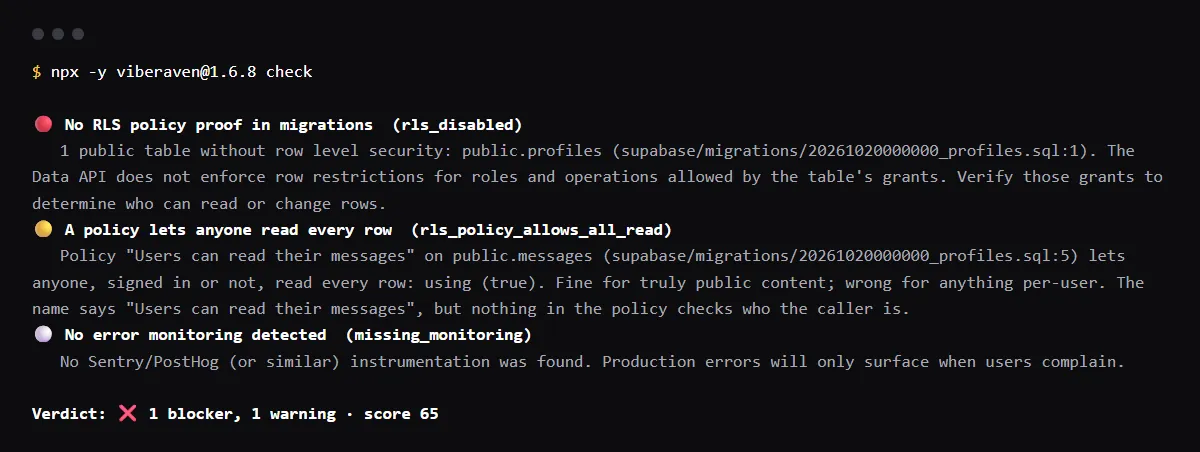
If you are reviewing an existing Vercel + Supabase repo, the existing VibeRaven Skill provides a check, fix and recheck workflow. Use the repository pass to locate missing RLS or broad policies, then verify the intended access rule with the owner, another user and a signed-out visitor. A public key being visible is not itself a leak.
Read the linked Skill and use the parts relevant to your task. From your app folder, with Node.js 20 or newer, run the command below. No global Skill installation is required for this one-off check. It writes findings under .viberaven/. Exit code 1 means blockers were found, not necessarily that the command failed; inspect the output.
Read .viberaven/agent-tasklist.md and .viberaven/gate-result.json. Check each finding against the actual code, make the smallest authorized fix, then rerun the same command and your project checks. Report the changed files, remaining findings and checks you could not perform. Keep keys and private data out of chat.
This is a repository check, not a live database test. It cannot confirm deployed grants, rotate a key or verify hosted environment values. A clear result is not proof that the app is secure. Test the affected app behavior separately; provider changes and deployment follow your normal approval process.
npx -y viberaven@1.10.0 checkFound a permission problem in your app?
For an existing Vercel + Supabase repo, connect the app to VibeRaven and ask your agent for one migration implementing the access rule you identified. Describe who should read or write the record, the failing check and the expected result. Keep real keys and private rows out of the request.
The website requires your app folder on your computer, Node.js 20 or newer, a Google sign-in, and Claude Code, Codex or Gemini CLI installed and signed in. Keep the connection terminal open. Your agent uses your own provider account, and usage may be billed there.
Review the proposed diff and project checks before keeping it. It is a repository check, not a live database test. Creating a migration does not apply it to Supabase; the website does not automatically change provider settings or deploy. Apply reviewed database changes through your normal process and repeat the owner, other-user and signed-out tests.
Related guides
Official docs behind this checklist
- Supabase, API keys
- Supabase, Securing your data
- Supabase, Row Level Security
- Supabase, Securing your API
- Supabase, Advisors: 0013_rls_disabled_in_public
- Supabase, Build an API route in less than 2 minutes
- Supabase, Migrating to new API keys
- Supabase, Views
- Supabase, Storage access control
- Next.js, Environment variables
Browse all launch guides · Read resources · How to make and check your next change
FAQ for builders before launch
Is NEXT_PUBLIC_SUPABASE_ANON_KEY safe to put in Vercel?
Yes. A NEXT_PUBLIC_ variable is inlined into the JavaScript sent to the browser, which is where the anon or publishable key belongs. The same prefix on a service role or secret key is the leak: Supabase's own .env example says of server keys, "Never prefix these, or your bundler will ship the key."
Should I rotate the anon key after it was exposed?
Not for being seen; it is meant to be. Fix the tables it can reach. If you want off the anon key anyway, Supabase's path is to create a publishable key, move your clients to it, then deactivate the legacy keys in Settings, API Keys, which can be reversed. The docs deactivate the legacy anon and service_role keys as one step, so move your servers to a secret key first.
Can someone with my anon key delete my data?
Only where your grants and policies let the anon role delete. On a table with RLS off that still holds the default grants, yes. With RLS on and no delete policy for anon, a delete matches no rows, and with the delete grant revoked it fails with a permission error.