Where do I find the Supabase service role key?
The Supabase service role key is in the Supabase Dashboard under Settings > API Keys, which lists every key for the project, legacy or not. The legacy service_role key is a long key that starts with eyJ; the secret key that replaces it starts with sb_secret_. Copy either one only into server environment variables, never into code that runs in the browser.
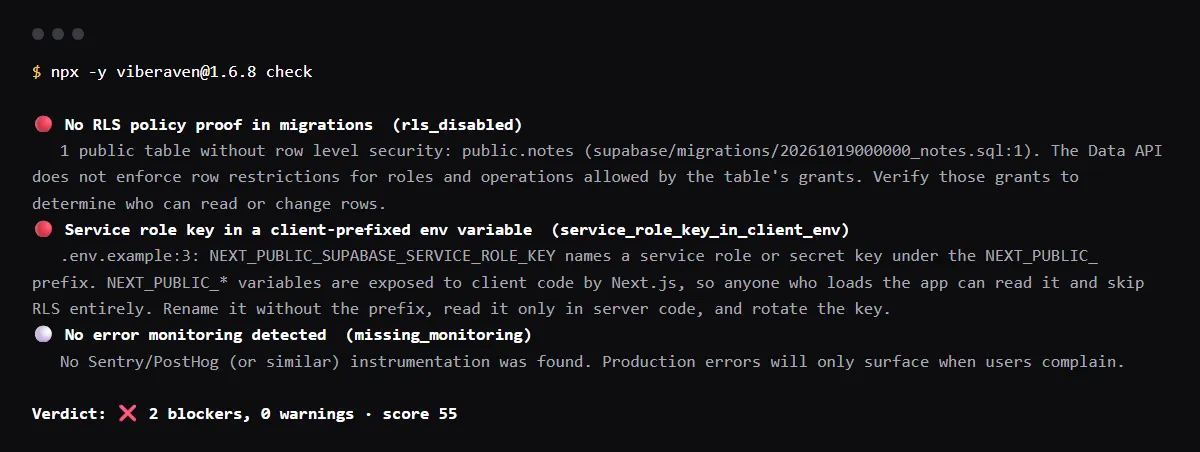
Already shipped it in a NEXT_PUBLIC_ or VITE_ variable? Then treat it as leaked and rotate the exposed key.
Why this matters
Read against the Supabase, Next.js and Vite docs on 19 October 2026. Supabase says secret keys "provide full access to your project's data, bypassing Row Level Security", lists service_role as their legacy version, and warns: "Never put one in a browser, a shipped application, or source control." A public env prefix puts it there: Next.js inlines a NEXT_PUBLIC_ value "into any JavaScript sent to the browser", and Vite says VITE_ variables "will be exposed in client-side source code". Supabase answers a secret key sent from a browser with 401 Unauthorized, but notes that "an attacker can still use the key from other tools". If the key already reached client code, a public repo or a log, treat it as leaked and rotate it.
Where the service role key is, and where it goes
- In the Supabase Dashboard, open your project, then Settings > API Keys. Supabase says "Every key lives there, legacy or not, and there is no separate Settings > API page", so a tutorial that sends you to Settings > API is out of date.
- Pick the key. The legacy service_role key starts with eyJ, like the anon key next to it, so read the label before you copy. A secret key starts with sb_secret_. If the project has none yet, create one on the same page: Supabase says it is added "alongside your existing anon and service_role keys without affecting them".
- From a terminal, the Supabase CLI lists the same keys:
supabase projects api-keys --project-ref <your-project-ref> - On a local stack started with supabase start, run supabase status. Supabase says the publishable and secret keys are in its output, under Authentication Keys.
- Store it as a server-only variable. Supabase's rule for server keys is "Never prefix these, or your bundler will ship the key":
# .env.local: read only in server code, API routes or Edge Functions
SUPABASE_SERVICE_ROLE_KEY=<copied from Settings > API Keys>

# Wrong: these prefixes ship the value to every visitor
# NEXT_PUBLIC_SUPABASE_SERVICE_ROLE_KEY=
# VITE_SUPABASE_SERVICE_ROLE_KEY=
Optional repo check
For AI-built Vercel + Supabase apps, an optional check looks for a service role key under a public prefix in the repo. In a run of npx -y viberaven@1.6.8 check on a Next.js + Supabase fixture repo on 2026-10-19 it reported NEXT_PUBLIC_SUPABASE_SERVICE_ROLE_KEY in .env.example as service_role_key_in_client_env, a blocker, with the fix: rename it without the prefix, read it only in server code and rotate the key. It reads only files: it cannot see the keys in your Supabase dashboard or whether a key was already rotated. It is advice, not a gate, and a repository check, not a live database or security test. It exits with code 1 when it finds a blocker and writes a .viberaven folder that it does not add to .gitignore.
Related guides
Sources
Is the service role key the same as the secret key?
They do the same job. Supabase lists service_role as the legacy version of secret keys, and both bypass Row Level Security. Secret keys (sb_secret_) are short strings, not JWTs. Supabase is deprecating the anon and service_role keys by the end of 2026; a legacy key keeps working until you disable it in Settings > API Keys.