What is the Supabase anon key, and where do I find it?
The Supabase anon key is your project's public API key: the long key starting with eyJ that your frontend sends with every request to Supabase. Find it in the Supabase Dashboard under Settings > API Keys, which lists every key, legacy or not. Its replacement, the publishable key (sb_publishable_), is on the same page and in the project's Connect dialog.
Seeing this key in your browser bundle is expected. Before launch, check whether it is safe to expose for your tables.
Why this matters
Read against the Supabase docs on 19 October 2026. Supabase lists anon as the "Legacy version of publishable keys". A request with it runs as the anon Postgres role when nobody is signed in, and as authenticated when it carries a signed-in user's token, so Supabase says to write Row Level Security policies "for the anon and authenticated roles". The key is meant to be public: Supabase calls the publishable key "Safe to expose online", source code included. Your grants and RLS decide what it can reach; whether that is safe for your tables is answered in the first related guide below.
Where to find the anon key and the publishable key
- Open your project in the Supabase Dashboard, then Settings > API Keys. Supabase says "Every key lives there, legacy or not, and there is no separate Settings > API page". The anon key is the legacy key labelled anon; it starts with eyJ.
- For the key your framework needs, open the Connect dialog instead. Supabase says it "shows the URL and publishable key for the framework you select, ready to paste into .env".
- No publishable key yet? Create it in Settings > API Keys. It is added alongside the anon key without affecting it, and the anon key keeps working until you disable the legacy keys there.
- From a terminal, the Supabase CLI lists every key of a hosted project, and supabase status prints the keys of a local stack:
supabase projects api-keys --project-ref <your-project-ref> supabase status - Put it in the frontend env file with your framework's public prefix, next to the project URL from the same project. For example:
# Next.js NEXT_PUBLIC_SUPABASE_URL=https://<project-ref>.supabase.co NEXT_PUBLIC_SUPABASE_ANON_KEY=eyJ... # Vite VITE_SUPABASE_URL=https://<project-ref>.supabase.co VITE_SUPABASE_ANON_KEY=eyJ... - Do not copy the key next to it by mistake. The legacy service_role key also starts with eyJ, and it and the secret keys (sb_secret_) bypass RLS, so they stay on the server.
Optional repo check
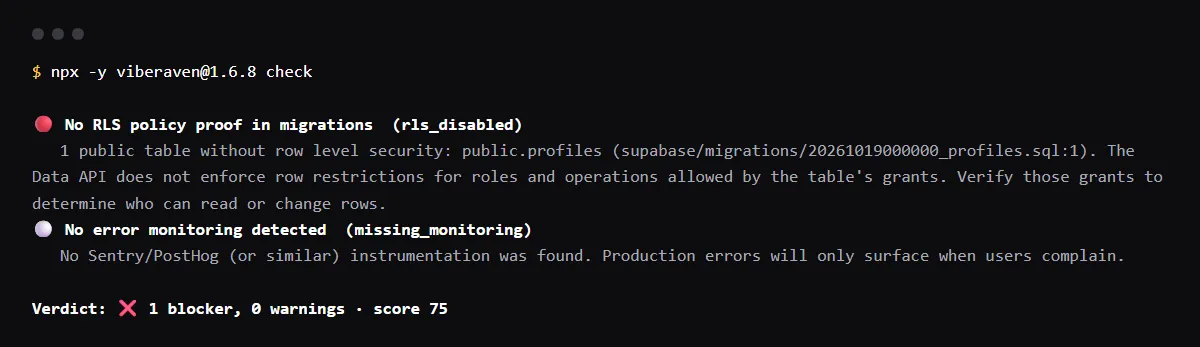
For AI-built Vercel + Supabase apps, an optional check reads the migrations for tables with no row level security, the ones this key may reach. In a run of npx -y viberaven@1.6.8 check on a Next.js + Supabase fixture repo on 2026-10-19 it reported public.profiles, created in a migration with no row level security, as rls_disabled, a blocker. It reads only files, not the grants or policies in your live project. It is advice, not a gate, and a repository check, not a live database or security test. It exits with code 1 when it finds a blocker and writes a .viberaven folder that it does not add to .gitignore.
Related guides
Sources
What is an anon key?
In Supabase, the anon key is the public API key your app sends with requests from a browser or a mobile app. With no signed-in user, the request runs as the anon Postgres role, which is where the name comes from. Supabase now lists it as the legacy version of the publishable key.
Is the anon key the same as the publishable key?
They do the same job. The publishable key (sb_publishable_) is the newer format, and Supabase is deprecating the anon and service_role keys by the end of 2026. A legacy key keeps working until you disable it in Settings > API Keys.