Vercel question
 Vercel
What are sensitive environment variables on Vercel?
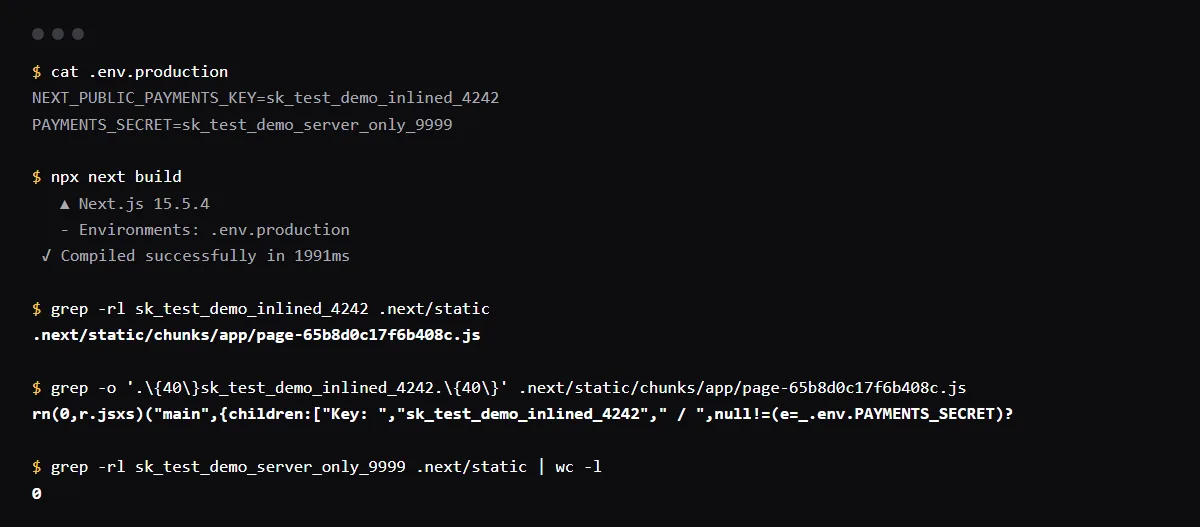
A sensitive environment variable on Vercel is one whose value nobody can read back after it is saved. Vercel now calls this type Secret, next to Config for values that stay readable, and treats existing Sensitive variables as Secrets. A Secret hides the value in the dashboard, vercel env pull cannot download it, and build logs redact it when it is 32 characters or longer. It does not stop your build from putting the value in the browser: a NEXT_PUBLIC_ or VITE_ variable is copied into the JavaScript bundle whatever its type.
Not sure which Supabase key is the secret one? Compare the publishable, secret, anon and service role keys.
Vercel Secret vs Config environment variables
Config values stay readable after saving for members with access; Vercel suggests them for non-sensitive configuration such as public prefixes. Secret values are write-only after saving; use them for passwords, API keys and tokens. To rotate a Secret, enter a new value. You cannot turn a saved Secret into Config in place: delete it and create a Config variable.
How do I view a sensitive environment variable on Vercel?
You cannot, from the dashboard or the CLI. vercel env pull keeps the value already in your local file for a Secret, or writes a placeholder for you to replace. If nobody has the value, set a new one and rotate it at the provider.
Can a sensitive variable be used in Development?
Yes, now. Vercel says Secrets are allowed in Development, which reverses the earlier rule that limited Sensitive variables to Production and Preview.
Why can't I mark an integration's variable as sensitive?
Vercel does not let you change a variable an integration created to Secret from the list. Disconnect the resource from all its projects, rotate its secrets, reconnect it with Development deselected and Sensitive turned on, then redeploy. The Supabase integration is one example: Which env vars does the Supabase Vercel integration add?.
Checklist
Store each Vercel variable as the right type
- 01For each variable, ask whether the value could sit on a public page. A public value with a NEXT_PUBLIC_ or VITE_ prefix is Config; everything else is a Secret.
- 02Add secrets as Secret. The Vercel CLI already defaults to Secret for Production and Preview, and stores names with a public framework prefix as Config:
vercel env add STRIPE_SECRET_KEY production --sensitive - 03Never give a secret a public prefix. The Secret type does not change what the build puts in the browser.
- 04If you are a team owner and want production secrets kept apart, turn on Require Separate Values under Separate Production Secret Values in the team's Security settings.
- 05Redeploy after any change. A new value reaches new deployments only.
Related
Related guides
Sources
Official docs behind this checklist
Browse all launch guides · Read resources · How to make and check your next change
FAQ
FAQ for builders before launch
What happened to the Enforce Sensitive Environment Variables policy?
Vercel deprecated it. Separate Production Secret Values replaces it: when on, every Secret needs a different value in Production than in the other environments.
Does the Secret type encrypt the value at build time?
The build still receives the plain value, which is how your code reads it. The type controls who can read it back after saving.