Next.js question
Are NEXT_PUBLIC_ environment variables exposed to the browser?
Yes. Next.js copies the value of every NEXT_PUBLIC_ variable into the JavaScript it sends to the browser when next build runs, so anyone who loads your app can read it. Use the prefix only for values meant to be public, such as your Supabase URL and publishable or anon key, a Stripe publishable key or an analytics ID. A secret, such as a Supabase service role or secret key, a Stripe secret key or an API key that bills your account, must have no prefix and be read only in server code. If one already shipped with the prefix, rotate it.
Already shipped a Supabase service role key this way? Rotate the exposed key.
Repository check
Check this in your repo
Check your repo for a Supabase secret key under a public prefix
From your app folder, with Node.js 20 or newer, run the command below. It reports a Supabase service role or secret key under NEXT_PUBLIC_ or VITE_ in an env file as service_role_key_in_client_env, and a Supabase client created with that key in a file that ships to the browser as service_role_key_in_client_code. Both are blockers, so it exits with code 1.
Built for Vercel + Supabase apps, it is advice, not a gate. It is a repository check, not a live database test: it looks for Supabase keys only. In the run below it did not report NEXT_PUBLIC_OPENAI_API_KEY, so read the other public names yourself.
npx -y viberaven@1.6.12 checkWhat it printed on a fixture repo
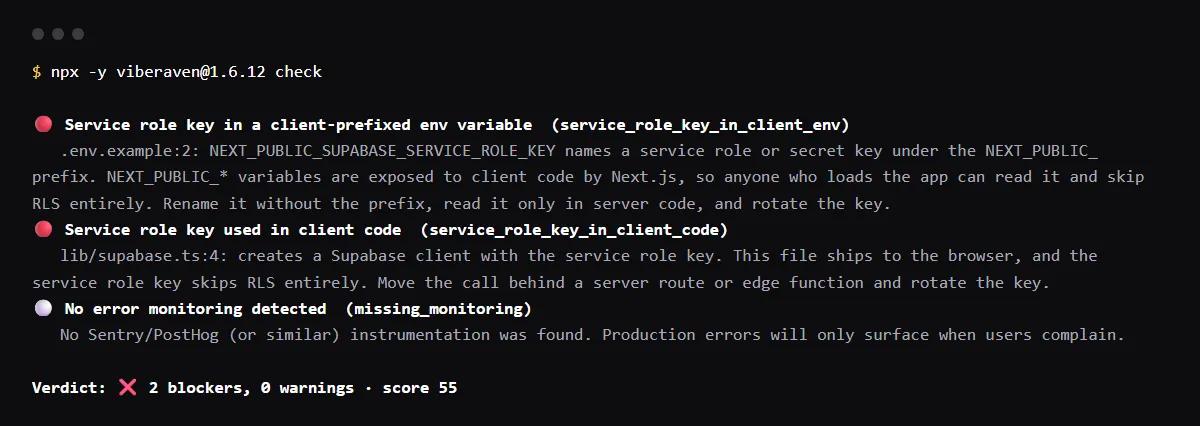
On 2026-10-23 we ran it on a small Next.js fixture repo made for this page, not a customer repo. Its .env.example lists NEXT_PUBLIC_SUPABASE_URL, NEXT_PUBLIC_SUPABASE_SERVICE_ROLE_KEY and NEXT_PUBLIC_OPENAI_API_KEY, and lib/supabase.ts, marked "use client", creates a Supabase client with the service role key. The output is below, with the temp folder shortened to ~/notes-app. The exit code was 1.
$ npx -y viberaven@1.6.12 check

viberaven check · ~/notes-app

🔴 Service role key in a client-prefixed env variable  (service_role_key_in_client_env)
   .env.example:2: NEXT_PUBLIC_SUPABASE_SERVICE_ROLE_KEY names a service role or secret key under the NEXT_PUBLIC_ prefix. NEXT_PUBLIC_* variables are exposed to client code by Next.js, so anyone who loads the app can read it and skip RLS entirely. Rename it without the prefix, read it only in server code, and rotate the key.
🔴 Service role key used in client code  (service_role_key_in_client_code)
   lib/supabase.ts:4: creates a Supabase client with the service role key. This file ships to the browser, and the service role key skips RLS entirely. Move the call behind a server route or edge function and rotate the key.
⚪ No error monitoring detected  (missing_monitoring)
   No Sentry/PostHog (or similar) instrumentation was found. Production errors will only surface when users complain.

Verdict: ❌ 2 blockers, 0 warnings · score 55
Fix: viberaven fix · Details: ~/notes-app/.viberaven/agent-tasklist.md
Is NEXT_PUBLIC_ safe for API keys?
Only for keys built to be public. Stripe says only publishable keys are safe to expose outside your backend. Supabase says its publishable key, and the legacy anon key, is safe to expose because it only reaches what row level security allows, while a secret key, or the legacy service_role key, bypasses every policy and must never be in a browser.
How do I use a secret key from a client component?
You do not. Next.js keeps variables without the prefix in the Node.js environment only. Put the call that needs the key in a Route Handler or Server Action that reads the unprefixed variable, and have the client component call that.
Does marking it Sensitive on Vercel hide a NEXT_PUBLIC_ value?
No. Vercel's Secret type, which Sensitive variables became, hides the value in the dashboard. The build still copies a NEXT_PUBLIC_ value into the browser bundle. See What are sensitive environment variables on Vercel?.
Checklist
Find and fix secrets under NEXT_PUBLIC_
- 01List every public name your tracked files use:
git grep -hoE 'NEXT_PUBLIC_[A-Z0-9_]+' | sort -u - 02For each one, ask whether the value could sit on your home page. If not, it is a secret.
- 03Rename each secret without the prefix and move the code that reads it to a Route Handler, a Server Action or a server component.
- 04Rotate every secret that already shipped. An older deployment keeps the JavaScript it was built with, value included.
- 05In Vercel, delete the old prefixed names from every environment, then redeploy.
Related
Related guides


Sources
Official docs behind this checklist
Browse all launch guides · Read resources · How to make and check your next change
FAQ
FAQ for builders before launch
Can I change a NEXT_PUBLIC_ value without rebuilding?
No. Next.js freezes it at build time, so a new value needs a new build. Next.js suggests your own API for values that must change at runtime.
Is the Supabase anon key safe under NEXT_PUBLIC_?
Yes, it is made for the browser. What it can read depends on row level security, so every exposed table needs RLS and a policy.