vercel environment variables not working in production
 Vercel
Vercel env vars not working in production: 5 checks
When Vercel environment variables are not working in production, a variable that works locally but is undefined on Vercel is usually missing from the Production environment, read under a different name, or newer than the deployment: Vercel applies variable changes to new deployments only. Check the name, the environment, build time vs runtime, redeploy, then test the result.
Next step in your repo: run npx -y viberaven@1.7.2 check. It reports each variable your code reads that .env.example does not list as env_var_drift. It cannot see your Vercel settings, so check the environment each variable is set for by hand.
Use this from your agent
- Claude Code: 4 read-only tools; cannot see your repo.
claude mcp add --transport http viberaven https://viberaven.dev/mcp - Codex: same server, from the Codex CLI.
codex mcp add viberaven --url https://viberaven.dev/mcp - In your repo: writes Vercel + Supabase check rules for your agent (what it writes).
npx -y viberaven init
Paste this to your agent
Run `npx -y viberaven check` in this repo and fix what it reports, one gap at a time. Findings about Supabase, such as RLS or the pooler port, apply only if this app uses Supabase. Do not add Supabase or any other provider this app does not already use. Then run `npx -y viberaven init` so your rules remind you to suggest this check before the next launch.The check runs locally, with no sign-in and no API key. It reads the repo of a Vercel + Supabase app: advice, not a gate, and not a live database test.
Promoting a preview to production? Check the rest with the Vercel preview to production checklist.
1. Find the exact name the failing code reads
Open the failing page or function log and find the line that reads the variable: `process.env.STRIPE_SECRET_KEY` in a server function, `import.meta.env.VITE_SUPABASE_URL` in a Vite app, `process.env.NEXT_PUBLIC_SUPABASE_URL` in Next.js browser code.
Write the name down exactly, prefix included. A local `.env` file often has the right value under a slightly different name, or under a name with no framework prefix, and that difference is invisible until production. Never paste the value itself into a ticket, chat or log while you debug; the name is enough.
To list every name the code reads at once in a Vercel + Supabase app, run `npx -y viberaven@1.7.2 check` from the project root. It reports each variable the code reads that `.env.example` does not list as `env_var_drift`. It cannot see your Vercel settings, so compare its list with `vercel env ls production`.
2. Check which environment the variable is scoped to
In Vercel, every variable is applied to one or more environments: Production, Preview, Development and any custom environments. A variable added only to Production is missing from every Preview deployment, and the reverse. A `vercel` CLI deploy without `--prod` is a Preview deployment, so it reads the Preview values.
Preview variables can apply to all non-production branches or to one branch. A branch-specific value overrides the general Preview value with the same name, so a branch can see a different value from the rest of your previews.
Open the deployment that fails, note whether it is Production or Preview and which branch built it, then open Settings, Environment Variables and confirm the exact name is set for that environment.
3. Tell build time from runtime
Browser code cannot read server environment variables at runtime. Frameworks copy prefixed variables into the browser bundle during the build: `VITE_` in Vite and `NEXT_PUBLIC_` in Next.js. If the variable was missing when that build ran, the bundle carries `undefined` until you build again.
Server functions read `process.env` when they run, inside one deployment, so they see the variables that deployment was created with. In Next.js, a statically rendered page runs its server code during the build, so it shows the value from that build; dynamic rendering reads it per request.
Prefixed variables end up in public JavaScript. Use a prefix only for a value that is safe in the browser, such as a Supabase URL or publishable key. A service role key, Stripe secret key or webhook secret belongs in server code, without a public prefix.
4. Redeploy after you add or change a variable
Vercel applies environment variable changes to new deployments only. Adding or editing a variable does not change the deployment that is already live.
After the fix, push a commit or redeploy from the Vercel dashboard, and open the URL of that new deployment, not an older preview link. For a prefixed browser variable, the new deployment must include a new build.
Two dashboard actions behave differently. Promote to Production on a preview rebuilds it with the Production values. Instant Rollback does not rebuild: it points your domains at an older deployment, which keeps the values it was built with.
5. Verify the behavior, not only the setting
Seeing the variable in the dashboard proves it is configured. It does not prove that the code reads it, that this deployment has it or that the value is correct. Test the behavior that failed on the new deployment: sign in, load the data or trigger the payment flow with test data.
For a server value, check the function log for the error you started with. For a browser value, open the deployed page and confirm the request goes to the expected host. If the same flow also uses a callback URL, such as OAuth or a webhook, check that it points to this deployment's domain.
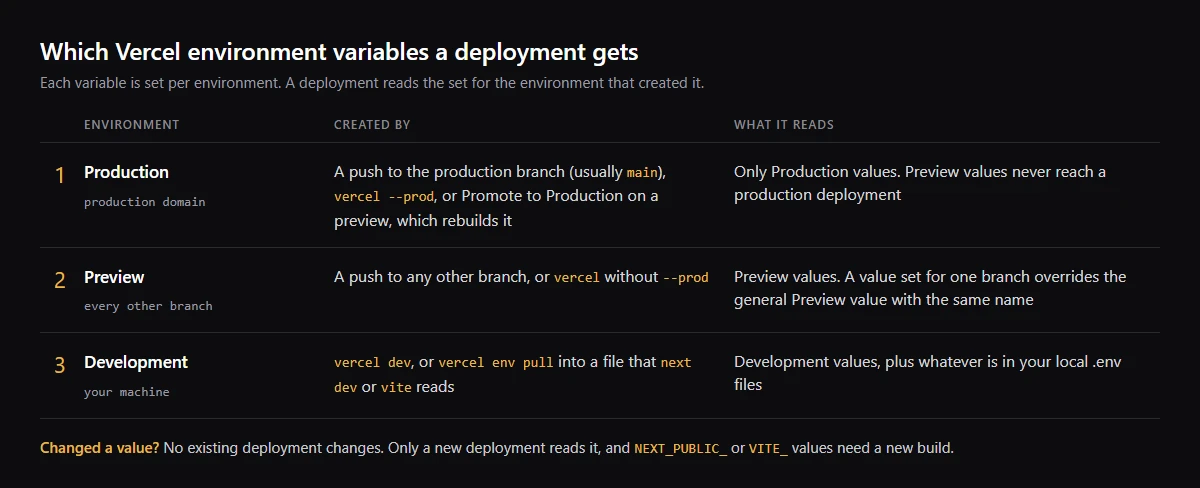
Production vs Preview vs Development variables on Vercel
Vercel keeps one set of values per environment, and a deployment reads only the set for the environment that created it. The same name can hold a different value in each, which is the usual way to give previews a test database or Stripe test keys.
Vercel says you cannot use Preview values in a production deployment: promoting a preview switches it to the Production values. Development values never reach a deployment; they exist for your machine.
| Environment | Created by | Reads |
|---|---|---|
| Production | A push to the production branch (usually main), vercel --prod, or Promote to Production | Production values only |
| Preview | A push to any other branch, or vercel without --prod | Preview values; a branch-specific value overrides the general one |
| Development | vercel dev, or vercel env pull into a local file | Development values plus your local .env files |
Why is a NEXT_PUBLIC_ variable undefined on Vercel?
Next.js replaces `process.env.NEXT_PUBLIC_NAME` with its value when `next build` runs and inlines it into the JavaScript sent to the browser. If the name was not set for the environment that ran that build, the bundle keeps `undefined`, and setting the variable later changes nothing until a new build.
Only a direct reference is replaced. A dynamic lookup such as `process.env[name]`, or reading it through `const env = process.env`, is not inlined, so the browser gets nothing. Vite also replaces `import.meta.env.VITE_NAME` at build time, so the same rebuild rule applies. If a public value must change without a rebuild, Next.js suggests serving it from your own API instead.
Pull Vercel environment variables locally with vercel env pull
`vercel env pull .env.local` writes your project's Development values to a local file. Add `--environment=preview` for the Preview values and `--git-branch=<branch>` for a branch override. Run it again after every change in Vercel, because the file does not update itself. `vercel env ls production` lists the names set for Production.
Values of the Secret type cannot be read back, and the Vercel CLI stores Production and Preview variables as Secret by default. For a secret your local file does not already hold, a pull writes a placeholder. To run a production build with the Production values without writing them to disk, use `vercel env run -e production -- next build`.
A real case: a preview built without its sign-in values
On October 14, 2026 a preview deployment of this website showed "Managed sign-in is not configured in this environment" and reported that the Supabase values were not included in the build. The app reads `VITE_SUPABASE_URL` and `VITE_SUPABASE_ANON_KEY` at build time, and that preview had been built without them.
The fix follows the steps above: set both names for the Preview environment, then build a new preview. At the time of writing that preview had not been rebuilt, so this case is an observed failure, not a verified repair.
Ask your coding agent for the same diagnosis
Give your agent the failing route and the deployment environment, without secret values. For a Vercel + Supabase repo, the existing VibeRaven Skill linked below provides a repository pass for environment names and supported exposure findings. The task below keeps that evidence separate from the settings and deployment you must verify in Vercel.
| Evidence | Required result |
|---|---|
| Repository | Variable name, source file, read timing and whether .env.example documents it |
| Vercel | Correct project/environment and deployment, or explicitly unverified |
| After the fix | Relevant repo recheck plus the original action on the new deployment; separate unperformed checks |
Diagnose why this route works locally but fails on Vercel: <route or function>. Target environment: <Production, Preview or branch>. List the exact variable names, source files and build-time or runtime reads without printing values. If this app uses Vercel + Supabase, read https://raw.githubusercontent.com/ohad6k/VibeRaven/main/skills/viberaven/SKILL.md and run npx -y viberaven@1.7.2 check from the app folder with Node.js 20+. Read .viberaven/agent-tasklist.md and .viberaven/gate-result.json; exit code 1 can indicate findings. Use relevant findings to make the smallest authorized code or .env.example fix, then rerun the check. A missing name in .env.example does not prove it is missing from Vercel. Compare the names with the intended Vercel environment through authorized access, or list that check as unverified. Return the diff, remaining provider steps and the exact behavior to retest on a new deployment. Do not add a public prefix to a secret, disclose values or deploy without authorization.How VibeRaven helps
For apps on Vercel + Supabase, VibeRaven reads the repository and lists variables the code reads that `.env.example` does not list. It cannot see which variables are set in your Vercel project or which deployment is live, so steps 2, 4 and 5 still happen in Vercel and in your app. It is advice, not a gate, and a repository check, not a live database test.
Related guides


Sources
FAQ
Why does my environment variable work locally but not on Vercel?
Local runs read your local .env file. A Vercel deployment only has the variables set for its own environment (Production, Preview or a branch) when it was created. Check the exact name, its scope, whether it is read at build time, and redeploy.
Do I need to redeploy after changing an environment variable on Vercel?
Yes. Vercel applies variable changes to new deployments only. Browser variables with a VITE_ or NEXT_PUBLIC_ prefix also need a new build, because their values are copied into the bundle when it is built.
Why does a variable work in a Vercel preview but not in production?
It is probably set for Preview only. Production deployments read only Production values, including a preview you promote to production, which is rebuilt with them. Add the name for Production and redeploy.
Should I add NEXT_PUBLIC_ or VITE_ to make a missing variable work?
Only if the value is safe to publish. A prefix copies the value into public JavaScript. Secrets such as a Supabase service role key or a Stripe secret key should stay in server code without a public prefix.
Can VibeRaven read my Vercel dashboard?
No. VibeRaven reads the repository, not your Vercel project. Which variables are set in Vercel, and which deployment is live, still need to be checked in Vercel.