Supabase and Vercel question
 Supabase
 Vercel
Which env vars does the Supabase Vercel integration add?
The Supabase integration on the Vercel Marketplace syncs three groups of variables to your connected Vercel projects. For a Postgres client: POSTGRES_URL, POSTGRES_PRISMA_URL, POSTGRES_URL_NON_POOLING, POSTGRES_USER, POSTGRES_HOST, POSTGRES_PASSWORD and POSTGRES_DATABASE. For server code: SUPABASE_URL, SUPABASE_PUBLISHABLE_KEY, SUPABASE_SECRET_KEY and SUPABASE_JWT_SECRET. For the browser: NEXT_PUBLIC_SUPABASE_URL and NEXT_PUBLIC_SUPABASE_PUBLISHABLE_KEY. Browser code reads only that NEXT_PUBLIC_ pair, the secret key stays on the server, and a Postgres client in a Vercel function should use the transaction pooler on port 6543.
Seeing "Max client connections reached" on Vercel? Fix the Supabase connection string your functions use.
Repository check
Check this in your repo
Check your repo for the wrong connection string and undocumented names
From your app folder, with Node.js 20 or newer, run the command below. When the repo has a Postgres driver or ORM, it reports a DATABASE_URL or POSTGRES_URL on port 5432 as pooler_port_mismatch, and every variable name the code reads that .env.example does not list, such as SUPABASE_SECRET_KEY, as env_var_drift. Both are warnings, and the check cannot see the values the integration synced to Vercel.
Built for Vercel + Supabase apps, it is advice, not a gate. It is a repository check, not a live database test: it reads only DATABASE_URL and POSTGRES_URL lines, so a client that connects with POSTGRES_URL_NON_POOLING is not reported. It exits with code 1 only when it finds a blocker, and writes a .viberaven folder that it does not add to .gitignore.
npx -y viberaven@1.6.12 checkWhat it printed on a fixture repo
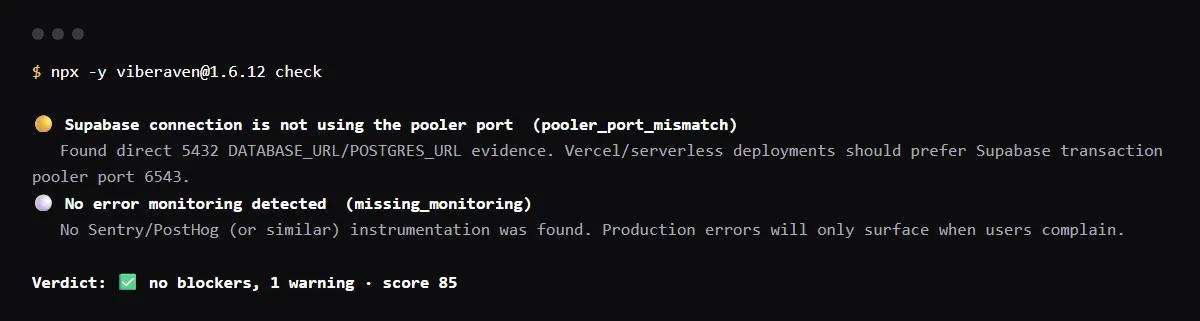
On 2026-10-23 we ran it on a small Next.js fixture repo made for this page, not a customer repo. Its package.json lists postgres, lib/db.ts connects with postgres(process.env.POSTGRES_URL!), and its .env.example sets POSTGRES_URL to a session pooler URI on port 5432. The output is below, with the temp folder shortened to ~/notes-app. A warning is not a blocker, so the exit code was 0.
In a second run, .env.example kept the integration's POSTGRES_URL on port 6543 and lib/db.ts connected with POSTGRES_URL_NON_POOLING on port 5432. That run reported no pooler finding, and reported SUPABASE_SECRET_KEY and SUPABASE_URL, which lib/admin.ts reads, as env_var_drift; it cannot see whether the integration set them in Vercel.
$ npx -y viberaven@1.6.12 check

viberaven check · ~/notes-app

🟡 Supabase connection is not using the pooler port  (pooler_port_mismatch)
   Found direct 5432 DATABASE_URL/POSTGRES_URL evidence. Vercel/serverless deployments should prefer Supabase transaction pooler port 6543.
⚪ No error monitoring detected  (missing_monitoring)
   No Sentry/PostHog (or similar) instrumentation was found. Production errors will only surface when users complain.

Verdict: ✅ no blockers, 1 warning · score 85
Fix: viberaven fix · Details: ~/notes-app/.viberaven/agent-tasklist.md
POSTGRES_URL vs POSTGRES_URL_NON_POOLING
Supabase's own guide for Vercel stores the transaction pooler URI, on port 6543, as POSTGRES_URL. Supabase recommends the transaction pooler for serverless and edge functions, which open many short-lived connections. POSTGRES_URL_NON_POOLING, as its name says, is not that pooled URL: keep it for migrations and long-running tools. Open both values and read the port.
Does the Supabase integration set the service role key?
Its current list has SUPABASE_SECRET_KEY. Supabase calls service_role the legacy version of secret keys, and both bypass row level security, so read it only in server code and never copy it to a NEXT_PUBLIC_ name.
Can I store the integration's variables as Secret?
Not from the environment variables list. Vercel says to disconnect the resource, rotate its secrets, reconnect it with Development deselected and Sensitive turned on, and redeploy. More in What are sensitive environment variables on Vercel?.
Checklist
Wire the integration variables into your app
- 01In Vercel, open Settings, Environment Variables, search for SUPABASE and POSTGRES, and note which names each environment has.
- 02Make the code read those exact names. Code written for the legacy anon key reads names such as NEXT_PUBLIC_SUPABASE_ANON_KEY, which is not in the integration's list.
- 03In a function that uses a Postgres client, connect with POSTGRES_URL on port 6543 and turn off prepared statements, which transaction mode does not support. With postgres.js:
import postgres from 'postgres'; export const sql = postgres(process.env.POSTGRES_URL!, { prepare: false }); - 04Keep SUPABASE_SECRET_KEY and SUPABASE_JWT_SECRET in server code only.
- 05Add every name the code reads to .env.example, with placeholders, so fresh clones and CI know what to set.
- 06Redeploy after the integration changes a value. Vercel applies changes to new deployments only.
Related
Related guides
Sources
Official docs behind this checklist
Browse all launch guides · Read resources · How to make and check your next change
FAQ
FAQ for builders before launch
Can I use the integration variables in a Vite app?
Not the NEXT_PUBLIC_ pair as they are: Vite exposes only variables prefixed VITE_ to your client code. Set VITE_SUPABASE_URL and VITE_SUPABASE_PUBLISHABLE_KEY yourself with the same public values.