Supabase error
 Supabase
 Vercel
"Your project's URL and Key are required to create a Supabase client!" on Vercel: the fix
"Your project's URL and Key are required to create a Supabase client!" is thrown by @supabase/ssr when it gets an empty URL or key, which almost always means NEXT_PUBLIC_SUPABASE_URL or NEXT_PUBLIC_SUPABASE_PUBLISHABLE_KEY (NEXT_PUBLIC_SUPABASE_ANON_KEY in older code) was not set for the deployment that built or ran the app. Add both in the Vercel project, for Production and Preview, under the exact names your code reads, then redeploy: Vercel applies variable changes only to new deployments, and Next.js writes NEXT_PUBLIC_ values into the browser code when it builds. The values are in your Supabase project's API settings, which the error message links to.
Works in the preview and undefined in production? Five checks for Vercel env vars that fail in production.
Repository check
Check this in your repo
Find Supabase variables your code reads and your env template does not list
Run the command below from your app folder with Node.js 20 or newer. It compares the environment variable names your code reads, such as process.env.NEXT_PUBLIC_SUPABASE_URL or import.meta.env.VITE_SUPABASE_URL, with the names in .env.example or a similar template, and lists each one the template lacks as env_var_drift. It cannot see the variables set in your Vercel project, but a name nobody wrote down is the one most likely to be missing there, and a renamed key, such as code that reads the publishable key while the template still lists the anon key, shows up the same way.
It is a repository check, not a live database test: it reads files, so it cannot tell you that a deployment was built before you added a variable. With no template at all, it lists the names as an info note instead.
npx -y viberaven@1.6.12 checkWhat it printed on a fixture repo
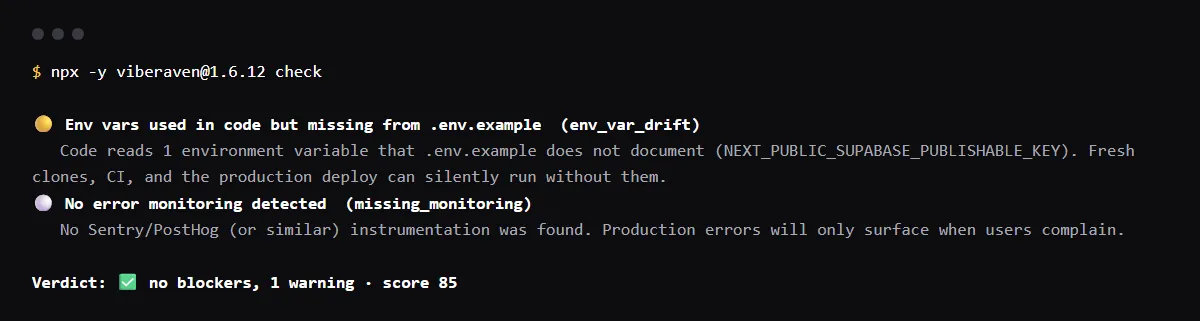
On 2026-10-23 we ran it on a small Next.js fixture repo made for this page, not a customer repo. Its browser client reads process.env.NEXT_PUBLIC_SUPABASE_URL and process.env.NEXT_PUBLIC_SUPABASE_PUBLISHABLE_KEY, the names in Supabase's Next.js quickstart, while its .env.example still lists NEXT_PUBLIC_SUPABASE_ANON_KEY. The output is below, with the temp folder shortened to ~/shop-app. A warning is not a blocker, so the exit code was 0.
With the publishable key name added to .env.example, the same command no longer reported the variable.
$ npx -y viberaven@1.6.12 check

viberaven check · ~/shop-app

🟡 Env vars used in code but missing from .env.example  (env_var_drift)
   Code reads 1 environment variable that .env.example does not document (NEXT_PUBLIC_SUPABASE_PUBLISHABLE_KEY). Fresh clones, CI, and the production deploy can silently run without them.
⚪ No error monitoring detected  (missing_monitoring)
   No Sentry/PostHog (or similar) instrumentation was found. Production errors will only surface when users complain.

Verdict: ✅ no blockers, 1 warning · score 85
Fix: viberaven fix · Details: ~/shop-app/.viberaven/agent-tasklist.md
The build fails: Error occurred prerendering page
When a client component creates the browser client while it renders, next build runs that code to prerender the page, so a missing variable stops the build itself. On Vercel that is a failed deployment with this in the build log. We built a small Next.js 15.5.4 app with @supabase/ssr 0.7.0 and no Supabase variables on 2026-10-23, and the build printed this and exited with code 1:
Error occurred prerendering page "/". Read more: https://nextjs.org/docs/messages/prerender-error
Error: @supabase/ssr: Your project's URL and API key are required to create a Supabase client!

Check your Supabase project's API settings to find these values

https://supabase.com/dashboard/project/_/settings/api
Export encountered an error on /page: /, exiting the build.
@supabase/ssr: Your project's URL and API key are required
The two clients in @supabase/ssr word it differently. createBrowserClient throws "@supabase/ssr: Your project's URL and API key are required to create a Supabase client!", and createServerClient, which middleware and server code use, throws "Your project's URL and Key are required to create a Supabase client!". Both mean the same thing: the URL or the key passed in was empty. We read both in the supabase/ssr source at v0.12.7 on 2026-10-23.
Every request returns 500 after the deploy
If only middleware or server code creates the client, the build passes and the error comes with each request. In the same app with a Supabase middleware and no variables, next build succeeded, and every request to next start returned 500 Internal Server Error with "Your project's URL and Key are required to create a Supabase client!" in the server log. On Vercel, look for it in the deployment's runtime logs, then set the variables and redeploy.
supabaseUrl is required (createClient from supabase-js)
With createClient from @supabase/supabase-js, the same missing variable throws "supabaseUrl is required." or "supabaseKey is required." instead. A URL that is set but has no http or https scheme throws "Invalid supabaseUrl: Must be a valid HTTP or HTTPS URL."
VITE_SUPABASE_URL is undefined in a Vite app
A Vite app reads the values from import.meta.env, and Vite exposes only variables prefixed with VITE_ to client code, replacing them at build time. Set VITE_SUPABASE_URL and the key, under the exact name the code reads, in Vercel before the build, and redeploy after any change. A name without the VITE_ prefix stays undefined in the browser.
It works locally but not on Vercel
.env.local stays on your machine: Next.js loads it, and create-next-app adds .env files to .gitignore, so Vercel never sees it. Vercel applies each variable only to the environments you select, Production, Preview or Development, and only to deployments created after the change. Check three things: the name matches the code exactly, it is set for the environment that failed, and the failing deployment was built after you added it.
Checklist
How to fix it on Vercel, then check the fix
- 01Find the names your code reads, in the files that create the Supabase client:
grep -rnE "SUPABASE_(URL|ANON_KEY|PUBLISHABLE_KEY)" --include=*.ts --include=*.tsx --exclude-dir=node_modules . - 02Copy the Project URL and the publishable key (or the legacy anon key) from your Supabase project. Both are meant for the browser. Never put the secret or service_role key in a NEXT_PUBLIC_ or VITE_ variable to make the error go away.
- 03Add them in the Vercel project under Settings, Environment Variables, for Production and Preview, with the exact names from the first step. With the Vercel CLI, each command asks for the value:
vercel env add NEXT_PUBLIC_SUPABASE_URL production vercel env add NEXT_PUBLIC_SUPABASE_PUBLISHABLE_KEY production vercel env ls production - 04If you connected Supabase through the Vercel Marketplace, compare the names it synced with the ones your code reads. Supabase's integration docs list NEXT_PUBLIC_SUPABASE_URL and NEXT_PUBLIC_SUPABASE_PUBLISHABLE_KEY, so code that reads NEXT_PUBLIC_SUPABASE_ANON_KEY gets undefined. Rename one side so they match.
- 05Redeploy. Vercel applies variable changes only to new deployments, so the failing deployment keeps failing until a new one is built. Redeploy from the Deployments tab, or push a commit.
- 06Check the new deployment: no prerender error in the build log, the page loads, and the runtime logs and browser console show no Supabase client error.
Related
Related guides
Sources
Official docs behind this checklist
- Supabase, Use Supabase with Next.js
- Supabase, Vercel Marketplace
- Supabase, API keys
- Next.js, Environment variables
- Vercel, Environment variables
- Vite, Env variables and modes
- supabase/ssr, createServerClient.ts at v0.12.7
- supabase/ssr, createBrowserClient.ts at v0.12.7
- supabase-js, lib/helpers.ts
- supabase-js, SupabaseClient.ts
Browse all launch guides · Read resources · How to make and check your next change
FAQ
FAQ for builders before launch
Is it safe to put the Supabase URL and publishable key in NEXT_PUBLIC_ variables?
Yes. Both are meant for the browser, and Supabase's Vercel integration syncs them under NEXT_PUBLIC_ names. Row level security on every table is what protects the data, not hiding this key. The secret or service_role key is the one that must never get a public prefix.
Why does it still fail when the variable is set in Vercel?
Usually one of three: the name differs from the one the code reads, it is set for Production while the failing deployment is a Preview (or the other way round), or the deployment was built before you added it.