Supabase error
 Supabase
Invalid API key
"Invalid API key" with HTTP 401 is Supabase's API gateway rejecting the apikey header: the key is not one this project accepts, such as a key from another project or environment, a mistyped or cut-off key, or a value that is not a key at all. Copy the Project URL and the publishable key (or the legacy anon key) from the same project, under Settings > API Keys, set them under the names your code reads, and redeploy. Do not follow the hint by swapping in the service_role key: it bypasses row level security and must never ship to the browser. We reproduced the error and both hint texts against a live project on 2026-10-25.
Not sure which key belongs in the browser? See publishable, secret, anon and service_role keys compared.
Repository check
Check this in your repo
Find a service role key headed for the browser
For AI-built Vercel + Supabase apps, run the command below from your app folder with Node.js 20 or newer. It cannot tell whether a key is valid for your project, because it never sends one. What it does find is the dangerous answer to this error's hint: a service role or secret key under a NEXT_PUBLIC_ or VITE_ name, reported as service_role_key_in_client_env, and a Supabase client created with the service role key in a file that ships to the browser, reported as service_role_key_in_client_code.
It is a repository check, not a live database test: it reads files, so it does not call your project or see which key your deployment holds. It is advice, not a gate, and it exits with code 1 when it finds a blocker.
npx -y viberaven@1.6.12 checkWhat it printed on a fixture repo
On 2026-10-25 we ran it on a small Next.js fixture repo made for this page, not a customer repo, whose browser client had been switched to process.env.NEXT_PUBLIC_SUPABASE_SERVICE_ROLE_KEY, the change the hint invites. The output is below, with the temp folder shortened to ~/notes-app. Both findings are blockers, so the exit code was 1.
$ npx -y viberaven@1.6.12 check

viberaven check · ~/notes-app

🔴 Service role key in a client-prefixed env variable  (service_role_key_in_client_env)
   .env.example:2: NEXT_PUBLIC_SUPABASE_SERVICE_ROLE_KEY names a service role or secret key under the NEXT_PUBLIC_ prefix. NEXT_PUBLIC_* variables are exposed to client code by Next.js, so anyone who loads the app can read it and skip RLS entirely. Rename it without the prefix, read it only in server code, and rotate the key.
🔴 Service role key used in client code  (service_role_key_in_client_code)
   src/lib/supabase.ts:5: creates a Supabase client with the service role key. This file ships to the browser, and the service role key skips RLS entirely. Move the call behind a server route or edge function and rotate the key.
⚪ No error monitoring detected  (missing_monitoring)
   No Sentry/PostHog (or similar) instrumentation was found. Production errors will only surface when users complain.

Verdict: ❌ 2 blockers, 0 warnings · score 55
Fix: viberaven fix · Details: ~/notes-app/.viberaven/agent-tasklist.md
The two hints, and the message with no key
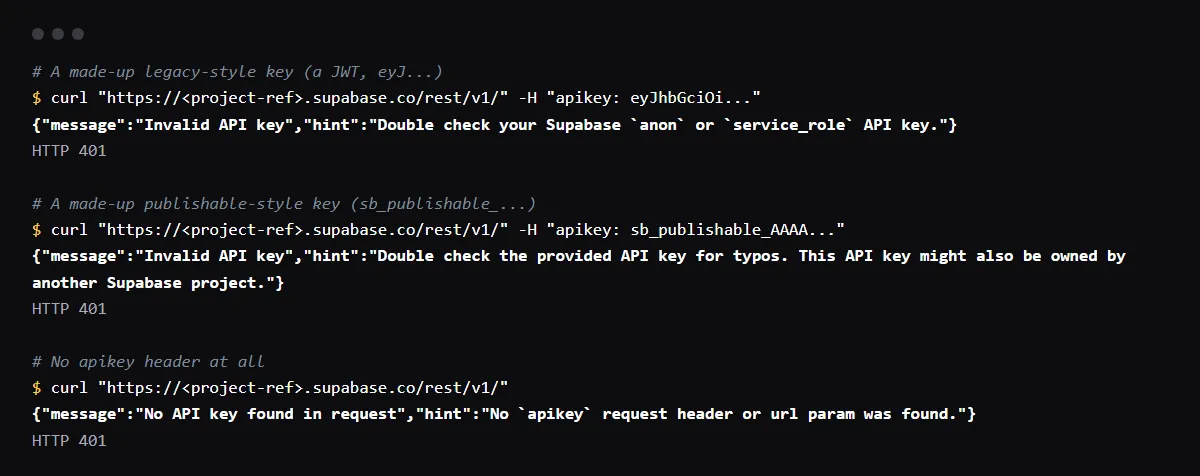
We sent requests to a live Supabase project's REST endpoint on 2026-10-25. A made-up key in the legacy JWT format got the first body below and a made-up sb_publishable_ key got the second, both with HTTP 401, and the Auth endpoint, /auth/v1/settings, answered another made-up key with the first body. A request with no apikey header got the third. supabase-js does not throw: the call returns the message in error.
{"message":"Invalid API key","hint":"Double check your Supabase `anon` or `service_role` API key."}
{"message":"Invalid API key","hint":"Double check the provided API key for typos. This API key might also be owned by another Supabase project."}
{"message":"No API key found in request","hint":"No `apikey` request header or url param was found."}
The URL and the key come from different projects
Each key belongs to one project, which is what the second hint means by "owned by another Supabase project". It happens when the URL and the key come from different places: a staging key with the production URL, the keys a local supabase start stack prints sent to the hosted project, or an old key left in Vercel after the app moved to a new project. Check that the project ref in the URL the deployed app calls is the project you copied the key from.
Publishable and secret keys go in the apikey header
Publishable (sb_publishable_) and secret (sb_secret_) keys are not JWTs. Supabase's API keys guide says to send them on the apikey header, not as Authorization: Bearer, because anything that tries to verify one as a JWT fails. supabase-js does this for you. It also says a secret key does not work in a browser: Supabase matches on the User-Agent header and returns 401.
Invalid API key after switching to the new keys
Creating publishable and secret keys does not revoke the legacy anon and service_role keys; both keep working until someone disables the legacy keys under Settings > API Keys, which Supabase says you can reverse. If requests from one client started failing right after that, it still sends an old eyJ key: update that client, or turn the legacy keys back on while you finish the move. Supabase is deprecating the legacy keys by the end of 2026.
Checklist
How to fix it, then check the fix
- 01Open the browser's Network tab on the failing page and note the host the request went to: <project-ref>.supabase.co.
- 02In that project, open Settings > API Keys and copy the publishable key, or the legacy anon key if the project still uses it.
- 03Find the names your code reads for the URL and the key:
grep -rnE "SUPABASE_(URL|ANON_KEY|PUBLISHABLE_KEY)" --include=*.ts --include=*.tsx --exclude-dir=node_modules . - 04Set both values in Vercel under those exact names, for Production and Preview, then redeploy: a deployment keeps the values it was built with.
- 05Test the pair outside the app; an Invalid API key body means the project still does not accept the key:
curl -s "https://<project-ref>.supabase.co/auth/v1/settings" -H "apikey: <publishable key>" - 06Keep the secret or service_role key on the server, even if the error suggests it.
Related
Related guides

Sources
Official docs behind this checklist
Browse all launch guides · Read resources · How to make and check your next change
FAQ
FAQ for builders before launch
The key is copied straight from the dashboard. Why is it still invalid?
Check two things: the URL the app calls may belong to another project, or the deployment was built before you changed the variable. Compare the host in the failing request with the project you copied the key from, then redeploy.
Should I use the service_role key, since the hint names it?
Not in the browser. The hint names both legacy key types because either can be the one sent. The service_role and secret keys bypass row level security, so they belong only in server code.