Supabase Edge Function error
 Supabase
Failed to send a request to the Edge Function
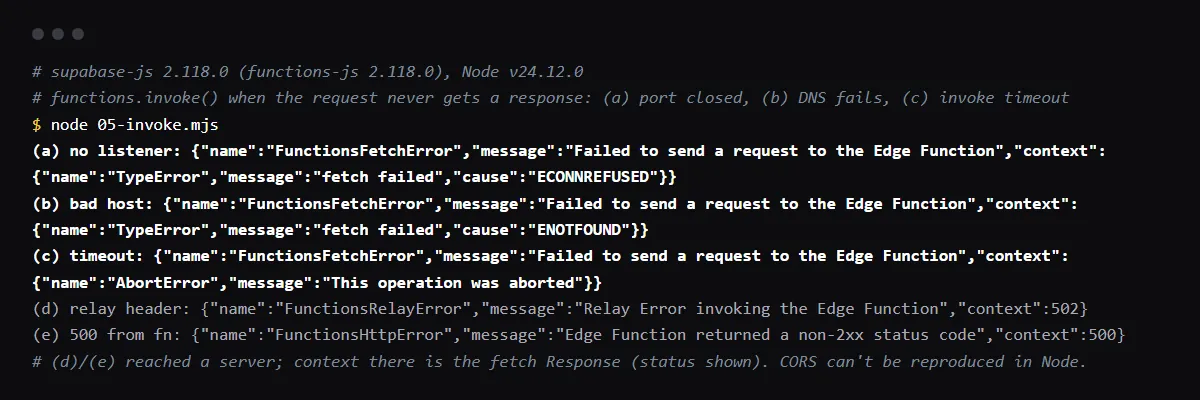
"Failed to send a request to the Edge Function" is the message of FunctionsFetchError in supabase-js: the fetch for functions.invoke() threw before any response came back, so your function code may never have run. Its context holds the real cause. In Node it is fetch failed with ECONNREFUSED or ENOTFOUND for a wrong or unreachable URL, or an AbortError when a timeout you set fires. In the browser the most common cause is CORS: the function, or the platform answering for it, returned a response without Access-Control-Allow-Origin, so the browser blocks it and fetch rejects. Answer the OPTIONS preflight with CORS headers in the function, deploy it to the project your app's URL points at, and read error.context. Reproduced with supabase-js 2.118.0 and checked against its source on 2026-10-27.
The request reached the function and it failed? See what a non-2xx status from an Edge Function means.
Read error.context
supabase-js wraps the underlying error in error.context. In our run, nothing listening gave TypeError fetch failed with cause ECONNREFUSED, a host that does not resolve gave ENOTFOUND, and invoke() with a timeout option against a slow server gave AbortError. A request that got a response throws something else: FunctionsRelayError or FunctionsHttpError, "Edge Function returned a non-2xx status code".
const { data, error } = await supabase.functions.invoke('hello', { body: { name: 'x' } })
if (error) console.error(error.name, error.message, error.context)
CORS in the browser
A browser sends an OPTIONS preflight before invoke(), because it sends an Authorization header and a JSON body. The function must answer it, and every other response, with CORS headers, including its error responses. Supabase's troubleshooting page adds that a function name that does not exist returns a 404 the browser shows as a CORS error, so the client sees only this generic message.
const corsHeaders = {
  'Access-Control-Allow-Origin': '*',
  'Access-Control-Allow-Headers': 'authorization, x-client-info, apikey, content-type',
}

Deno.serve(async (req) => {
  if (req.method === 'OPTIONS') return new Response('ok', { headers: corsHeaders })
  // ...
  return new Response(JSON.stringify({ ok: true }), { headers: { ...corsHeaders, 'Content-Type': 'application/json' } })
})
The function is not deployed where the app calls it
invoke() builds the URL from the project URL the client was created with. A function deployed to your Lovable Cloud project, a branch or the local stack is not on the project in the deployment's environment variables. List the functions of that project in the dashboard, or deploy with supabase functions deploy name --project-ref and the right ref.
Ad blockers, networks and outages
An extension or a company network that blocks the request makes fetch reject too, so the same app works on another browser or network. Check the Network tab: a request that never shows, or shows as blocked, did not reach Supabase. Check Supabase's status page when every function fails at once.
Checklist
How to fix it, then check the fix
- 01Log error.context and open the browser Network tab for the failing call.
- 02If the console shows a CORS error, answer OPTIONS and every response, errors included, with the CORS headers.
- 03Check that the function name and the project URL match a deployed function in the Supabase dashboard.
- 04Call the function directly with the same key to see the real status:
curl -i -X POST "$SUPABASE_URL/functions/v1/hello" -H "Authorization: Bearer $SUPABASE_ANON_KEY" -H "Content-Type: application/json" -d '{}' - 05Repeat invoke() from the app: the call returns data, or a FunctionsHttpError with the function's own error, which its logs explain.
Related
Related guides

Sources
Official docs behind this checklist
Browse all launch guides · Read resources · How to make and check your next change
FAQ
FAQ for builders before launch
Is this the same as Edge Function returned a non-2xx status code?
No. That one means the function answered with an error status. This one means no usable response arrived at all, so check the URL, CORS and the network first.
Why is there nothing in the function logs?
Because the request may never have reached your code: a blocked preflight, a wrong project or an unknown function name fails before the function runs.