Resend and Supabase error
 Supabase
No matching signature found
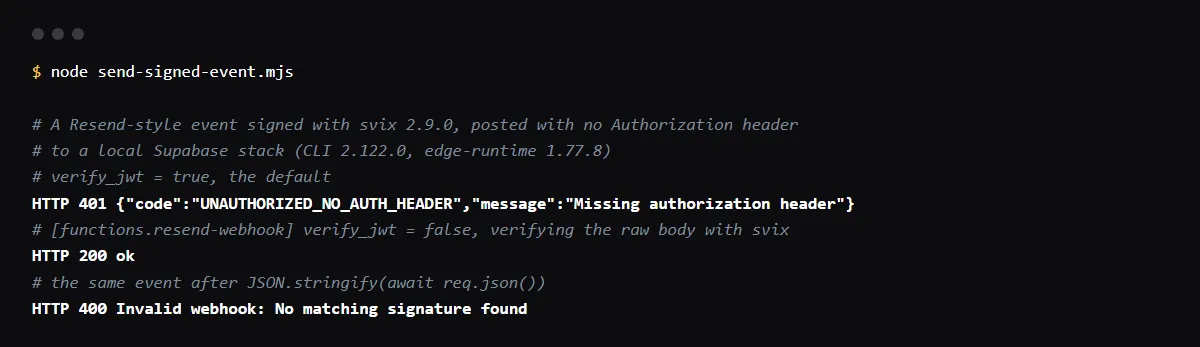
"No matching signature found" (a WebhookVerificationError from svix) means the bytes you verified are not the bytes Resend signed, or the signing secret is not that endpoint's. In a Supabase Edge Function, read the body once with await req.text(), pass it with the svix-id, svix-timestamp and svix-signature headers to new Webhook(secret).verify() using the endpoint's whsec_ signing secret, and parse the JSON only after that. Before any of it, deploy the function with verify_jwt = false: Resend sends no Authorization header, so with the default setting Supabase answers 401 "Missing authorization header" and your code never runs. We reproduced both on a local Supabase stack with svix 2.9.0 on 2026-10-26.
Taking Stripe events in an Edge Function too? See the Deno version of Stripe signature checks.
Missing authorization header comes first
Edge Functions run a platform check, verify_jwt, before your code, and it is on by default. Supabase's docs say to turn it off for functions called without an Authorization header, such as webhooks from external providers. Its troubleshooting guide gives the hosted response as { "code": 401, "message": "Missing authorization header" }; our local stack answered with the same message and the code UNAUTHORIZED_NO_AUTH_HEADER. Set it per function in supabase/config.toml, or pass --no-verify-jwt when you deploy.
[functions.resend-webhook]
verify_jwt = false

# or, per deploy
supabase functions deploy resend-webhook --no-verify-jwt
Verify the raw body with svix
Resend signs each webhook with svix and sends the svix-id, svix-timestamp and svix-signature headers. Resend's docs say to verify the raw request body, because parsing it as JSON and stringifying it again changes the bytes. The function below is the one that returned 200 in our run.
svix 2.2.0 and later return nothing from verify(); the svix changelog says JSON parsing was removed from it, so parse the body yourself after it passes. Resend's docs still say it returns the verified content, which was true of svix 1.x. The Resend SDK's resend.webhooks.verify() does return the parsed payload (resend 6.34.1).
import { Webhook } from 'npm:svix@2.9.0'

const wh = new Webhook(Deno.env.get('RESEND_WEBHOOK_SECRET')!)

Deno.serve(async (req) => {
  // The raw body, exactly as Resend signed it. Do not call req.json() first.
  const payload = await req.text()
  try {
    wh.verify(payload, {
      'svix-id': req.headers.get('svix-id') ?? '',
      'svix-timestamp': req.headers.get('svix-timestamp') ?? '',
      'svix-signature': req.headers.get('svix-signature') ?? '',
    })
  } catch (err) {
    return new Response(`Invalid webhook: ${(err as Error).message}`, { status: 400 })
  }
  const event = JSON.parse(payload) as { type: string }
  // handle event.type, such as email.delivered or email.bounced
  return new Response('ok', { status: 200 })
})
The three svix errors
In our run, svix 2.9.0 threw "No matching signature found" for a re-serialized body and for the wrong signing secret, "Missing required headers" when the svix-* headers were absent, and "Message timestamp too old" for an event signed 10 minutes earlier. Missing required headers also comes from reading headers the wrong way: Resend's Next.js example reads req.headers['svix-id'], which is undefined on a Fetch Headers object, so use req.headers.get('svix-id').
Where the signing secret comes from
Each Resend webhook endpoint has its own signing secret, starting with whsec_, on the webhook details page; Resend's docs say the create, retrieve and list webhook API calls return it too. Store it as a function secret and redeploy, and use a separate endpoint and secret for a preview project.
supabase secrets set RESEND_WEBHOOK_SECRET=whsec_...Checklist
How to fix it, then check the fix
- 01Set verify_jwt = false for the webhook function in supabase/config.toml, or deploy it with --no-verify-jwt.
- 02Copy the endpoint's signing secret from the Resend webhook page and set it with supabase secrets set.
- 03Read the body once with await req.text(), verify it with the three svix-* headers, and parse JSON only afterwards.
- 04Return 400 when verify() throws, and 200 quickly when it passes, before slow work.
- 05Send a test event from the Resend dashboard and check the function logs: a 200, and no Missing authorization header.
Related
Related guides

Sources
Official docs behind this checklist
Browse all launch guides · Read resources · How to make and check your next change
FAQ
FAQ for builders before launch
Is it safe to turn off verify_jwt for this function?
Yes, if the function checks the svix signature before it does anything. That check replaces the JWT check: without the signing secret nobody can produce a valid signature.
Can I use the Resend SDK instead of svix?
Yes. resend.webhooks.verify({ payload, headers: { id, timestamp, signature }, webhookSecret }) checks the same signature and returns the parsed event; pass it the raw body, as with svix.