Supabase Edge Functions error
 Supabase
Edge Function returned a non-2xx status code
"Edge Function returned a non-2xx status code" is the fixed message supabase-js gives a FunctionsHttpError: the function, or the platform in front of it, answered with a 4xx or 5xx status, and the real reason is in that response, not in this message. Read it with error.context.status and await error.context.json() (or .text()), then open the function's logs in the Supabase dashboard. Common causes: a secret the function reads with Deno.env.get that was never set on the project (set it with supabase secrets set; no redeploy needed), an uncaught exception (500), a missing or invalid JWT while JWT verification is on (401), and a function name that is not deployed (404). Checked against the supabase-js source and Supabase's docs on 2026-10-25.
Moving a Lovable app to your own Supabase project? Its functions need their secrets set again. See what moves when you leave Lovable Cloud.
Repository check
Check this in your repo
Find secrets your functions read and nobody wrote down
For AI-built Vercel + Supabase apps, run the command below from your app folder with Node.js 20 or newer. It collects the environment variable names your code reads, including Deno.env.get('NAME') in supabase/functions, and lists each one that no env template such as .env.example lists as env_var_drift; it cannot see the secrets set in your Supabase project or the variables in Vercel, so read it as the list of names a new project or a new teammate has no record of. The variables Supabase injects into every function, such as SUPABASE_URL and SUPABASE_SECRET_KEYS, are left out.
It is a repository check, not a live database test: it reads files, so it does not call your functions, read their logs or see the status they return. It is advice, not a gate, and it exits with code 1 when it finds a blocker.
npx -y viberaven@1.6.12 checkWhat it printed on a fixture repo
On 2026-10-25 we ran it on a small Vite fixture repo made for this page, not a customer repo. Its supabase/functions/send-welcome/index.ts reads Deno.env.get('RESEND_API_KEY'), the app calls it with supabase.functions.invoke('send-welcome'), and .env.example lists only the two VITE_ Supabase names. The output is below, with the temp folder shortened to ~/welcome-app. A warning is not a blocker, so the exit code was 0.
$ npx -y viberaven@1.6.12 check

viberaven check · ~/welcome-app

🟡 Env vars used in code but missing from .env.example  (env_var_drift)
   Code reads 1 environment variable that .env.example does not document (RESEND_API_KEY). Fresh clones, CI, and the production deploy can silently run without them.
⚪ No error monitoring detected  (missing_monitoring)
   No Sentry/PostHog (or similar) instrumentation was found. Production errors will only surface when users complain.

Verdict: ✅ no blockers, 1 warning · score 85
Fix: viberaven fix · Details: ~/welcome-app/.viberaven/agent-tasklist.md
Read the real error from error.context
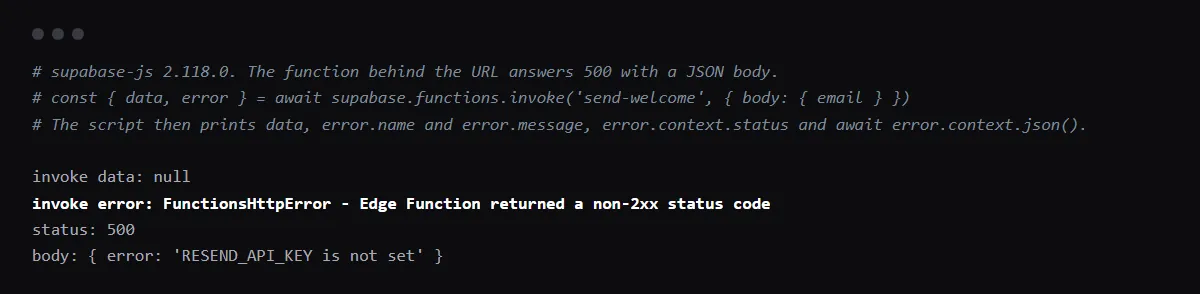
The message is fixed text in supabase-js (FunctionsHttpError in functions-js), thrown whenever the response status is not 2xx; error.context is that response. In our run with supabase-js 2.118.0 on 2026-10-25, a function that answered 500 with a JSON body gave data null, this message, error.context.status 500 and the body. Supabase's error handling guide reads it the same way:
import { FunctionsHttpError } from '@supabase/supabase-js'

const { data, error } = await supabase.functions.invoke('send-welcome', { body: { email } })
if (error instanceof FunctionsHttpError) {
  console.error(error.context.status, await error.context.json())
}
A secret the function reads is not set
Secrets live in the Supabase project, not in your repo or in Vercel. Locally, functions read supabase/functions/.env; deployed functions read the project's Edge Function secrets, set in the dashboard or with supabase secrets set. A Deno.env.get name that was never set there is undefined, the call that needs it fails, and the function answers 500 or whatever its own error handling returns. Supabase says functions read a new secret immediately, without a redeploy. After a move off Lovable, Lovable's guide says the secrets your server functions read are not in the repository, so set each one again on the new project.
supabase secrets list
supabase secrets set RESEND_API_KEY=re_...
401: JWT verification
With verify_jwt on, the default, the platform checks the Authorization header before your code runs and returns 401 when it is missing, malformed or signed with a different key, and your code never runs. Leave it on for functions the app calls with supabase.functions.invoke as a signed-in user. Supabase's docs say to turn it off for functions called without an Authorization header, such as webhooks from other services, in supabase/config.toml:
[functions.stripe-webhook]
verify_jwt = false
404, 500, 503, 504 and 546
Supabase's status code reference lists them: 404 when the function is not deployed or the name in the URL is wrong; 500 when your code throws an uncaught exception (WORKER_ERROR); 503 when the function fails to start (BOOT_ERROR), such as a syntax or import error; 504 when it does not answer within the request time limit; and 546 when it hits a memory or CPU limit (WORKER_RESOURCE_LIMIT). Error responses can also carry an sb-error-code header.
Failed to send a request to the Edge Function is a different error
That one is FunctionsFetchError: the request never got a response, so there is no status to read. A wrong project URL, a network failure or a browser preflight the function did not answer all end there; Supabase's CORS guide shows answering the OPTIONS request. Relay Error invoking the Edge Function is FunctionsRelayError, when the response carries an x-relay-error header.
Checklist
How to find the cause, then check the fix
- 01Log error.context.status and the body, as above, and note the function name and the time of the call.
- 02Open the function under Edge Functions in the Supabase dashboard and read its Invocations and Logs for that call.
- 03List the names the function reads and the secrets the project holds, and compare them:
grep -rn "Deno.env.get" supabase/functions supabase secrets list - 04Set each missing secret with supabase secrets set, or in the dashboard's Edge Function Secrets page, then call the function again.
- 05If the status is 401, check the Authorization header the caller sends and the function's verify_jwt setting before you change the function's code.
- 06Catch errors inside the function and return a JSON body with a clear message and the right status, so the next failure explains itself.
Related
Related guides


Sources
Official docs behind this checklist
- Supabase, Edge Functions error handling
- Supabase, Edge Functions status codes
- Supabase, Edge Functions environment variables and secrets
- Supabase, Edge Functions auth headers and verify_jwt
- Supabase, Edge Functions logging
- Supabase, Edge Functions CORS
- Lovable, Deploying and hosting outside Lovable
- supabase-js, functions-js types.ts
- supabase-js, functions-js FunctionsClient.ts
Browse all launch guides · Read resources · How to make and check your next change
FAQ
FAQ for builders before launch
Why does the function work locally and fail after deploy?
Locally it reads supabase/functions/.env. The deployed function reads only the project's secrets, so a name that is in the local file and was never set on the project is undefined in production.
Is data null when this error happens?
Yes. invoke returns data as null with the error, and the function's response body is only in error.context. That is what our run on 2026-10-25 printed.