Lovable backend
 Supabase
 Lovable
Lovable Cloud vs your own Supabase: which should you use, and how do you move off Lovable Cloud?
Lovable Cloud vs your own Supabase comes down to who runs the backend. Lovable Cloud, which Lovable's docs now call the built-in backend, is a database, auth, storage and edge functions on Supabase's open-source foundation that Lovable runs and bills from your credits; the project never appears in your Supabase dashboard, and you do not get its service role key. Your own Supabase project is billed by Supabase, and you get its dashboard, its keys and the Supabase CLI. Pick before the first backend feature: you can connect your own Supabase only to a Lovable project with no backend yet, and Lovable does not move a project between the two in either direction. Moving off Cloud is manual: export the database, download storage files, apply the migrations from GitHub to a new Supabase project, then point the app at it. Checked against Lovable's and Supabase's docs on 2026-10-25.
Whichever backend you pick, Lovable scans it on publish. For what that scan reads, see Lovable's Quick and Deep security scans.
Repository check
Check this in your repo
Check the migrations in your Lovable repo
For AI-built Vercel + Supabase apps, run the command below in a clone of the GitHub repo Lovable syncs, with Node.js 20 or newer. It reads the .sql files in the repo, including drizzle/migrations, where Lovable Cloud records schema changes since 2026-10-07, as well as supabase/migrations. It reports a table created without RLS as rls_disabled and a policy using (true) as rls_policy_allows_all_read, and env var names the code reads that no template lists as env_var_drift, which cannot see the secrets stored in Lovable or Vercel.
It is a repository check, not a live database test: it does not connect to Lovable Cloud, so a change made in the SQL editor that never became a migration file is invisible to it. It is advice, not a gate, and it exits with code 1 when it finds a blocker.
npx -y viberaven@1.6.12 checkWhat it printed on a Lovable Cloud style fixture
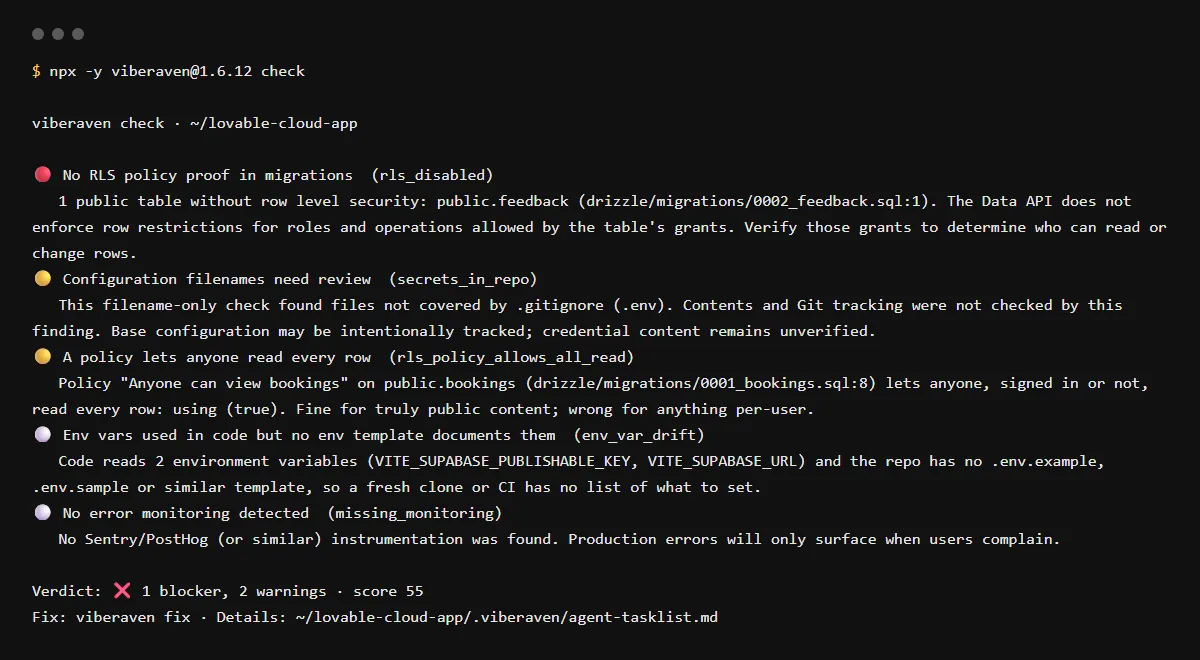
On 2026-10-25 we ran it on a small fixture repo made for this page, not a customer repo, with three migrations under drizzle/migrations and a drizzle journal, laid out as Lovable's docs describe a Cloud project. The output is below, with the temp folder shortened to ~/lovable-cloud-app. It found one blocker, so the exit code was 1.
$ npx -y viberaven@1.6.12 check

viberaven check · ~/lovable-cloud-app

🔴 No RLS policy proof in migrations  (rls_disabled)
   1 public table without row level security: public.feedback (drizzle/migrations/0002_feedback.sql:1). The Data API does not enforce row restrictions for roles and operations allowed by the table's grants. Verify those grants to determine who can read or change rows.
🟡 Configuration filenames need review  (secrets_in_repo)
   This filename-only check found files not covered by .gitignore (.env). Contents and Git tracking were not checked by this finding. Base configuration may be intentionally tracked; credential content remains unverified.
🟡 A policy lets anyone read every row  (rls_policy_allows_all_read)
   Policy "Anyone can view bookings" on public.bookings (drizzle/migrations/0001_bookings.sql:8) lets anyone, signed in or not, read every row: using (true). Fine for truly public content; wrong for anything per-user.
⚪ Env vars used in code but no env template documents them  (env_var_drift)
   Code reads 2 environment variables (VITE_SUPABASE_PUBLISHABLE_KEY, VITE_SUPABASE_URL) and the repo has no .env.example, .env.sample or similar template, so a fresh clone or CI has no list of what to set.
⚪ No error monitoring detected  (missing_monitoring)
   No Sentry/PostHog (or similar) instrumentation was found. Production errors will only surface when users complain.

Verdict: ❌ 1 blocker, 2 warnings · score 55
Fix: viberaven fix · Details: ~/lovable-cloud-app/.viberaven/agent-tasklist.md
Lovable Cloud pricing and what happens when credits run out
Since 2026-06-18, Cloud usage comes out of the same credit balance as building. Free, Pro and Business plans include a monthly Cloud grant of 20 credits, which Lovable calls temporary. When the grant and your other credits are gone, the backend pauses: the published site stays up, but the database, storage and sign-in stop, and Lovable says you cannot read or export the data until it runs again. A top-up does not restart it; open the project and click Wake up. A workspace admin can also set a usage limit that pauses Cloud (2026-10-07), and a project idle for about 7 days pauses on its own.
Can I switch an existing project to my own Supabase?
Not with a button. Lovable shows External Supabase, under Settings, General, only on projects without a backend, and says there is no automatic migration between the built-in backend and your own Supabase in either direction; Supabase's docs say a Cloud project cannot be switched to an external connection. Remixing gives you another Cloud project. What remains is the manual move below.
How to move off Lovable Cloud
Export the database from More, Database, Manage, Settings, Export project data: a PostgreSQL .backup archive of up to 5 GB, once per 24 hours, while the database is running. It holds the schema, the data and your users with their password hashes, so users keep their passwords after a restore. It does not hold storage files, edge function code, secrets or sign-in provider settings: download files from More, Storage, and enter secrets again, since Lovable never shows a saved secret.
On the new Supabase project, apply the migration files in their recorded order. Projects changed since 2026-10-07 keep them in drizzle/migrations, ordered by drizzle/migrations/meta/_journal.json, and Lovable says supabase db push does not run those; older projects use supabase/migrations. Then point the app at the new project by editing .env and supabase/config.toml. Lovable says its app connectors and AI gateway calls work while the project uses the built-in backend and that connections are not exported, so plan replacements for those.
Who is responsible for RLS on Lovable Cloud
You are, on both backends. Lovable's Quick scan checks row level security coverage on publish for Cloud and your own Supabase; its personal data scan covers only Cloud. Lovable lists RLS configuration and security scanning among your jobs once you move off.
Checklist
Before you move a Lovable app off Cloud
- 01Top up credits first if the backend is paused: the export runs only while the database is running.
- 02Export the database and keep the .backup file somewhere outside Lovable.
- 03Download every storage bucket's files, and write down each secret name, since the values cannot be read back.
- 04Create the Supabase project, restore the export or apply the migrations in order, and upload the storage files.
- 05Set the secrets, sign-in providers and redirect URLs on the new project, then edit .env and supabase/config.toml.
- 06Sign in as two different users on the published app and confirm neither can read the other's rows.
Related
Related guides
Sources
Official docs behind this checklist
- Lovable, Built-in backend (Cloud)
- Lovable, Supabase integration
- Lovable, Database backups and export
- Lovable, Deploy and host outside Lovable
- Lovable, Pause or remove the database
- Lovable, Out of credits
- Lovable, Credits and usage
- Lovable, Git sync
- Lovable, Changelog
- Supabase, Can't access a Supabase project created by Lovable Cloud
Browse all launch guides · Read resources · How to make and check your next change
FAQ
FAQ for builders before launch
Is Lovable Cloud the same as Supabase?
It runs on Supabase. Supabase says every Lovable Cloud project is powered by Supabase behind the scenes, but the project belongs to Lovable, not to your Supabase account.
Can I get the service role key for a Lovable Cloud project?
Supabase's docs say no: service role and API keys are not accessible, and external connections are not supported. For direct queries, Lovable documents its own SQL editor, under Database, Manage.