Supabase Auth and Resend error
 Supabase
Error sending confirmation email
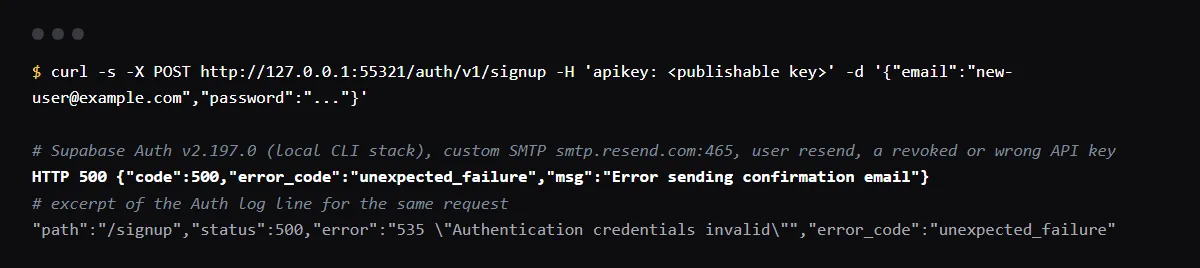
"Error sending confirmation email" (HTTP 500, error_code unexpected_failure) is what Supabase Auth returns from sign-up when the custom SMTP server refuses the message; the reason is only in the Auth logs. With Resend SMTP the usual causes are a password that is not a valid Resend API key, which Resend answers with 535 Authentication credentials invalid, and a sender address on a domain that is not verified in your Resend account. Use host smtp.resend.com, port 465, username resend, an API key as the password and a sender on your verified domain, then sign up again. We reproduced the 500 and the 535 with Supabase Auth v2.197.0 on 2026-10-26.
No error, but the email never arrives? Start with why Supabase confirmation emails go missing.
Read the reason in the Auth logs
In supabase/auth, sendConfirmation returns "Error sending confirmation email" as a 500 for any mailer error and keeps the SMTP reply as the internal error, which goes to the Auth logs, not to the app. The sibling messages work the same way: "Error sending recovery email", "Error sending magic link email" and "Error sending invite email". Our log line for the failed sign-up:
"path":"/signup","status":500,"error":"535 \"Authentication credentials invalid\"","error_code":"unexpected_failure"You can only send testing emails to your own email address
Resend's API answers this 403 validation_error when the sender is the resend.dev testing domain, such as onboarding@resend.dev, and the recipient is not the address on your Resend account. AI-built apps often keep that sender in an Edge Function or server route that sends welcome or invite emails. The fix is the same as for SMTP: verify your own domain in Resend and send from an address on it. The full message:
You can only send testing emails to your own email address (youremail@domain.com). To send emails to other recipients, please verify a domain at resend.com/domains, and change the `from` address to an email using this domain.The Resend settings Supabase needs
Resend's Supabase guide gives host smtp.resend.com, port 465, username resend and an API key as the password, and asks for a verified domain first. In Supabase, the Sender email and name are required fields; the sender has to be on a domain verified in the same Resend account the key belongs to, or Resend refuses it with "The domain.com domain is not verified." Once custom SMTP is on, Supabase starts the project at 30 emails per hour.
API key is invalid
Calling Resend's API directly with a wrong key, we got HTTP 401 with {"message":"API key is invalid","name":"validation_error"} from POST /emails. Resend's errors page explains why other reports say 400: the sending endpoints answer 401 for a key that does not exist, and the other endpoints answer 400.
Checklist
How to fix it, then check the fix
- 01Open the Auth logs for the failed sign-up and read the error after the 500: 535 means the password, a domain message means the sender.
- 02Create a Resend API key, with sending access at least, and paste it as the SMTP password in Supabase.
- 03Set host smtp.resend.com, port 465 and username resend on the Auth SMTP settings page.
- 04Verify your domain in Resend, then set the Sender email in Supabase to an address on it.
- 05Replace any onboarding@resend.dev sender in your own code with the same verified address.
- 06Sign up with an address outside your team: the request returns 200 and the email arrives.
Related
Related guides
Sources
Official docs behind this checklist
Browse all launch guides · Read resources · How to make and check your next change
FAQ
FAQ for builders before launch
Why does the app show only "Error sending confirmation email"?
Supabase Auth hides the SMTP reply from the client on purpose: the message to the app is fixed, and the real error is in the internal error it logs.
Is the user created when this happens?
In our run the Auth log recorded user_confirmation_requested for the new user before the send failed, so check Authentication, Users and send the confirmation again once SMTP works.