Supabase Auth
 Supabase
Why is my Supabase confirmation email not arriving, and how do I turn off Confirm email?
A Supabase confirmation email usually does not arrive because the project still uses Supabase's built-in email provider, which sends 2 emails per hour for the whole project and delivers only to addresses on your organization's team; everyone else gets nothing. The fix for a real app is custom SMTP, set on the Auth SMTP settings page of the dashboard, with a provider such as Resend, Postmark or Amazon SES. If you do not want confirmation at all, turn off Confirm email in the Email provider settings, under Authentication, Sign In / Providers: sign-ups then return a session at once and send no email, but anyone can sign up with an address they do not own. Until a user confirms, password sign-in fails with "Email not confirmed" (error code email_not_confirmed). Checked against Supabase's docs and the Auth server source on 2026-10-25.
If the error says the limit is used up, read why sign-up emails stop at 2 an hour.
Email not confirmed (email_not_confirmed)
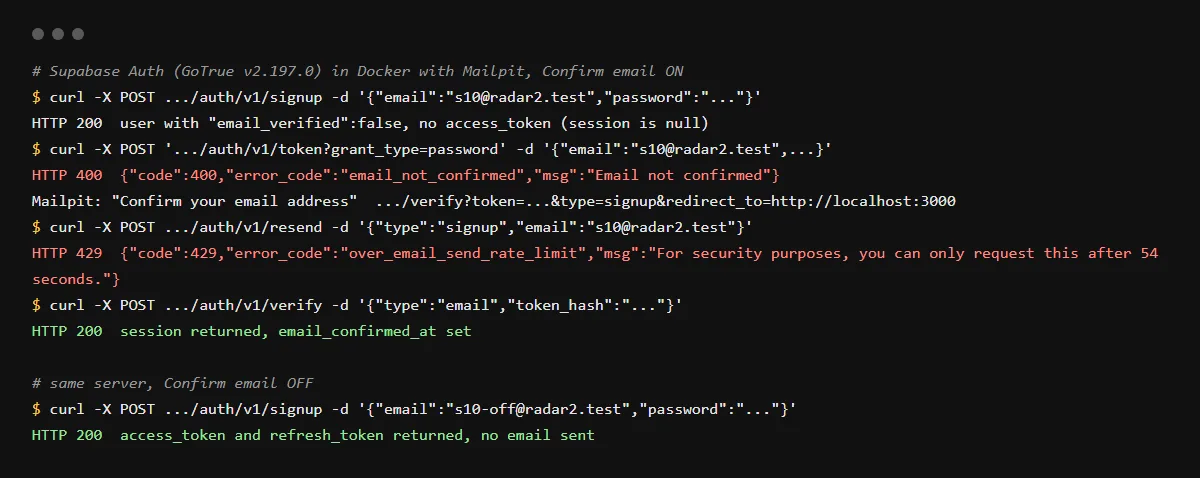
With Confirm email on, signUp returns the user with session set to null, and signing in with the password before the user clicks the link returns HTTP 400. We ran Supabase Auth v2.197.0 locally on 2026-10-25 and got the body below. After the token in the email was verified, the same sign-in returned a session.
{"code":400,"error_code":"email_not_confirmed","msg":"Email not confirmed"}Not arriving: where to look
Open the Auth logs first: they show whether Supabase sent the message or refused it. On the built-in provider, a non-team address fails with "Email address not authorized" and the hourly limit with "email rate limit exceeded". Supabase's troubleshooting guide then lists your SMTP provider's suppression list, the spam folder and the recipient's firewall; the built-in provider sends from a supabase.io address. Asking again within 60 seconds returns "For security purposes, you can only request this after N seconds."
Hosted vs local: who has Confirm email on
Supabase's docs say Confirm email is on by default for hosted projects and off for local development and self-hosting. Locally it is enable_confirmations under [auth.email] in supabase/config.toml, false in the CLI template, and the emails land in Mailpit at http://localhost:54324 instead of an inbox. An app that worked without confirmation locally can therefore stop signing people in once it runs against the hosted project.
Where the confirmation link sends the user
Without a redirect, Supabase sends the user to the Site URL; with signUp({ email, password, options: { emailRedirectTo } }) it uses that address if it is on the Redirect URLs list. If links land on localhost:3000, see why Supabase login lands on localhost. For server-side rendering, Supabase's docs point the template link at your own /auth/confirm route with {{ .TokenHash }}, and that route calls verifyOtp({ type, token_hash }) and redirects. Since 2026-06-03, new Free plan projects on the built-in provider cannot edit email templates, so that template change needs custom SMTP first.
Token has expired or is invalid
Supabase's docs warn that some corporate email scanners open links to check them, which uses up the one-time link before the user clicks it. A link works once, so the user needs a new email from resend.
Checklist
Get confirmation emails delivered
- 01Sign up with a test address outside your team, then read the entry for that request in the project's Auth logs.
- 02Set up custom SMTP on the Auth SMTP settings page (dashboard/project/_/auth/smtp), with a provider whose sending domain you have verified. Supabase starts you at 30 emails per hour once it is on.
- 03Pass the address users should land on after confirming, and make sure it is on the Redirect URLs list:
await supabase.auth.signUp({ email, password, options: { emailRedirectTo: 'https://yourapp.com/auth/confirm' }, }); - 04Let users ask for a new email, at most once a minute:
await supabase.auth.resend({ type: 'signup', email, options: { emailRedirectTo: 'https://yourapp.com/auth/confirm' } }); - 05In the app, catch email_not_confirmed on sign-in and show "check your inbox" with a resend button instead of a generic error.
- 06Only if you accept unverified addresses: turn off Confirm email in the Email provider settings, and know that it confirms new users automatically.
Related
Related guides
Sources
Official docs behind this checklist
- Supabase, Password-based auth (Confirm email, PKCE confirm route)
- Supabase, General configuration
- Supabase, Send emails with custom SMTP
- Supabase, Email templates
- Supabase, Error codes
- Supabase, Rate limits
- Supabase troubleshooting, Not receiving Auth emails
- Supabase changelog, Changes to email template customisation on Free tier (2026-06-03)
- supabase/auth v2.197.0, internal/api/token.go
Browse all launch guides · Read resources · How to make and check your next change
FAQ
FAQ for builders before launch
Does turning off Confirm email confirm existing users?
Supabase's docs say that with Confirm email off, a new user's email is confirmed in the database at sign-up. They do not say what happens to users who signed up earlier and never clicked, so check those under Authentication, Users.
Why did no email arrive with Confirm email off?
Because none is sent: signup returns a session and the user is already confirmed. In our run, Mailpit received no message for that sign-up.