Supabase error
 Supabase
Supabase "email rate limit exceeded": why sign-up emails stop, and the fix
"email rate limit exceeded" is the 429 error Supabase Auth returns, with the code over_email_send_rate_limit, when your project has used up its hourly email allowance. With the built-in email provider that allowance is 2 emails per hour for the whole project, shared by sign-up confirmations, magic links, password resets and invites, so the third sign-up in an hour fails. The fix for a real app is custom SMTP: connect a provider such as Resend, Postmark or Amazon SES in the Auth SMTP settings of your project, then raise the limit under Authentication, Rate Limits, which you can change only once custom SMTP or a Send Email hook is on. Checked against Supabase's docs and the Auth server source on 2026-10-24.
Setting up sign-in for an app an agent built? Also check the Supabase auth and RLS checklist.
The error body and the two messages
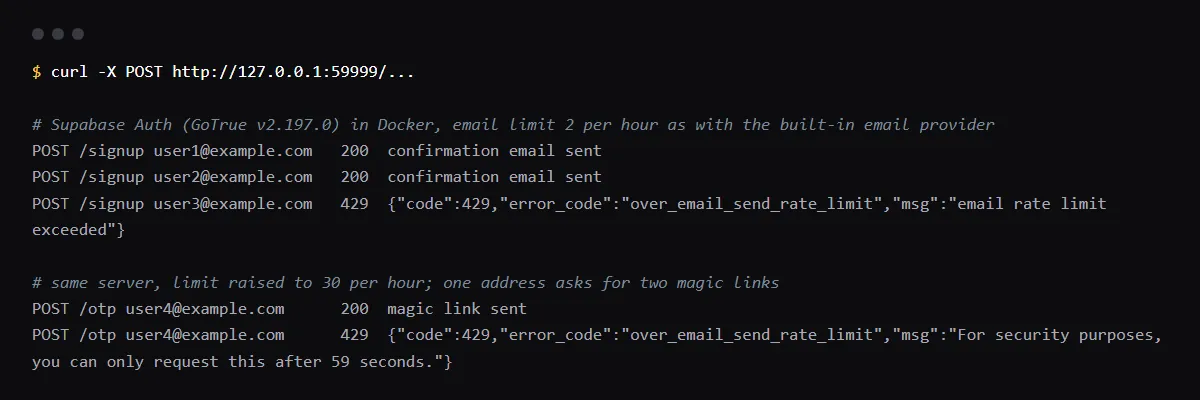
Both cases below return HTTP 429 with error_code over_email_send_rate_limit, and supabase-js surfaces them as an AuthApiError with status 429 and that code. "email rate limit exceeded" means the project-wide hourly count is used up. "For security purposes, you can only request this after N seconds." means the same address asked again within the per-user cooldown, 60 seconds by default for sign-up confirmations, magic links and password resets. We ran Supabase Auth v2.197.0 locally on 2026-10-24 and got:
{"code":429,"error_code":"over_email_send_rate_limit","msg":"email rate limit exceeded"}
{"code":429,"error_code":"over_email_send_rate_limit","msg":"For security purposes, you can only request this after 59 seconds."}
What is the email rate limit in Supabase?
With the built-in provider, 2 emails per hour per project, and Supabase says that number can change without notice. Once you save custom SMTP settings, Supabase starts you at 30 per hour, which you can raise. Separately, each address waits 60 seconds between emails of the same kind, and sign-up, sign-in and reset requests are limited to 30 per 5 minutes per IP address; that one returns over_request_rate_limit, "Request rate limit reached".
Magic link and password reset share the limit
Every email Auth sends counts against the same hourly number: confirmations, magic links, one-time codes, resets, invites and email change messages. In the Auth source, a magic link to an existing user also reuses the password reset timer, so a reset followed by a magic link to the same address within a minute hits the cooldown.
Email address not authorized
A different error with the same cause. Without custom SMTP, Supabase delivers only to addresses on your organization's team, and any other address fails with email_address_not_authorized. If test sign-ups from your own address work and real users get nothing, this is why. The built-in provider is meant for trying Auth out, not for production.
Since 2026-06-03: templates need custom SMTP on new free projects
Supabase announced that from 2026-06-03, new Free plan projects using the default SMTP cannot customize their auth email templates; existing projects keep theirs, and custom SMTP lifts the restriction. It is one more reason to set up SMTP before launch.
Local development
supabase start does not send real email: the local mail catcher, Mailpit, at http://localhost:54324, shows each message. The CLI sets a very high hourly limit unless you configure an SMTP block in supabase/config.toml, where [auth.rate_limit] email_sent then applies. The per-address cooldown comes from auth.email.max_frequency.
Checklist
Set up custom SMTP and raise the limit
- 01Pick an SMTP provider and verify your sending domain with it. Supabase lists Resend, Amazon SES, Postmark, Twilio SendGrid, ZeptoMail and Brevo, among others.
- 02In the Supabase dashboard, open the Auth SMTP settings page (dashboard/project/_/auth/smtp), turn on custom SMTP and enter the host, port, user, password and sender address from the provider.
- 03Open Authentication, then Rate Limits, and set the emails-per-hour limit to what your sign-up volume needs. Supabase starts it at 30 after you save SMTP settings.
- 04Or set it with the Management API, using a personal access token:
curl -X PATCH "https://api.supabase.com/v1/projects/$PROJECT_REF/config/auth" \ -H "Authorization: Bearer $SUPABASE_ACCESS_TOKEN" \ -H "Content-Type: application/json" \ -d '{"rate_limit_email_sent": 100}' - 05In your app, catch status 429 from signUp, signInWithOtp and resetPasswordForEmail and show a "try again in a minute" message instead of a generic failure, and disable the button after one click.
- 06Sign up with an address outside your team and confirm the email arrives and its link returns to your production URL.
Related
Related guides


Sources
Official docs behind this checklist
- Supabase, Rate limits
- Supabase, Send emails with custom SMTP
- Supabase, Error codes
- Supabase, CLI configuration: auth.rate_limit.email_sent
- Supabase changelog, Changes to email template customisation on Free tier (2026-06-03)
- supabase/auth v2.197.0, internal/api/mail.go
- supabase/auth v2.197.0, internal/api/apierrors/errorcode.go
Browse all launch guides · Read resources · How to make and check your next change
FAQ
FAQ for builders before launch
Can I raise the limit without custom SMTP?
No. Supabase lets you change the email limit only when you use custom SMTP or the Send Email hook. On the built-in provider it stays at 2 per hour.
Does turning off Confirm email avoid the limit?
It removes the confirmation email from sign-ups, so they stop using the allowance, but magic links and password resets still send email. Turning it off also lets anyone sign up with an address they do not own.