Supabase API error
 Supabase
Could not find the table 'public.<table>' in the schema cache
"Could not find the table 'public.x' in the schema cache" (code PGRST205, HTTP 404) means the Supabase REST API, PostgREST, has no table by that name in the schema it serves. Check three things in order: the name, which PostgREST matches exactly and often answers with a hint such as "Perhaps you meant the table 'public.profiles'"; the project, because a migration that ran on one Supabase project (a Lovable Cloud project, a branch or your local stack) does not exist on the one your app's URL points at; and the cache, when the table exists but was created in a way PostgREST was not told about. For the last case run NOTIFY pgrst, 'reload schema'; in the SQL editor. Reproduced on a local Supabase stack (PostgREST 16.5) and checked against the PostgREST source on 2026-10-27.
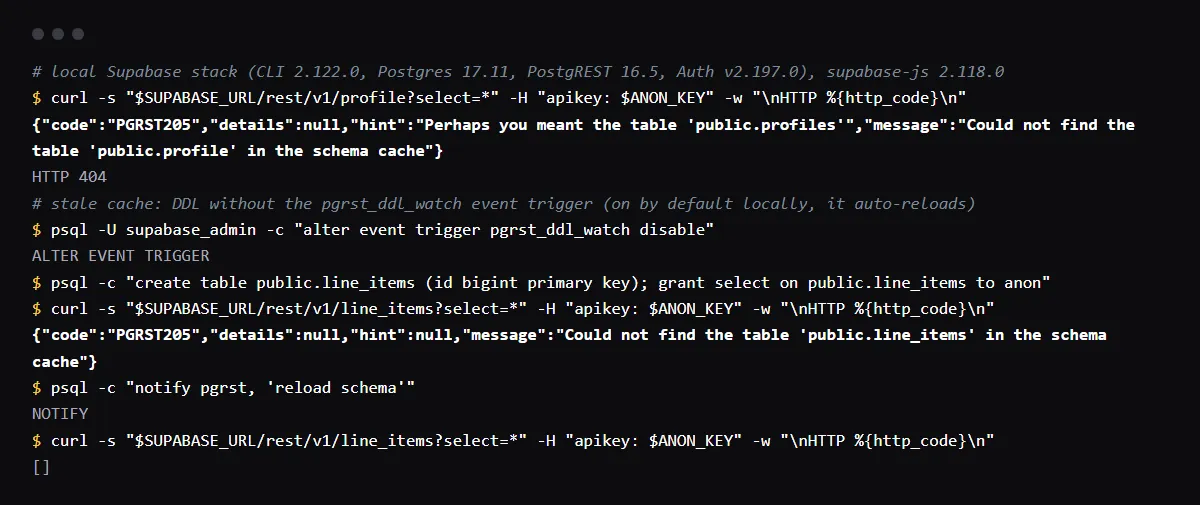
Table found, and the request still fails with 42501? See the missing grant behind permission denied for table.
Read the hint first
When a table with a similar name exists, PostgREST 16.5 puts it in the hint field of the error, with details null. In our run, a request for profile returned the hint "Perhaps you meant the table 'public.profiles'". No hint means nothing close exists in that schema: check the project and the schema next.
{"code":"PGRST205","details":null,"hint":"Perhaps you meant the table 'public.profiles'","message":"Could not find the table 'public.profile' in the schema cache"}The migration ran on a different project
Open the Table Editor of the project whose URL the app uses, the value of NEXT_PUBLIC_SUPABASE_URL or VITE_SUPABASE_URL in the deployment, not the one in .env.local. An app moved off Lovable Cloud, a Supabase branch, or a local stack each has its own database, and supabase db push applies migrations only to the linked project.
Tables in another schema
The error names the schema it searched. A table in a schema other than public needs the client to ask for that schema, supabase.schema('billing').from('invoices'), and the schema has to be listed under Exposed schemas in the API settings. A schema that is not exposed returns a different error, PGRST106 Invalid schema, with the list of schemas that are.
Reload the schema cache
Supabase projects tell PostgREST about schema changes through event triggers, so a table created in the dashboard or by a migration shows up at once; in our run a table created through psql was readable on the first request. When the reload is missed, the table returns PGRST205 until you reload it. We reproduced that by turning off the pgrst_ddl_watch trigger; one NOTIFY fixed it. Supabase's troubleshooting page has the same command.
NOTIFY pgrst, 'reload schema';Checklist
How to fix it, then check the fix
- 01Copy the table name from the message and compare it with the Table Editor of the same project, including case and plural.
- 02Check that the deployment's Supabase URL is the project where the migration ran.
- 03If the table is in another schema, call supabase.schema(name) and add the schema to Exposed schemas.
- 04If the table exists in that project and schema, run NOTIFY pgrst, 'reload schema'; and repeat the request.
- 05After it is found, a 401 or 403 with 42501 means the table needs grants or a policy, not a reload.
Related
Related guides

Sources
Official docs behind this checklist
Browse all launch guides · Read resources · How to make and check your next change
FAQ
FAQ for builders before launch
Do I need to restart the project?
Not for this. NOTIFY pgrst, 'reload schema'; reloads the cache in place. If the table still is not found, it is not in that project or schema.
The same error mentions a column or a function instead
Those are the same cache for other objects: a missing column and a missing function each have their own PGRST code. The checks are the same: the name, the project, then the reload.