Supabase error
 Supabase
Supabase "permission denied for table" (42501): the missing grant and the fix
"permission denied for table profiles" (code 42501) means the Postgres role behind the request, anon for a signed-out visitor or authenticated for a signed-in user, has no grant for that command on the table, so Postgres refuses the query before any row level security policy runs. The fix is a grant for that role and command, in a migration, once row level security and policies are on: grant select on table public.profiles to authenticated; The hint in the error body names the GRANT to run. It is not a policy failure: a write that a policy rejects fails with "new row violates row-level security policy" instead, under the same code.
A table created after the Data API change? What the October 30 grants change does to new tables.
Repository check
Check this in your repo
Find client-queried tables with no grant in your repo
Run the command below from your app folder with Node.js 20 or newer. When the repo turns default grants off, with auto_expose_new_tables = false under [api] in supabase/config.toml or a migration that revokes them, it lists each public table that has row level security and a policy, that your client code queries through supabase-js, and that no migration grants, as data_api_grant_missing, with the grant line to add. A table that a migration grants to anon or authenticated while row level security is off comes out as data_api_grant_without_rls, the wrong way to silence this error.
It is a repository check, not a live database test: it does not read the grants your hosted project holds, tables made in the dashboard, or a table that only a policy, a view or your server reads. With default grants left on, it does not look for missing grants at all.
npx -y viberaven@1.6.12 checkWhat it printed on a fixture repo
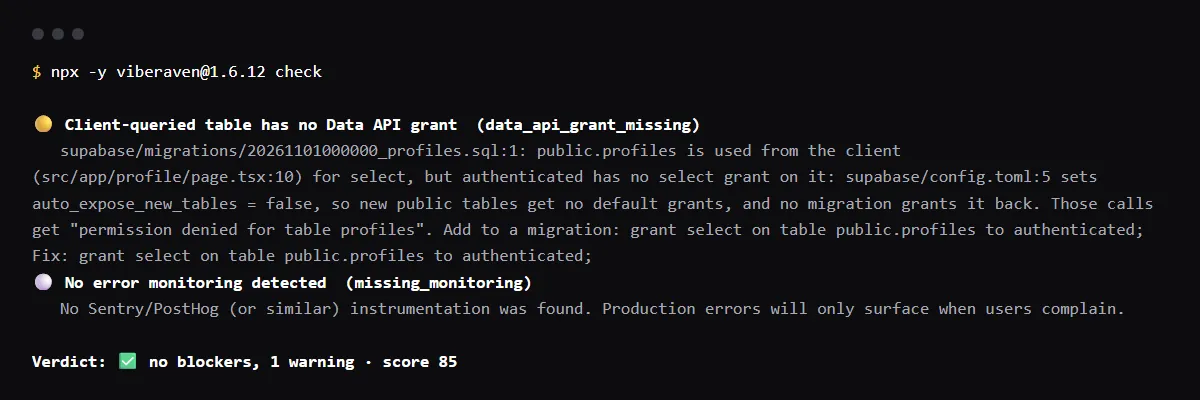
On 2026-10-23 we ran it on a small Next.js fixture repo made for this page, not a customer repo. Its supabase/config.toml sets auto_expose_new_tables = false under [api], one migration creates public.profiles with row level security and owner-only select and update policies but no grant, and a client component reads it with supabase.from('profiles').select('display_name'). The output is below, with the temp folder shortened to ~/profiles-app. A warning is not a blocker, so the exit code was 0.
A second migration with grant select, update on table public.profiles to authenticated cleared the warning. A migration that instead turned row level security off and granted the table to anon and authenticated got two blockers, rls_disabled and data_api_grant_without_rls, and exit code 1.
$ npx -y viberaven@1.6.12 check

viberaven check · ~/profiles-app

🟡 Client-queried table has no Data API grant  (data_api_grant_missing)
   supabase/migrations/20261101000000_profiles.sql:1: public.profiles is used from the client (src/app/profile/page.tsx:10) for select, but authenticated has no select grant on it: supabase/config.toml:5 sets auto_expose_new_tables = false, so new public tables get no default grants, and no migration grants it back. Those calls get "permission denied for table profiles". Add to a migration: grant select on table public.profiles to authenticated; Fix: grant select on table public.profiles to authenticated;
⚪ No error monitoring detected  (missing_monitoring)
   No Sentry/PostHog (or similar) instrumentation was found. Production errors will only surface when users complain.

Verdict: ✅ no blockers, 1 warning · score 85
Fix: viberaven fix · Details: ~/profiles-app/.viberaven/agent-tasklist.md
The 42501 error body in supabase-js
supabase-js does not throw here: the call returns the error in error, with the code, message and hint that PostgREST sends. Supabase's error handling guide shows this body for a table whose default grants were revoked from anon, with HTTP status 401. PostgREST answers 403 instead when the request carries a signed-in user's token, so clients often report the error as an auth problem. Log the whole error object, not only error.message: the hint is the GRANT to run.
{
  "code": "42501",
  "message": "permission denied for table users",
  "details": null,
  "hint": "Grant the required privileges to the current role with: GRANT SELECT ON public.users TO anon;"
}
permission denied for table vs new row violates row-level security policy
Both carry code 42501, so go by the message. permission denied for table is a grant: the role may not run that command on the table at all, and Postgres checks it before any policy. new row violates row-level security policy for table "profiles" is a policy: the role may insert or update, and a with check clause rejected the row. A grant does not fix the policy error, and a policy does not fix the grant error.
For the policy error, see how to diagnose new row violates row-level security policy.
permission denied for table on a new table
Supabase has announced that new tables in public stop getting automatic grants on existing projects from October 30, 2026. The first table a prompt adds after that, or old migrations replayed into a fresh database with the new default, then fail with this error, while existing tables keep their grants. Grant each new table in the migration that creates it, next to its row level security and policies.
The date, what it changes and how to test it locally are in the October 30 Data API grants guide.
permission denied for table with the service role key
The secret or service_role key skips row level security, not grants. Supabase's API keys guide says a missing grant returns a permission error for service_role too, so grant service_role on the tables your server reaches: grant select, insert, update, delete on table public.profiles to service_role;
The error names a table you did not query
Postgres runs a policy with the privileges of the role making the query. When a policy on projects reads team_members and the role has no grant on team_members, the error names team_members. On a local Supabase stack (CLI v2.119.0) on 2026-10-01, that read failed with permission denied for table team_members. Grant select on the table the policy reads, or read it through a security definer function in a schema the API does not expose, as Supabase's RLS guide suggests.
permission denied for schema, view or sequence
The same 42501 comes in other forms. permission denied for schema means the API roles cannot use the schema: Supabase's 42501 guide says auth and vault are closed to them on purpose, and a custom schema has to be exposed and granted first. On the same local stack, a security invoker view with no grant failed with permission denied for view project_names, fixed by a grant on the view, and an insert into a serial column with every privilege revoked from its sequence failed with permission denied for sequence items_serial_id_seq, fixed by grant usage on that sequence.
Checklist
How to fix permission denied for table, then check the fix
- 01Note the table the message names and the hint, then list which roles hold which privileges on that table, with the query from Supabase's 42501 guide:
select grantee, privilege_type from information_schema.role_table_grants where table_name = 'profiles'; - 02Find the role that made the request. Signed out, supabase-js runs as anon; with a session, as authenticated. A 401 points at anon, a 403 at a signed-in user.
- 03Turn row level security on and write the policies before you grant. Supabase's guide warns that a grant exposes the table through the Data API, and its RLS guide says a table without RLS is open to any role that holds the grant.
- 04Grant only the commands the app runs, to the roles that run them, in a migration so every environment gets it:
alter table public.profiles enable row level security; -- policies here, then: grant select, update on table public.profiles to authenticated; grant select, insert, update, delete on table public.profiles to service_role; -- only if signed-out visitors read it, with an anon policy too: -- grant select on table public.profiles to anon; - 05Apply the migration to the project that fails, for example with supabase db push on a linked project, then repeat the request as the same role. A grant run only in the SQL editor is missing from the next database built from your migrations.
- 06Do not silence it with a grant on a table that has RLS off, or with the secret key in the browser. The grant hands every row to anyone with the key your frontend ships, and the secret key skips every policy and still needs the grant.
Related
Related guides
Sources
Official docs behind this checklist
Browse all launch guides · Read resources · How to make and check your next change
FAQ
FAQ for builders before launch
Why does the same query work in the SQL editor?
The dashboard runs it as the postgres role, which owns the tables, unless you pick another role in its role selector. The app runs as anon or authenticated through the Data API, so test as that role, or from the app itself, signed in and signed out.
Does a 401 with code 42501 mean my API key is wrong?
No. PostgREST returns 401 for a 42501 error when the request has no signed-in user, and 403 when it has one. The key reached the database; the role it maps to has no grant.