OpenAI SDK error
It looks like you're running in a browser-like environment
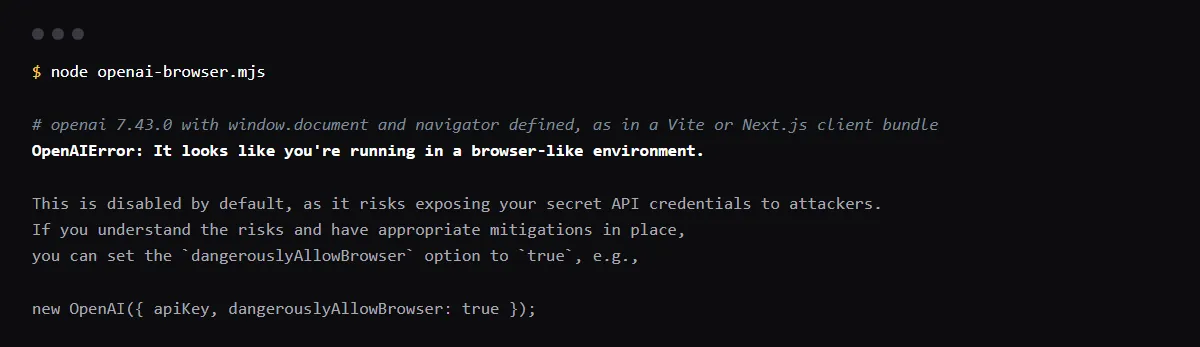
"It looks like you're running in a browser-like environment." is thrown by the OpenAI Node.js SDK when new OpenAI() runs where window.document and navigator exist, which means client code. It stops you because the API key would sit in every visitor's browser, and a NEXT_PUBLIC_OPENAI_API_KEY or VITE_OPENAI_API_KEY variable is already in your bundle, error or not. Move the OpenAI call into server code, such as a Next.js Route Handler, a Vercel Function or a Supabase Edge Function, read OPENAI_API_KEY there with no public prefix, have the browser call your route, and rotate the key if it was ever public. dangerouslyAllowBrowser: true only silences the error. Reproduced with openai 7.43.0 on 2026-10-26.
Using NEXT_PUBLIC_ for other keys too? Read what Next.js copies into the browser bundle.
What the SDK checks
In openai-node's client.ts the constructor throws this error unless dangerouslyAllowBrowser is set, when window, window.document and navigator are all defined, or when it runs in a browser worker. It runs after the key check, so with no key at all you get a different message first: openai 7.x says "Missing credentials. Please pass an `apiKey`, `workloadIdentity`, `adminAPIKey`, or set the `OPENAI_API_KEY` or `OPENAI_ADMIN_KEY` environment variable." Older releases said "The OPENAI_API_KEY environment variable is missing or empty".
NEXT_PUBLIC_OPENAI_API_KEY and VITE_OPENAI_API_KEY are public
Next.js inlines every NEXT_PUBLIC_ value into the JavaScript it sends to the browser at build time, and Vite exposes every VITE_ variable to client code. Anyone who opens the site can read the key in the bundle and run requests on your bill, even if the SDK never ran there. Rename the variable to OPENAI_API_KEY and read it only on the server.
Move the call behind a route
A Next.js Route Handler keeps the key on the server; the browser posts the prompt to it and gets the text back. Add your own sign-in check and rate limit to the route, since anyone can call it.
// app/api/chat/route.ts
import OpenAI from 'openai'

const openai = new OpenAI() // reads OPENAI_API_KEY on the server

export async function POST(req: Request) {
  const { prompt } = await req.json()
  const response = await openai.responses.create({ model: process.env.OPENAI_MODEL!, input: prompt })
  return Response.json({ text: response.output_text })
}

// in the browser
const res = await fetch('/api/chat', { method: 'POST', body: JSON.stringify({ prompt }) })
When dangerouslyAllowBrowser is acceptable
The openai-node README lists the cases where the risk is small, such as a key each user types in for their own account. For the Realtime API in the browser, the SDK's own error points to ephemeral session tokens instead. A project key in a public bundle is not one of those cases.
Checklist
How to fix it, then check the fix
- 01Find the browser-side OpenAI code and public key names:
grep -rnE "NEXT_PUBLIC_OPENAI|VITE_OPENAI|dangerouslyAllowBrowser" --include=*.ts --include=*.tsx --include=*.js --exclude-dir=node_modules . - 02Move each new OpenAI() call into a server route or function, and call that route from the browser.
- 03Rename the variable to OPENAI_API_KEY in your host, such as Vercel, and delete the public one, then redeploy.
- 04If the old key was ever in a deployed bundle, revoke it in the OpenAI dashboard and create a new one.
- 05Search the built output for the key prefix, such as sk-proj-, to confirm it is gone from the bundle.
Related
Related guides

Sources
Official docs behind this checklist
Browse all launch guides · Read resources · How to make and check your next change
FAQ
FAQ for builders before launch
My tests fail with this error. Why?
A jsdom test environment defines window, document and navigator, so the SDK thinks it is in a browser. The openai-node README says jsdom is not supported; run those tests in the node environment, or mock the client.
Is a Supabase Edge Function a safe place for the key?
Yes. It runs on Supabase's servers with Deno, so the key set with supabase secrets set never reaches the browser.