Vercel question
 Vercel
Why does my Vercel function time out with FUNCTION_INVOCATION_TIMEOUT?
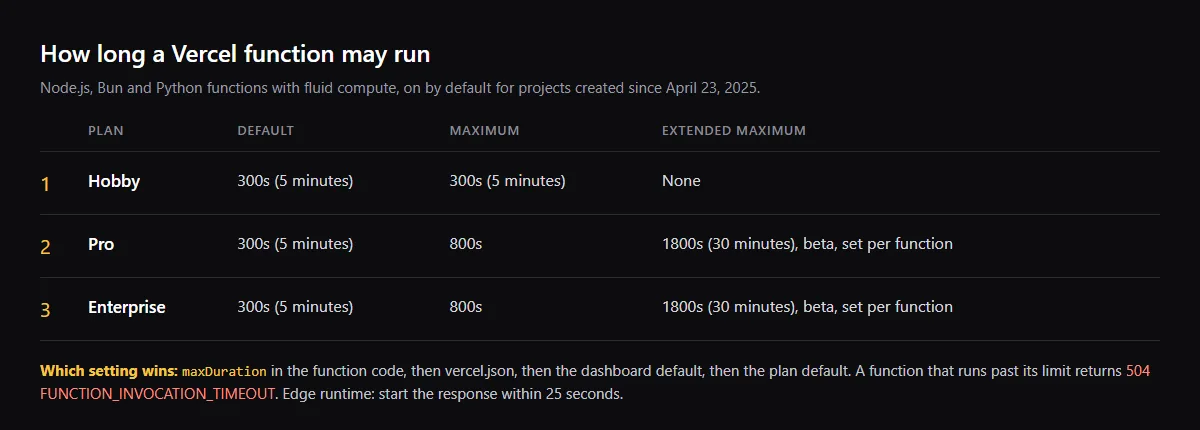
A Vercel function times out when it runs longer than its maximum duration, and Vercel then returns 504 FUNCTION_INVOCATION_TIMEOUT. With fluid compute, on by default for projects created since April 23, 2025, the default is 300 seconds on every plan: Hobby cannot go higher, and Pro and Enterprise can raise it to 800 seconds with maxDuration. Vercel lists slow API or database calls, a function that never returns a response, an infinite loop, upstream errors and unhandled exceptions as causes. In an AI app, check the model call first, and any maxDuration set lower in the route file.
Getting a 500 instead of a 504? Find the crash behind FUNCTION_INVOCATION_FAILED.
Vercel function timeout limit by plan
Node.js, Bun and Python functions with fluid compute: Hobby 300 seconds default and maximum; Pro and Enterprise 300 seconds default and 800 seconds maximum. Pro and Enterprise can also set up to 1800 seconds per function, in beta, on supported runtime versions. Edge runtime functions must start their response within 25 seconds and can stream for up to 300 seconds.
How do I increase the Vercel function timeout?
Set maxDuration on the route. In the Next.js App Router it is a named export in the route file. A value in the code wins over vercel.json, which wins over the Default Max Duration in Settings, Functions, which wins over the plan default. On Hobby, 300 is the most you can set.
// app/api/chat/route.ts
export const maxDuration = 300; // seconds
Does streaming stop a Vercel timeout?
Not by itself. Vercel counts the time spent sending the response, streamed responses included, toward the maximum duration. Streaming shows the user output sooner, and Vercel suggests streaming progress or heartbeat data so idle HTTP/1.1 connections are not closed, but the function still stops at its limit.
Checklist
Fix a FUNCTION_INVOCATION_TIMEOUT
- 01Confirm it is a timeout: a 504 with FUNCTION_INVOCATION_TIMEOUT for that request in the Logs tab. A 500 is a crash, not a timeout.
- 02Search the route and vercel.json for maxDuration. A template value lower than the work needs wins over the 300 second default.
- 03Check that fluid compute is on, in Settings, Functions. Projects created before April 23, 2025 may not have it; turn it on and redeploy.
- 04Make every path return a response, errors included. Vercel says a function that returns none times out.
- 05Give the model call its own timeout, shorter than maxDuration, and return an error you can read when it fires:
const response = await fetch(modelUrl, { method: 'POST', body, signal: AbortSignal.timeout(240_000), }); - 06For work longer than your plan allows, move it out of the request: start a job, return its id, and let the client poll. Vercel points long work to Vercel Workflows.
Related
Related guides
Sources
Official docs behind this checklist
Browse all launch guides · Read resources · How to make and check your next change
FAQ
FAQ for builders before launch
Is the Hobby function timeout still 10 seconds?
Not with fluid compute. Vercel's limits page gives Hobby a 300 second default and maximum. Older answers quote lower Hobby limits from before fluid compute was the default.
Does waiting on the model cost CPU time?
Vercel says waiting for I/O, such as calling AI models or database queries, does not count toward active CPU time. It still counts toward the maximum duration.