Netlify and Supabase error
 Supabase
Secrets scanning found secrets in build
"Secrets scanning found secrets in build" on Netlify means the value of an environment variable marked as secret (Contains secret values) was found in the build output or repo files. In a Supabase app it is usually VITE_SUPABASE_ANON_KEY or VITE_SUPABASE_PUBLISHABLE_KEY: Vite copies every VITE_ value into the browser bundle, so the scan finds it in dist/assets. That key is public by design, so list only the public names in SECRETS_SCAN_OMIT_KEYS, or stop marking them secret, and redeploy. Never omit a service role or secret key: if the scan finds one in the bundle, it is already public, so move it to server code and rotate it. We reproduced both cases with @netlify/build on 2026-10-26.
Not sure the anon key belongs in the bundle at all? Read what the public key can reach, and what keeps it safe.
Repository check
Check this in your repo
Find a service role key headed for the browser
For AI-built Vercel + Supabase apps, run the command below from your app folder with Node.js 20 or newer. It reads only files, so it runs the same on a repo you deploy to Netlify, and it cannot see which Netlify variables are marked secret. What it finds is the key the scan must keep failing on: a service role or secret key under a VITE_ or NEXT_PUBLIC_ name in .env.example or a similar template, reported as service_role_key_in_client_env.
It is a repository check, not a live database test: it does not run the Netlify build or open your bundle. It is advice, not a gate, and it exits with code 1 when it finds a blocker.
npx -y viberaven@1.6.12 checkWhat it printed on a fixture repo
On 2026-10-26 we ran it on a small Vite fixture repo made for this page, not a customer repo, whose .env.example listed VITE_SUPABASE_SERVICE_ROLE_KEY next to the URL and anon key. The output is below, with the temp folder shortened to ~/notes-app. The finding is a blocker, so the exit code was 1.
$ npx -y viberaven@1.6.12 check

viberaven check · ~/notes-app

🔴 Service role key in a client-prefixed env variable  (service_role_key_in_client_env)
   .env.example:3: VITE_SUPABASE_SERVICE_ROLE_KEY names a service role or secret key under the VITE_ prefix. VITE_* variables are exposed to client code by Vite, so anyone who loads the app can read it and skip RLS entirely. Rename it without the prefix, read it only in server code, and rotate the key.
⚪ No error monitoring detected  (missing_monitoring)
   No Sentry/PostHog (or similar) instrumentation was found. Production errors will only surface when users complain.

Verdict: ❌ 1 blocker, 0 warnings · score 75
Fix: viberaven fix · Details: ~/notes-app/.viberaven/agent-tasklist.md
What the deploy log says
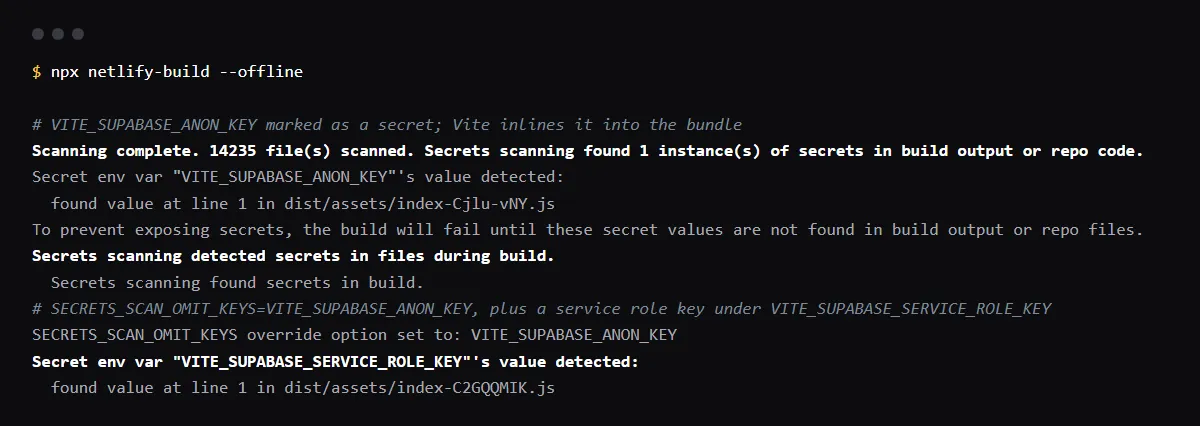
The messages come from the secrets scanning step in netlify/build. Our local run of @netlify/build on a Vite app, with VITE_SUPABASE_ANON_KEY marked as a secret, printed the lines below; the step then failed with "Secrets scanning detected secrets in files during build." Each finding names the variable, never its value, and the file and line where the value was found.
Scanning complete. 14235 file(s) scanned. Secrets scanning found 1 instance(s) of secrets in build output or repo code.
Secret env var "VITE_SUPABASE_ANON_KEY"'s value detected:
  found value at line 1 in dist/assets/index-Cjlu-vNY.js
To prevent exposing secrets, the build will fail until these secret values are not found in build output or repo files.
If these are expected, use SECRETS_SCAN_OMIT_PATHS, SECRETS_SCAN_OMIT_KEYS, or SECRETS_SCAN_ENABLED to prevent detecting.
Which names to omit, and which must keep failing
SECRETS_SCAN_OMIT_KEYS takes a comma-separated list of variable names whose values the scan stops looking for. Put only the public ones there: the Supabase URL and the anon or publishable key, under VITE_ or NEXT_PUBLIC_ names. In our run, with VITE_SUPABASE_ANON_KEY omitted, a service role key under VITE_SUPABASE_SERVICE_ROLE_KEY that was also marked secret still failed the build, which is the result you want.
SECRETS_SCAN_OMIT_KEYS=VITE_SUPABASE_URL,VITE_SUPABASE_ANON_KEY,VITE_SUPABASE_PUBLISHABLE_KEYSmart detection does not flag Supabase keys
Netlify's smart detection looks for likely secrets by prefix, such as sk_, ghp_ or AKIA, without any variable marked. Its prefix list in netlify/build has nothing for Supabase: in our run with smart detection on, an sb_publishable_ key and an sb_secret_ key, both under VITE_ names and both in the bundle, passed. So a Supabase service role or secret key fails the build only when its variable is marked as secret. SECRETS_SCAN_SMART_DETECTION_OMIT_VALUES is for values smart detection flagged, and takes the values, not names.
Do not turn the scan off
SECRETS_SCAN_ENABLED=false turns off every scan, including the one for real secrets, and SECRETS_SCAN_OMIT_PATHS=dist would skip the very bundle a leaked service key ends up in. Omitting the public names is narrower.
Checklist
How to fix it, then check the fix
- 01In the failed deploy log, note each Secret env var "NAME"'s value detected line and the file under it.
- 02For each name, decide: the Supabase URL and the anon or publishable key are public; a service role or secret key is not.
- 03Add only the public names to SECRETS_SCAN_OMIT_KEYS under Project configuration, Environment variables, or stop marking them as secret.
- 04If a service role or secret key was listed, remove its VITE_ or NEXT_PUBLIC_ variable, call Supabase with it only from a Netlify Function or a Supabase Edge Function, and rotate the key in Supabase.
- 05Mark the server-only key, such as SUPABASE_SERVICE_ROLE_KEY or SUPABASE_SECRET_KEY, as containing a secret value, so the scan keeps looking for it.
- 06Trigger a deploy: the secrets scanning step passes, and a leaked secret key would still fail it.
Related
Related guides
Sources
Official docs behind this checklist
Browse all launch guides · Read resources · How to make and check your next change
FAQ
FAQ for builders before launch
Is it safe to let the anon key through?
The anon and publishable keys are meant for the browser; what protects your data is row level security on every table the key can reach. A service role or secret key skips RLS, so it must never be omitted.
Why did the build pass before and fail now?
Netlify starts scanning on the next build after a variable is marked as secret, per its docs. Marking the Supabase variables, or adding them with the secret box ticked, is enough to start the failures.