Vercel build error
 Vercel
ERR_PNPM_OUTDATED_LOCKFILE
"ERR_PNPM_OUTDATED_LOCKFILE Cannot install with "frozen-lockfile" because pnpm-lock.yaml is not up to date with package.json" means package.json changed and pnpm-lock.yaml was not updated with it, and on Vercel pnpm will not update the lockfile itself: Vercel sets CI=1 during the build, and pnpm fails an install in CI when the lockfile needs an update. Run pnpm install locally, with the same pnpm major version the build uses, and commit the updated pnpm-lock.yaml together with package.json. The Failure reason lines under the error say what differs, such as a dependency added to package.json only. Reproduced with pnpm 10.34.8 on 2026-10-25.
For the other problems a first Vercel deploy hits, see the Vercel deploy questions by symptom.
Why it fails on Vercel and not on your machine
Vercel picks pnpm when the repo has pnpm-lock.yaml and runs pnpm install. Its system environment variables include CI=1 at build time, and pnpm's install docs say that in a CI environment the install fails if a lockfile is present but needs an update. On your machine, without CI set, pnpm install updates the lockfile quietly, so the problem only shows on the build.
Read the Failure reason lines
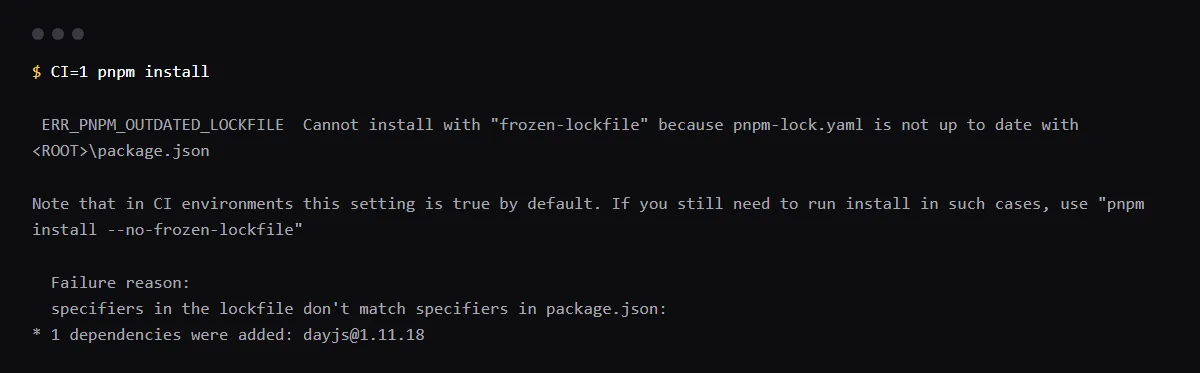
We added a dependency to package.json by hand, without pnpm add, and ran the install with CI=1. pnpm 10.34.8 printed the error, the hint about --no-frozen-lockfile, and which specifiers differ:
 ERR_PNPM_OUTDATED_LOCKFILE  Cannot install with "frozen-lockfile" because pnpm-lock.yaml is not up to date with <ROOT>/package.json

Note that in CI environments this setting is true by default. If you still need to run install in such cases, use "pnpm install --no-frozen-lockfile"

  Failure reason:
  specifiers in the lockfile don't match specifiers in package.json:
* 1 dependencies were added: dayjs@1.11.18
Use the same pnpm version as the build
Vercel chooses the pnpm version from the lockfile: lockfileVersion 9.0 means pnpm 9 or 10, and the build log shows which one ran. To pin it, set the packageManager field in package.json and add the ENABLE_EXPERIMENTAL_COREPACK environment variable with the value 1 to the Vercel project, as Vercel's build docs describe.
{
  "packageManager": "pnpm@10.34.8"
}
Should I use --no-frozen-lockfile?
It makes the build pass by resolving versions on Vercel that nobody tested, and the updated lockfile is thrown away after the build, so the next deploy resolves again. Commit the lockfile instead. If you need a deploy out first, Vercel's installCommand in vercel.json can run pnpm install --no-frozen-lockfile; remove it once the lockfile is committed.
Checklist
How to fix it, then check the fix
- 01Reproduce it locally the way the build runs it:
pnpm install --frozen-lockfile - 02Update the lockfile and commit it with package.json:
pnpm install git add package.json pnpm-lock.yaml git commit -m "Update pnpm-lock.yaml" - 03Keep one lockfile. Vercel picks the package manager from the lockfile it finds, so delete a package-lock.json or yarn.lock left over from another tool.
- 04If your pnpm major differs from the one in the build log, pin it with packageManager and ENABLE_EXPERIMENTAL_COREPACK=1.
- 05Add dependencies with pnpm add from now on, not by editing package.json, and redeploy: the install step in the build log should finish without the error.
Related
Related guides
Sources
Official docs behind this checklist
Browse all launch guides · Read resources · How to make and check your next change
FAQ
FAQ for builders before launch
Can I delete pnpm-lock.yaml to make the error go away?
Then Vercel finds no lockfile and, per its docs, installs with npm instead, at the newest versions your ranges allow. Regenerate the lockfile with pnpm install and commit it.
Does the same thing happen with npm?
Vercel runs npm install for a project with package-lock.json, per its package manager table, and npm install updates an outdated lockfile instead of refusing. pnpm is strict here because of CI=1.