Next.js build error
Failed to collect page data for
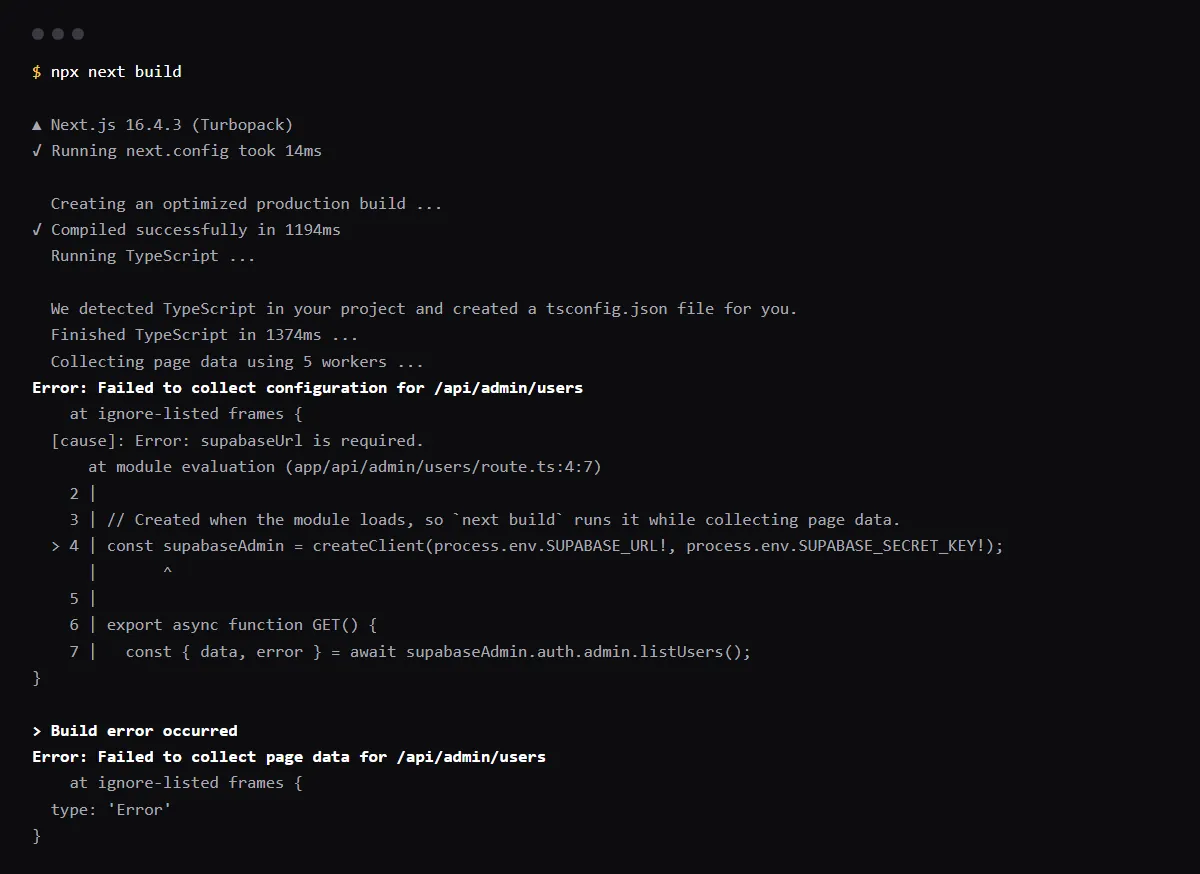
"Failed to collect page data for /api/admin/users" (or any route) means next build loaded that route's module to read its config and static params, and something threw; Next.js prints the real error just above this line. One cause we reproduced: a client created at the top of the file from an environment variable the build does not have, such as createClient(process.env.SUPABASE_URL!, process.env.SUPABASE_SECRET_KEY!), which throws "supabaseUrl is required." while the build imports the route. Set the variable in Vercel for the environment that builds, or create the client inside the handler so the build no longer runs it. Reproduced with Next.js 16.4.3 on 2026-10-25.
The variable is set in Vercel and the build still fails? See five checks for Vercel env vars.
Repository check
Check this in your repo
Find variables your code reads and your env template does not list
For AI-built Vercel + Supabase apps, run the command below from your app folder with Node.js 20 or newer. It compares the environment variable names your code reads, such as process.env.SUPABASE_URL in a route handler, with the names in .env.example or a similar template, and lists each one the template lacks as env_var_drift; it cannot see the variables set in your Vercel project, so it points at the names most likely to be missing from the build there, not at the ones that are.
It is a repository check, not a live database test: it reads files, so it does not run next build or see which variables a deployment was built with. It is advice, not a gate, and it exits with code 1 when it finds a blocker.
npx -y viberaven@1.6.12 checkRead the error above it
In Next.js's build code (packages/next/src/build/utils.ts), the step that loads each route logs the original error and then throws Failed to collect page data for that route, so the last line names the route and the lines above name the cause. On Next.js 16.4.3 the cause is wrapped as Failed to collect configuration for /api/admin/users with a [cause] that points at the file and line. Our run printed:
Collecting page data using 5 workers ...
Error: Failed to collect configuration for /api/admin/users
    at ignore-listed frames {
  [cause]: Error: supabaseUrl is required.
      at module evaluation (app/api/admin/users/route.ts:4:7)
...
> Build error occurred
Error: Failed to collect page data for /api/admin/users
Create the client inside the handler
Code at the top of a route file runs when the build imports it. In the same app, moving createClient into the GET handler made next build pass with no variables set, and the route stayed dynamic (ƒ). The variables still have to be set where the function runs, but a missing one now fails that request, not the build. Setting the two variables instead also made the build pass.
import { createClient } from '@supabase/supabase-js'

export async function GET() {
  const supabaseAdmin = createClient(process.env.SUPABASE_URL!, process.env.SUPABASE_SECRET_KEY!)
  const { data, error } = await supabaseAdmin.auth.admin.listUsers()
  if (error) return Response.json({ error: error.message }, { status: 500 })
  return Response.json(data.users)
}
It builds locally and fails on Vercel
Locally, next build reads .env.local; Vercel never sees that file. Vercel applies each variable only to the environments you select, Production, Preview or Development, and only to deployments created after the change. Check that the name matches the code, that it is set for the environment of the failing deployment, and redeploy.
Other errors that end the same way
Anything that throws while the route loads or while its static params are collected ends with this line: a Stripe or OpenAI client created at the top of the file without its key, a generateStaticParams that queries a database the build cannot reach, or an import that fails. Fix the error printed above it; this last line only names the route.
Checklist
How to fix it, then check the fix
- 01Find the route in the last line and the first error printed above it, usually with a file and line.
- 02If that line creates a client from process.env, decide: set the variable for the build, or move the client into the function that uses it.
- 03Add the variable in Vercel under the exact name the code reads, for the environment that failed, and add the name to .env.example so the next clone knows it.
- 04Reproduce the build locally without your .env.local before you push:
mv .env.local .env.local.off && npx next build; mv .env.local.off .env.local - 05Redeploy and check the build log reaches Generating static pages.
Related
Related guides


Sources
Official docs behind this checklist
Browse all launch guides · Read resources · How to make and check your next change
FAQ
FAQ for builders before launch
Why does next build run my API route at all?
It imports every route to read its configuration and, for pages, to decide what to prerender. Importing runs the file's top-level code, but not the handler.
Will export const dynamic = "force-dynamic" fix it?
No. The build still imports the file to read that setting: in our run, the same route with export const dynamic = "force-dynamic" failed the same way. Move the client into the handler or set the variable.