Vercel error
 Vercel
Node.js Version "20.x" is discontinued and must be upgraded on Vercel: the fix
"Node.js Version "20.x" is discontinued and must be upgraded" is the error a Vercel build fails with since 2026-10-01, the date Vercel stopped building and deploying with Node.js 20, five months after Node.js 20 reached end of life on 2026-04-30. Fix it where the 20.x comes from. If package.json has "engines": { "node": "20.x" } (or ^20), change it to "24.x" or "22.x": engines overrides the Node.js Version in Project Settings. If it does not, set Node.js Version to 24.x under Settings, Build and Deployment. Then redeploy. Deployments built before the cutoff keep running; only new builds fail. Checked against Vercel's changelog, docs and build code on 2026-10-24.
For the other problems AI-built apps hit on the first Vercel deploy, see the Vercel questions, by symptom.
The two wordings: engines or Project Settings
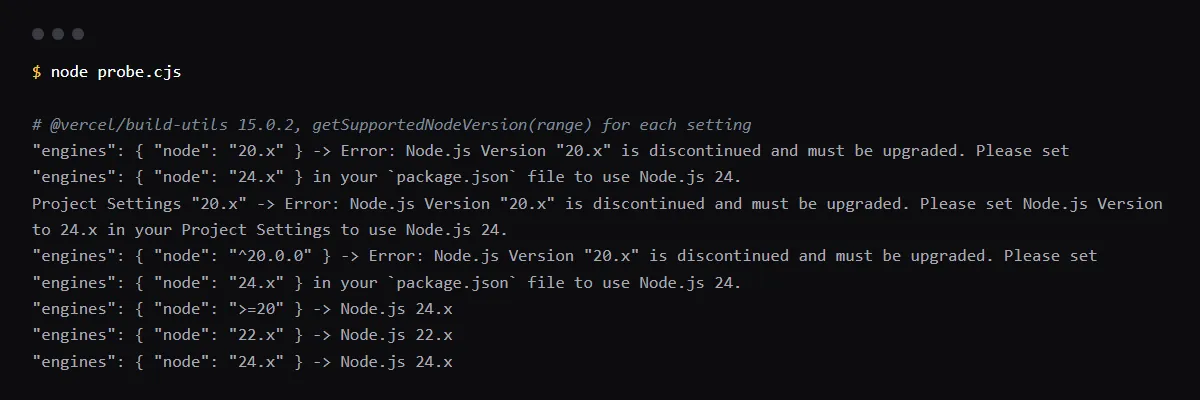
Vercel's build code words the second sentence by where the version came from. With an engines field in package.json it asks you to change package.json; with no engines field it points at Project Settings. We ran Vercel's own @vercel/build-utils 15.0.2 package with each setting on 2026-10-24 and got these two messages, the same text builders posted from failed Vercel builds in October 2026:
Node.js Version "20.x" is discontinued and must be upgraded. Please set "engines": { "node": "24.x" } in your `package.json` file to use Node.js 24.
Node.js Version "20.x" is discontinued and must be upgraded. Please set Node.js Version to 24.x in your Project Settings to use Node.js 24.
I changed Project Settings and it still says 20.x
Then package.json still pins it. Vercel's docs say engines.node overrides the version selected in Project Settings, and when the two differ the build log prints the warning below, from Vercel's build code, with your values filled in. Fix engines, or remove it so the Project Settings version applies. Vercel's one-click upgrade for deprecated versions changes Project Settings only, so a pinned engines field still needs the edit by hand.
Warning: Due to "engines": { "node": "20.x" } in your `package.json` file, the Node.js Version defined in your Project Settings ("24.x") will not apply, Node.js Version "20.x" will be used instead. Learn More: https://vercel.link/node-versionWhich engines values still build
Vercel builds with Node.js 24.x (the default for new projects) and 22.x, and only the major version counts. Vercel's docs map 24.x, ^24.0.0 and >=22.0.0 to the latest 24.x. In our run of the build code, >=20 also resolved to 24.x, because it picks the newest version the range allows, while 20.x and ^20.0.0 match only Node 20 and fail. .nvmrc and .node-version do not choose the version on Vercel.
What can break moving from Node 20 to 22 or 24
Node.js 22 removed crypto.createCipher and crypto.createDecipher and dropped import assertions (assert { type: 'json' } becomes with { type: 'json' }). Native addons are built per Node version, so packages with compiled code need a fresh install on the new one. Node.js 24 ships npm 11, warns on url.parse() in your own code, removed tls.createSecurePair, and uses OpenSSL 3.5, which rejects RSA, DSA and DH keys shorter than 2048 bits and RC4 cipher suites. Run the build and your tests locally on the new version before you deploy.
Checklist
Move the project off Node 20
- 01Find where the version is pinned. Look at the engines field in every package.json Vercel builds, including the one in your Root Directory in a monorepo:
grep -rn --include=package.json -E '"node": *"[^"]*20' --exclude-dir=node_modules . - 02If engines pins 20, change it to "24.x" (or "22.x" if a dependency is not ready for 24) and commit.
- 03In the Vercel dashboard, open the project, then Settings, Build and Deployment, Node.js Version, and select 24.x. This is the version used when package.json has no engines field.
- 04Install and build locally on the same major version, with nvm use 24 or your version manager, and run your tests.
- 05Redeploy, and check that the build passes and its log has no Due to "engines" warning about Project Settings.
- 06Set the same version in CI and your local version manager so the three do not drift apart.
Related
Related guides
Sources
Official docs behind this checklist
- Vercel changelog, Node.js 20 is being deprecated on October 1, 2026
- Vercel, Supported Node.js versions
- Vercel changelog, One-click upgrade for deprecated Node.js versions
- vercel/vercel, build-utils node-version.ts
- vercel/vercel, build-utils run-user-scripts.ts
- Node.js, Migrating from v20 to v22
- Node.js, Migrating from v22 to v24
- Node.js 24.0.0 release notes
Browse all launch guides · Read resources · How to make and check your next change
FAQ
FAQ for builders before launch
Will my existing deployments stop working?
No. Vercel says deployments created before 2026-10-01 are not affected and keep running on Node.js 20. Only new builds fail, which includes a redeploy of an old commit.
Should I pick 22.x or 24.x?
Vercel defaults new projects to 24.x, the newer of the two lines it supports. Pick 22.x only if a dependency does not run on 24 yet, and plan the next move.