Supabase API error
 Supabase
permission denied for schema public
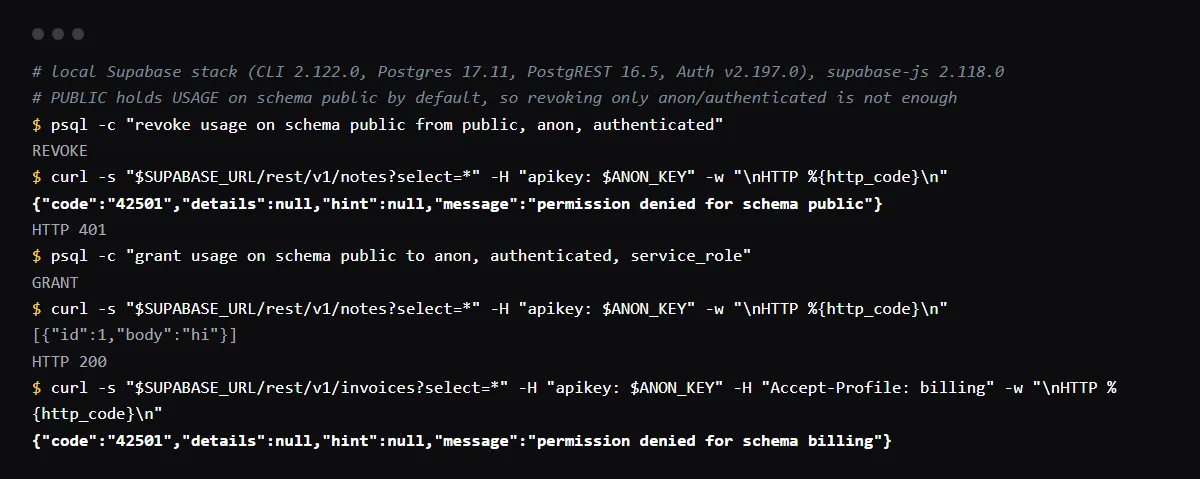
"permission denied for schema public" (Postgres error 42501) means the role that ran the query, anon, authenticated or service_role, has no USAGE privilege on the schema, so Postgres stops before it looks at any table, grant or policy. The Supabase API returns it as HTTP 401 for the anon key and 403 for a signed-in user. On a new project these roles can use public, so the error usually follows SQL that took the privilege away: a hardening script that revoked it from PUBLIC, a restore without the grants, or a custom schema that was never granted (then the message names that schema). Run grant usage on schema public to anon, authenticated, service_role; and keep table grants and RLS as they are. Reproduced on a local Supabase stack (Postgres 17.11, PostgREST 16.5) and checked against the Postgres source on 2026-10-27.
The message names a table instead of a schema? See the missing grant behind permission denied for table.
Schema, table or row: which 42501 is it?
Postgres checks in order: USAGE on the schema, then the privilege on the table, then the RLS policies. permission denied for schema is the first check, permission denied for table the second, and new row violates row-level security policy the third. They share the code 42501, so read the message.
Revoking from anon and authenticated is not the whole story
In our run, revoke usage on schema public from anon, authenticated; did not cause the error: the public schema also grants USAGE to PUBLIC, every role, so anon could still read. The error appeared only after usage was revoked from PUBLIC too. If you are hardening the schema on purpose, grant USAGE back to the roles the API uses, and limit access with table grants and policies instead.
-- who can use the schema
select nspname, nspacl from pg_namespace where nspname = 'public';

-- the fix
grant usage on schema public to anon, authenticated, service_role;
A custom schema
A schema you create has no grants for the API roles. After you add it to Exposed schemas, requests fail with permission denied for schema billing until you grant it. Supabase's custom schema guide lists the grants: usage on the schema, then the tables, routines and sequences, and default privileges for objects you create later. Grant only what each role needs, and enable RLS on every table in it.
grant usage on schema billing to anon, authenticated, service_role;From Prisma, Drizzle or a direct connection
The same message from an ORM or a migration tool comes from the database user in your connection string, not from the API roles. Check which user it is and grant that user USAGE (and CREATE, if it runs migrations), or connect as postgres for migrations.
Checklist
How to fix it, then check the fix
- 01Read the schema name in the message: public, or a custom schema you exposed.
- 02Check which role made the request: the anon key, a user token or the service role key.
- 03Grant usage on that schema to anon, authenticated and service_role in a migration, so every environment gets it.
- 04Repeat the request: a 200, or a table-level 42501 that now names the table, which needs a table grant.
- 05Search your migrations for revoke on schema public, and remove or narrow it.
Related
Related guides
Sources
Official docs behind this checklist
Browse all launch guides · Read resources · How to make and check your next change
FAQ
FAQ for builders before launch
Is granting usage on schema public safe?
It is the default on Supabase projects. USAGE only lets a role look up objects in the schema; table grants and RLS policies still decide what it can read or change.
Why does the anon key get 401 and a user 403?
PostgREST maps 42501 to 401 for an unauthenticated request and 403 for an authenticated one. The cause is the same.