Supabase Auth
 Supabase
Why does Supabase login redirect to localhost in production?
Supabase login redirects to localhost in production because the URL your app asks for, the redirectTo or emailRedirectTo option, is not on the project's Redirect URLs allow list, so Supabase Auth silently uses the Site URL instead, and the Site URL is still the default http://localhost:3000. Confirmation emails, magic links, password resets and OAuth sign-ins all do this, with HTTP 200 and no error. Fix it in the dashboard under Authentication, URL Configuration: set Site URL to your production URL, and add every URL you pass as redirectTo to Redirect URLs, such as https://yourapp.com/auth/callback, plus https://*-your-team.vercel.app/** for Vercel previews and http://localhost:3000/** for local work. Then send a new email: links already sent keep the old address. Checked against Supabase's docs and the Auth server source on 2026-10-25.
If Google itself shows an error, the problem is a different URL. See Google login that works in preview but fails on a custom domain.
Why Supabase falls back to localhost:3000
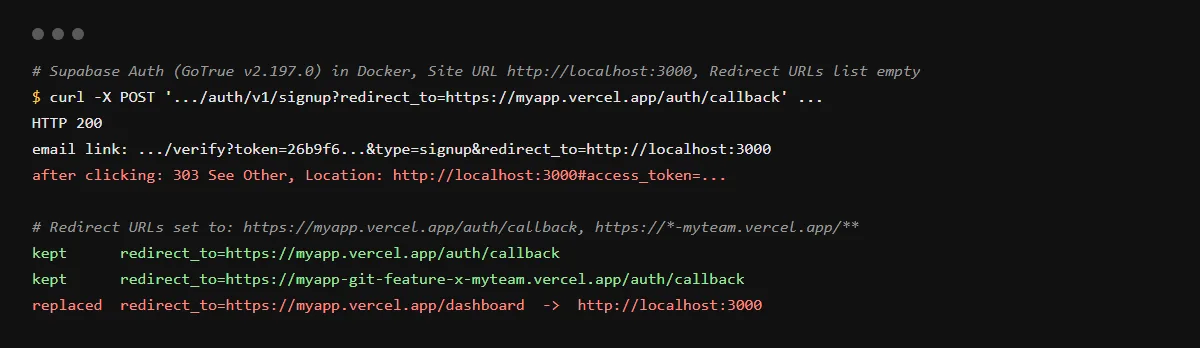
Supabase Auth picks the return address in this order: the redirect_to the app sent, if it matches the allow list; then the browser's Referer header, if that matches; then the Site URL. A URL on the Site URL's own host is allowed without being listed. supabase-js sends redirectTo and emailRedirectTo as redirect_to. We ran Supabase Auth v2.197.0 locally on 2026-10-25 with an empty list: a signup asking for https://myapp.vercel.app/auth/callback returned 200, and the email link carried redirect_to=http://localhost:3000. Clicking it answered 303 with Location: http://localhost:3000#access_token=..., which is what users see as a broken login on localhost.
Wildcards: why /* does not match /auth/callback
In Redirect URLs, * matches any characters except . and /, and ** matches anything. So https://myapp.vercel.app/* allows /dashboard but not /auth/callback, which falls back to the Site URL; we saw both in our run. Use ** for paths and for Vercel preview hosts, as Supabase documents: https://*-your-team-slug.vercel.app/**. In production, Supabase recommends listing the exact callback path instead of a wildcard.
The email link still says localhost after I fixed it
Check the email template. {{ .SiteURL }} always inserts the Site URL; Supabase's docs say to use {{ .RedirectTo }} when you pass a redirectTo. Since 2026-06-03, new Free plan projects on the default email provider cannot edit templates, so on those you need custom SMTP before you can change it. Emails sent before the fix keep their old link.
Local development with the Supabase CLI
The same settings live in supabase/config.toml under [auth]: site_url and additional_redirect_urls, which the CLI template comments as a list of exact URLs. The template starts at http://127.0.0.1:3000, so a dev server on localhost:3000 needs its own entry. These settings do not reach your hosted project; set the hosted values in the dashboard.
Checklist
Send users back to your production URL
- 01In the Supabase dashboard, open Authentication, then URL Configuration, and set Site URL to your production URL, such as https://yourapp.com.
- 02Add each URL your code passes as redirectTo or emailRedirectTo to Redirect URLs, with the full path, such as https://yourapp.com/auth/callback.
- 03For Vercel previews add https://*-your-team-slug.vercel.app/**, and for local work http://localhost:3000/**.
- 04Build redirectTo from a site URL variable, as the getURL() helper in Supabase's docs does with NEXT_PUBLIC_SITE_URL, and set that variable in each Vercel environment:
await supabase.auth.signInWithOAuth({ provider: 'google', options: { redirectTo: `${process.env.NEXT_PUBLIC_SITE_URL}/auth/callback` }, }); - 05If your email templates use {{ .SiteURL }} and you pass a redirect, switch them to {{ .RedirectTo }}.
- 06Request a new sign-up or magic link email and check the redirect_to in its link before you click it.
Related
Related guides

Sources
Official docs behind this checklist
- Supabase, Redirect URLs
- Supabase, Email templates
- Supabase, Login with Google
- Supabase troubleshooting, Redirected to the wrong URL when using redirectTo
- Supabase changelog, Changes to email template customisation on Free tier (2026-06-03)
- supabase/auth v2.197.0, internal/utilities/request.go
- supabase/cli v2.122.0, config.toml template
Browse all launch guides · Read resources · How to make and check your next change
FAQ
FAQ for builders before launch
Does Supabase return an error when redirectTo is not allowed?
No. In our run the request returned 200 and the link simply pointed at the Site URL. Errors from the sign-in itself come back as fragments on the redirect URL.
Do I need to add the Google callback to Redirect URLs?
No. Google redirects to your Supabase project's /auth/v1/callback, which you register in Google Cloud. Redirect URLs is the list of app addresses Supabase may send the user to after that.