Stripe webhooks
 Stripe
Why does Stripe say "No signatures found matching the expected signature for payload"?
Stripe's library throws "No signatures found matching the expected signature for payload" when the signature it computes from the three values you pass to constructEvent does not match the Stripe-Signature header. One of the three is wrong: the request body is not the exact bytes Stripe sent, the header is missing or changed, or the endpoint secret belongs to another endpoint, another mode or the Stripe CLI. Stripe's troubleshooting guide names the wrong secret as the most common cause. In a Next.js App Router handler, the other usual cause is reading the body with req.json() instead of req.text().
If it worked locally and broke only after a deploy, see also how to check the Stripe webhooks, env vars and Supabase policies in an app an agent wrote.
Repository check
Check this in your repo
Find a handler that verifies the wrong bytes
For AI-built Vercel + Supabase apps, run the command below from your app folder with Node.js 20 or newer. It reads your Stripe webhook handlers and reports unverified_stripe_webhook for a handler that passes JSON.stringify(...) to constructEvent, reads no raw body, reads no stripe-signature header or never calls constructEvent. It names the file and what is missing.
It is advice, not a gate, and a repository check, not a live database or payment test: it does not read the secret stored in Vercel, the endpoints registered in Stripe or their delivery attempts, so a correct handler with the wrong whsec_ secret passes it.
npx -y viberaven@1.6.12 checkWhat it printed on a fixture repo
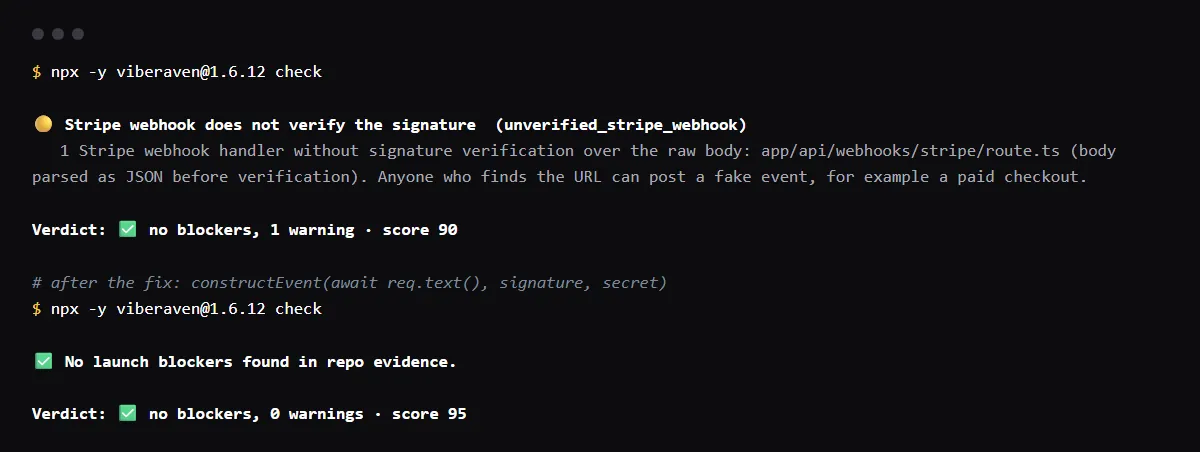
On 2026-10-23 we ran it on a small Next.js fixture repo made for this page, not a customer repo. Its app/api/webhooks/stripe/route.ts read the body with await req.json() and passed JSON.stringify(body) to constructEvent. The output is below, with the temp folder shortened to ~/stripe-app. A warning is not a blocker, so the exit code was 0.
After the route passed await req.text() to constructEvent instead, the same command reported no warnings.
$ npx -y viberaven@1.6.12 check

viberaven check · ~/stripe-app

🟡 Stripe webhook does not verify the signature  (unverified_stripe_webhook)
   1 Stripe webhook handler without signature verification over the raw body: app/api/webhooks/stripe/route.ts (body parsed as JSON before verification). Anyone who finds the URL can post a fake event, for example a paid checkout.

Verdict: ✅ no blockers, 1 warning · score 90
Fix: viberaven fix · Details: ~/stripe-app/.viberaven/agent-tasklist.md
Webhook signature verification failed: which value is wrong?
Print each of the three values your handler passes and compare. The secret should equal the one shown by Reveal secret on the endpoint in Workbench, or the whsec_ value stripe listen printed if the event came through the CLI. The header should look like t=...,v1=..., on one line. The body should be the exact UTF-8 string Stripe sent; any step that parses it, reorders keys, strips whitespace or changes the encoding makes verification fail.
Are you passing the raw request body you received from Stripe?
stripe-node adds that question to the error. On 2026-10-23 we signed one event with stripe-node 19.3.0 and verified it three ways with the same secret: the raw body passed, JSON.stringify of the parsed body failed with this error, and a header signed 10 minutes earlier failed with a different one.
raw body: OK evt_demo_1
JSON.stringify(await req.json()): No signatures found matching the expected signature for payload. Are you passing the raw request body you received from Stripe?
header signed 10 minutes ago: Timestamp outside the tolerance zone
Timestamp outside the tolerance zone
This is a different error. Stripe's libraries reject a signature whose timestamp is more than 5 minutes from your server's clock, to stop replays. Keep the server clock synced, and do not set the tolerance to 0, which turns the check off. Each retry from Stripe carries a new timestamp and signature.
Checklist
How to fix it, most common cause first
- 01Compare the secret your handler uses with the endpoint's own secret. Both start with whsec_, and the stripe listen secret is a different secret from any Dashboard endpoint's, so a secret that worked locally does not verify events sent to the deployed endpoint.
- 02If the endpoint receives both test and live events, it has a different secret for each mode. Set the one for the mode that sends events to this deployment, then redeploy: Vercel applies variable changes to new deployments only.
- 03Pass the body unchanged. In a Next.js App Router route handler, read it once with req.text():
const body = await req.text(); const signature = req.headers.get('stripe-signature'); const event = stripe.webhooks.constructEvent(body, signature!, process.env.STRIPE_WEBHOOK_SECRET!); - 04In Express, register express.json() after the webhook route, so it does not parse the body first. In the Pages Router, turn off bodyParser for that route and read the raw buffer.
- 05Return 400 when constructEvent throws, as Stripe's examples do, then resend a failed event from the Dashboard (up to 15 days after it was created) and confirm the Event deliveries tab shows 200.
Related
Related guides

Sources
Official docs behind this checklist
Browse all launch guides · Read resources · How to make and check your next change
FAQ
FAQ for builders before launch
Why does it work with stripe listen but fail after deploy?
stripe listen signs forwarded events with its own whsec_ secret. Events sent to a deployed endpoint are signed with that endpoint's secret, so production needs the endpoint's secret, not the one the CLI printed.
Should I skip verification to make the error go away?
No. Without verification anyone who finds the URL can post a fake event, such as a completed checkout, and your handler would grant access for it.