Stripe webhooks
 Stripe
How do I read the raw body for a Stripe webhook in the Next.js App Router?
Call await req.text() in the route handler and pass that string, unchanged, to stripe.webhooks.constructEvent with the stripe-signature header and your endpoint secret. App Router route handlers use the Web Request API and do not parse the body for you, so unlike Pages Router API routes there is no bodyParser setting to turn off. What breaks verification is reading the body with req.json() first, or passing JSON.stringify of the parsed object: the new string is not the bytes Stripe signed.
If verification already runs and still fails, see why Stripe says no signatures found matching the expected signature.
Repository check
Check this in your repo
Find a webhook route that never reads the raw body
For AI-built Vercel + Supabase apps, run the command below from your app folder with Node.js 20 or newer. It reads your Stripe webhook handlers and reports unverified_stripe_webhook for a route that reads no raw body (await req.text(), req.arrayBuffer() or an Express raw parser), reads no stripe-signature header, never calls constructEvent or passes JSON.stringify(...) to it. It names the file and what is missing.
It is advice, not a gate, and a repository check, not a live database or payment test: it does not send events to your route, so a handler it does not flag can still fail on a wrong secret or a redirect.
npx -y viberaven@1.6.12 checkWhat it printed on a fixture repo
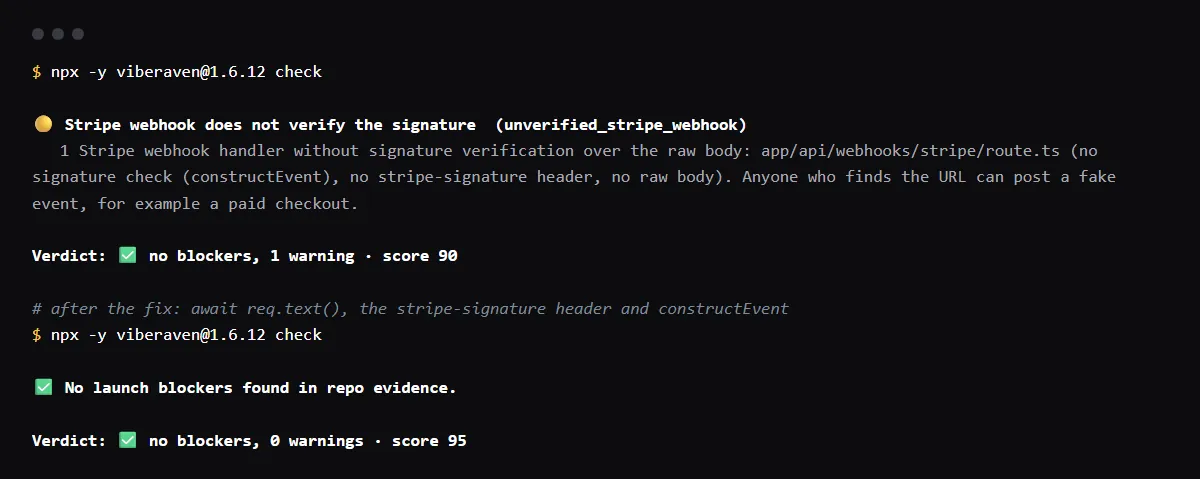
On 2026-10-23 we ran it on a small Next.js fixture repo made for this page, not a customer repo. Its app/api/webhooks/stripe/route.ts read the event with await req.json() and acted on event.type without verifying it. The output is below, with the temp folder shortened to ~/stripe-app. A warning is not a blocker, so the exit code was 0.
After the route read await req.text() and the stripe-signature header and called constructEvent, as in the example below, the same command reported no warnings.
$ npx -y viberaven@1.6.12 check

viberaven check · ~/stripe-app

🟡 Stripe webhook does not verify the signature  (unverified_stripe_webhook)
   1 Stripe webhook handler without signature verification over the raw body: app/api/webhooks/stripe/route.ts (no signature check (constructEvent), no stripe-signature header, no raw body). Anyone who finds the URL can post a fake event, for example a paid checkout.

Verdict: ✅ no blockers, 1 warning · score 90
Fix: viberaven fix · Details: ~/stripe-app/.viberaven/agent-tasklist.md
Next.js App Router Stripe webhook example
A route handler at app/api/webhooks/stripe/route.ts. Stripe's own Next.js App Router example in the stripe-node repository does the same: constructEvent(await req.text(), signature, secret), and a 400 response when it throws.
import Stripe from 'stripe';

const stripe = new Stripe(process.env.STRIPE_SECRET_KEY!);

export async function POST(req: Request) {
  const body = await req.text();
  const signature = req.headers.get('stripe-signature');
  let event: Stripe.Event;
  try {
    event = stripe.webhooks.constructEvent(body, signature!, process.env.STRIPE_WEBHOOK_SECRET!);
  } catch (err) {
    return new Response(`Webhook Error: ${(err as Error).message}`, { status: 400 });
  }
  if (event.type === 'checkout.session.completed') {
    // grant access
  }
  return Response.json({ received: true });
}
Do I need bodyParser: false in the App Router?
No. The Next.js docs say that, unlike API routes in the Pages Router, a route handler needs no bodyParser configuration to receive a webhook. The setting belongs to the Pages Router: there, Stripe's troubleshooting guide says to turn off bodyParser for the webhook route and read the raw buffer.
Stripe webhook on the edge runtime
On the default Node.js runtime, constructEvent works. A runtime that verifies with the Web Crypto API, such as a Supabase Edge Function on Deno, needs the async constructEventAsync instead, as in Supabase's own example.
Checklist
Set up the route, then test it
- 01Put the handler in app/api/webhooks/stripe/route.ts and export a POST function.
- 02Read the body once, with await req.text(), before anything else reads it. NextRequest extends the Web Request, so req.text() works with either type.
- 03Read the signature with req.headers.get('stripe-signature') and pass both to constructEvent with the endpoint's whsec_ secret.
- 04Make sure middleware or proxy code does not redirect /api/webhooks/stripe, for example to a sign-in page. Stripe treats a 3xx response as a failed delivery.
- 05Test locally with the Stripe CLI. Set STRIPE_WEBHOOK_SECRET to the secret stripe listen prints, then send an event:
stripe listen --forward-to localhost:3000/api/webhooks/stripe stripe trigger checkout.session.completed - 06Return a 2xx quickly and do slow work after it. Stripe marks a delivery that takes too long as timed out and retries it.
Related
Related guides

Sources
Official docs behind this checklist
Browse all launch guides · Read resources · How to make and check your next change
FAQ
FAQ for builders before launch
Why does req.json() break the signature?
Stripe signs the exact bytes it sends. Parsing them and serializing again can change whitespace and key order, so the string you verify is no longer the one Stripe signed.
Can I read the body as an ArrayBuffer instead?
stripe-node accepts a string or a Buffer, so Buffer.from(await req.arrayBuffer()) works as well. What matters is that nothing parses the body before verification.