Stripe webhooks
 Stripe
Is the Stripe webhook secret different in test and live mode?
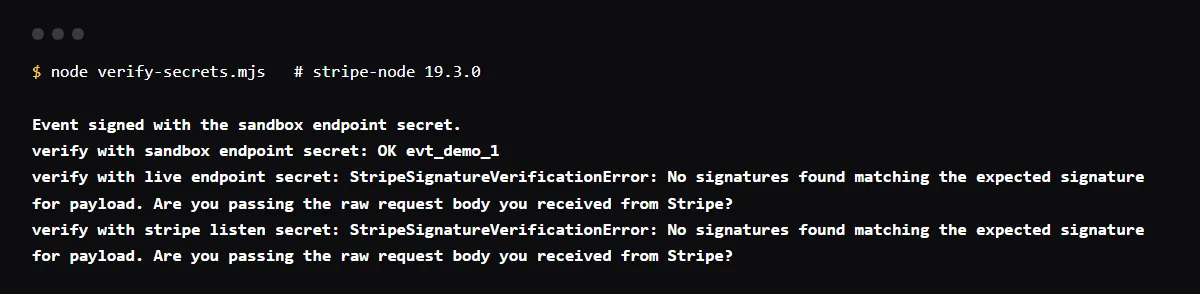
Yes. Stripe generates a unique signing secret for each webhook endpoint, and an endpoint used with both test and live API keys has a different secret for each. The Stripe CLI's stripe listen prints a third secret of its own for the events it forwards. All of them start with whsec_, so they look alike, but only the secret of the endpoint and mode that sent an event verifies it; any other fails with "No signatures found matching the expected signature for payload".
For the rest of the deploy-time checks, see how to check the Stripe webhooks, env vars and Supabase policies in an app an agent wrote.
Where do I find the Stripe webhook signing secret?
For an endpoint you registered: open the Webhooks tab in Workbench, select the endpoint and click Reveal secret. For local testing: stripe listen prints it when it starts, as "Ready! Your webhook signing secret is whsec_...". Webhook signing secrets are not API keys; they do not appear on the API keys page.
stripe listen secret vs Dashboard secret
Stripe's troubleshooting guide calls mixing these up the most common cause of signature errors. The CLI secret verifies only events the CLI forwards to your machine. A deployed endpoint receives events signed with its own secret, so the value that worked on localhost fails in production.
Which secret goes in which environment
Locally, the stripe listen secret with your sk_test_ key. On a test deployment, the secret of a sandbox endpoint that points at that deployment, with the same sandbox's keys. In production, the secret of the live mode endpoint, with your live key. Objects from one mode are not usable in the other, so mixing a live key with a sandbox secret fails too.
Checklist
Set the right secret in each environment
- 01List your endpoints in Workbench for each mode: sandbox and live. Note which deployment URL each one points at.
- 02Copy each endpoint's secret with Reveal secret, and the stripe listen secret for local work.
- 03Set STRIPE_WEBHOOK_SECRET per environment: the live endpoint's secret in Vercel's Production environment, a sandbox endpoint's secret in Preview if a sandbox endpoint points there, and the stripe listen secret in your local .env file.
- 04Redeploy after changing a variable. Vercel applies changes to new deployments only.
- 05When you go live, create or update the live endpoint and copy its new secret. Stripe's go-live steps list this next to switching to live keys.
- 06To rotate a secret, use Roll secret on the endpoint. You can keep the old one valid for up to 24 hours while you deploy the new one; Stripe signs with both until it expires.
Related
Related guides

Sources
Official docs behind this checklist
Browse all launch guides · Read resources · How to make and check your next change
FAQ
FAQ for builders before launch
Can one secret verify both test and live events?
No. Even on the same endpoint URL, Stripe uses a different secret for test and live events. Run one handler per deployment with the secret for the mode that deployment receives.
Does the secret change when I roll my API keys?
No. Webhook signing secrets are separate from API keys. They change only when you roll the endpoint's secret or create a new endpoint.