Stripe error
 Stripe
Neither apiKey nor config.authenticator provided
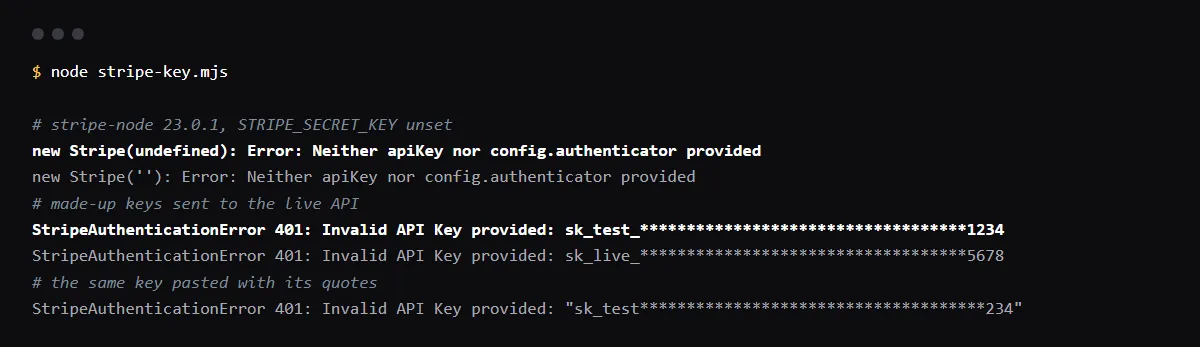
"Neither apiKey nor config.authenticator provided" is thrown by stripe-node when new Stripe() gets no key: process.env.STRIPE_SECRET_KEY is undefined or empty where that line runs, often at the top of a route file while next build imports it. Set STRIPE_SECRET_KEY in Vercel for the environment that builds and runs the code, or create the client inside the handler. "Invalid API Key provided: sk_test_****1234" is a different failure: the key reached Stripe and Stripe answered 401, because it is mistyped, rolled, from another account or sandbox, or pasted with its quotes. Reproduced with stripe-node 23.0.1 against the live API on 2026-10-26.
The build fails with this error at Collecting page data? Read why next build runs code at the top of route files.
Repository check
Check this in your repo
Find Stripe variables your env template does not list
For AI-built Vercel + Supabase apps, run the command below from your app folder with Node.js 20 or newer. It compares the environment variable names your code reads, such as process.env.STRIPE_SECRET_KEY in a route file, with the names in .env.example or a similar template, and lists each one the template lacks as env_var_drift; it cannot see the variables set in your Vercel project, so it points at the names most likely to be missing there, not at the ones that are.
It is a repository check, not a live database or payment test: it reads files, so it never sends a key to Stripe. It is advice, not a gate, and it exits with code 1 when it finds a blocker.
npx -y viberaven@1.6.12 checkWhere stripe-node throws it
The check is in stripe-node's stripe.core.ts, in the constructor, before any request. An empty string fails it like undefined, so a variable that exists but is blank in Vercel gives the same error. Because it runs on construction, a client created at the top of a file fails as soon as the file is imported, which during next build ends in "Failed to collect page data for".
// fails at import when the variable is missing
const stripe = new Stripe(process.env.STRIPE_SECRET_KEY!)

// fails only the request, with a clear message
export async function POST(req: Request) {
  const key = process.env.STRIPE_SECRET_KEY
  if (!key) return Response.json({ error: 'STRIPE_SECRET_KEY is not set' }, { status: 500 })
  const stripe = new Stripe(key)
  // ...
}
Invalid API Key provided: what the masked key tells you
Stripe masks all but the prefix and the last four characters, so compare those with the key in your dashboard. The prefix tells you the mode: sk_test_ is a sandbox secret key and sk_live_ a live one. In our run a key pasted with its quotes came back as "sk_test****234", with the quote in the message. stripe-node raises it as StripeAuthenticationError with status 401; the raw JSON body has type invalid_request_error. A trailing newline did not produce this message at all: stripe-node failed with StripeConnectionError instead.
StripeAuthenticationError 401: Invalid API Key provided: sk_test_***********************************1234
StripeAuthenticationError 401: Invalid API Key provided: "sk_test*************************************234"
Sandbox keys, live keys and their webhooks
Stripe's keys docs say sandbox keys start with pk_test_, rk_test_ and sk_test_, and live keys with pk_live_, rk_live_ and sk_live_; a sandbox key works only with its own sandbox. Keep Production on live keys and Preview on sandbox keys, and remember that each webhook endpoint has its own signing secret: see which whsec_ goes with which mode.
Checklist
How to fix it, then check the fix
- 01Find where new Stripe() runs and which variable it reads.
- 02Set that variable in Vercel for each environment that builds or runs the code, with no quotes or spaces, then redeploy.
- 03For Invalid API Key provided, compare the prefix and last four characters in the message with the keys page in the Stripe dashboard, for the same account and mode.
- 04Move client creation into the handler if the build should not need the key.
- 05Add STRIPE_SECRET_KEY to .env.example with a placeholder, so the next clone knows it is needed.
Related
Related guides

Sources
Official docs behind this checklist
Browse all launch guides · Read resources · How to make and check your next change
FAQ
FAQ for builders before launch
Can I use the publishable key on the server?
No. Stripe's docs say the publishable key can create tokens and PaymentMethods but cannot perform sensitive operations such as creating charges; server code needs a secret or restricted key.
What is config.authenticator?
An alternative to the key in stripe-node's config, for signing requests yourself. Almost every app passes the secret key instead, so the error nearly always means the key is missing.