Paddle webhook error
 Paddle
[Paddle] Webhook signature verification failed
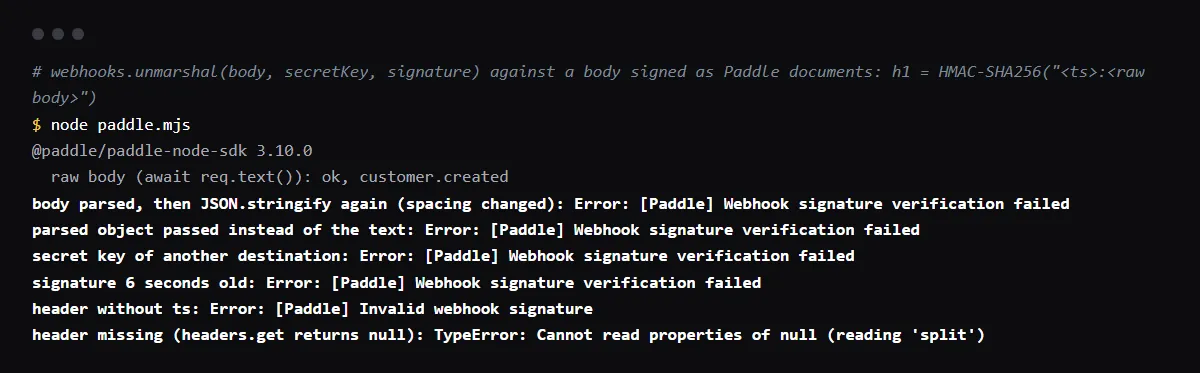
"[Paddle] Webhook signature verification failed" is thrown by paddle.webhooks.unmarshal() in @paddle/paddle-node-sdk when the HMAC it computes does not match the h1 value in the Paddle-Signature header. Paddle signs the timestamp, a colon and the raw request body with the secret key of that notification destination, so verification fails when the body was parsed and turned back into a string before the check, when the secret is from another destination or the other environment, sandbox or live, or when more than 5 seconds passed since the ts in the header. In a Next.js route handler pass await request.text() and request.headers.get("paddle-signature") straight to unmarshal(), and keep each destination's pdl_ntfset_ secret key in an environment variable per environment. Reproduced with @paddle/paddle-node-sdk 3.10.0 on 2026-10-27.
Use this from your agent
- Claude Code: 4 read-only tools; cannot see your repo.
claude mcp add --transport http viberaven https://viberaven.dev/mcp - Codex: same server, in ~/.codex/config.toml.
[mcp_servers.viberaven] url = "https://viberaven.dev/mcp" - In your repo: writes Vercel + Supabase check rules for your agent (what it writes).
npx -y viberaven init
The same raw body rule applies to Stripe. See reading the raw body in a Next.js route handler.
The Paddle-Signature header and what Paddle signs
The header holds a Unix timestamp and an HMAC-SHA256 signature, separated by a semicolon. Paddle builds the signed payload from the ts value, a colon and the raw body, and signs it with the destination's secret key. Paddle's docs say even added whitespace breaks the signature, and that more than one h1 value is sent while secrets are rotated out.
Paddle-Signature: ts=1671552777;h1=eb4d0dc8853be92b7f063b9f3ba5233eb920a09459b6e6b2c26705b4364db151

signed payload: 1671552777:{"event_id":"evt_...","event_type":"transaction.completed",...}
A Next.js App Router route that verifies
Read the body as text before anything parses it, and answer with an error status when verification fails:
import { Paddle, Environment } from '@paddle/paddle-node-sdk'

const paddle = new Paddle(process.env.PADDLE_API_KEY!, {
  environment: process.env.PADDLE_ENV === 'production' ? Environment.production : Environment.sandbox,
})

export async function POST(request: Request) {
  const signature = request.headers.get('paddle-signature')
  if (!signature) return new Response('Missing Paddle-Signature', { status: 400 })
  const body = await request.text()
  try {
    const event = await paddle.webhooks.unmarshal(body, process.env.PADDLE_WEBHOOK_SECRET!, signature)
    // handle event.eventType, then answer quickly
    return new Response('ok')
  } catch {
    return new Response('Invalid signature', { status: 400 })
  }
}
The 5 second window
The SDK rejects a signature whose ts is more than 5 seconds old, and Paddle's docs give that as the SDKs' default tolerance against replay attacks. A server clock that is off, a payload you saved and send again, or a slow step before unmarshal() all fail with the same message. Paddle's docs suggest syncing the clock and testing with the webhook simulator instead of replaying saved payloads.
Invalid webhook signature and a TypeError
Two other errors come from the same check. "[Paddle] Invalid webhook signature" means the header has no ts or no h1 value. "Cannot read properties of null (reading 'split')" means no Paddle-Signature header reached the code at all, so headers.get() returned null; check the header name and anything in front of the route that strips headers.
Checklist
How to fix it, then check the fix
- 01Pass the raw body text to unmarshal(), not a parsed object or JSON.stringify of one.
- 02Copy the secret key of this exact notification destination from Paddle, Events, Notifications, Edit destination, and keep sandbox and live keys in separate environments.
- 03Make sure nothing slow, such as a database write, runs before unmarshal().
- 04Return 400 on a failed check and 200 only after the event is handled.
- 05Send a test event from the Paddle webhook simulator and confirm the route logs the event type.
Related
Related guides


Sources
Official docs behind this checklist
Browse all launch guides · Read resources · How to make and check your next change
FAQ
FAQ for builders before launch
Is the secret key the same as my API key?
No. The API key authenticates your calls to Paddle. Each notification destination has its own secret key, prefixed pdl_ntfset_, used only to verify the webhooks it sends.
Can I verify without the SDK?
Yes. Paddle's docs give the steps: split the header on ; and =, build ts:rawBody, compute HMAC-SHA256 with the secret key, and compare it with h1 using a timing-safe comparison.