Next.js build error
useSearchParams() should be wrapped in a suspense boundary at page "/..."
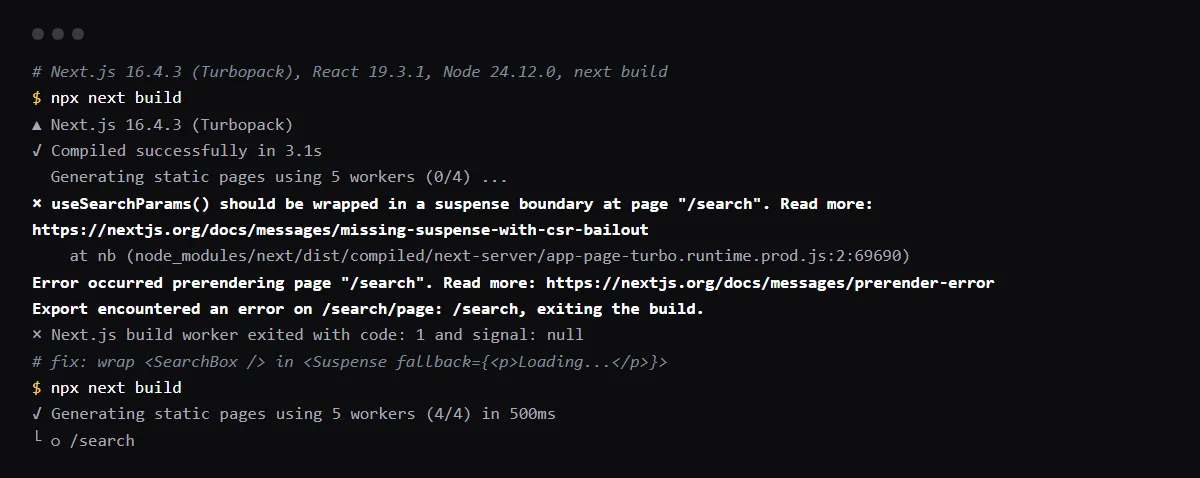
"useSearchParams() should be wrapped in a suspense boundary at page" means next build tried to prerender a static page, and a Client Component on it reads useSearchParams() with no <Suspense> boundary above it. Search params exist only at request time, so without a boundary the whole page would have to render in the browser, and next build stops instead: the error, then "Error occurred prerendering page" and "Export encountered an error", exit code 1. Wrap the smallest component that calls useSearchParams() in <Suspense fallback={...}>, and the rest of the page stays static. To render the page per request instead, call await connection() in the server page. Reproduced with Next.js 16.4.3 and checked against the Next.js source on 2026-10-27.
The build fails with uncached data outside Suspense instead? See the Cache Components version of this error.
The fix: Suspense around the component that reads the params
Next.js's page for this error says to wrap the smallest subtree that calls useSearchParams() in Suspense to keep the route static: the server renders the fallback, and the browser fills in the component once it has the URL. In our build, /search stayed static after the change.
// app/search/page.tsx
import { Suspense } from 'react'
import SearchBox from './search-box' // 'use client', calls useSearchParams()

export default function Page() {
  return (
    <Suspense fallback={<p>Loading...</p>}>
      <SearchBox />
    </Suspense>
  )
}
Or render the page per request
If the page needs the params on the server, read them there: await the searchParams prop in the page, or call await connection() from next/server. Both passed our build and turned /search into a dynamic route, rendered for each request. export const dynamic = 'force-dynamic' is the older way to do the same.
Why it passes in next dev and fails on Vercel
next dev renders every page on request, so nothing is prerendered and the missing boundary never matters. The check runs when next build prerenders static pages, which is what Vercel runs, so the first deploy is the first place you see it. Run next build locally before you push.
With Cache Components on, the message is different
Cache Components is off by default in Next.js 16.4.3. With cacheComponents: true, the same page fails with Route "/search": Next.js encountered URL data `useSearchParams()` in a Client Component outside of `<Suspense>`, and await connection() alone no longer fixes it in our build. Suspense still does.
Checklist
How to fix it, then check the fix
- 01Find the route in the message (at page "/...") and the Client Components on it that call useSearchParams(), including ones in shared layouts and navbars.
- 02Wrap each one, or its smallest parent, in <Suspense> with a fallback that keeps the layout from jumping.
- 03If the page must read the params on the server, await the searchParams prop or call await connection() instead.
- 04Run the production build locally:
npx next build - 05Check the route table at the end: the page shows as static (Suspense) or dynamic (connection), and the build exits 0.
Related
Related guides

Sources
Official docs behind this checklist
Browse all launch guides · Read resources · How to make and check your next change
FAQ
FAQ for builders before launch
Can I turn the check off?
The missingSuspenseWithCSRBailout option existed only in Next.js 14. In current versions, add the boundary or make the page dynamic.
Does the boundary make the page slower?
The rest of the page is still prerendered and served static; only the wrapped part waits for the browser. Without the boundary, the whole page would render in the browser.