Next.js error
Next.js "Uncached data was accessed outside of <Suspense>": why new apps hit it, and the fix
"Uncached data was accessed outside of <Suspense>" is the Next.js error for a page that reads per-request data, such as cookies(), headers(), params, searchParams or an uncached fetch, with Cache Components on and no <Suspense> boundary around the read. Next.js 16.3 and later word it "Next.js encountered uncached or runtime data during prerendering.", and new apps hit it now because create-next-app 16.4, released 2026-10-06, turns cacheComponents on by default. Fix it by moving the read into a component wrapped in <Suspense fallback={...}>: the rest of the page prerenders and that part streams in. For uncached data that is the same for every user, such as a fetch or a database query, you can cache it with "use cache" instead; cookies() and headers() cannot go inside "use cache". Checked against the Next.js docs, blog and source, and a next build on 16.4.3, on 2026-10-25.
Deploying the app to Vercel next? See the Vercel deploy and env var questions.
The 16.4 wording: "encountered uncached or runtime data during prerendering"
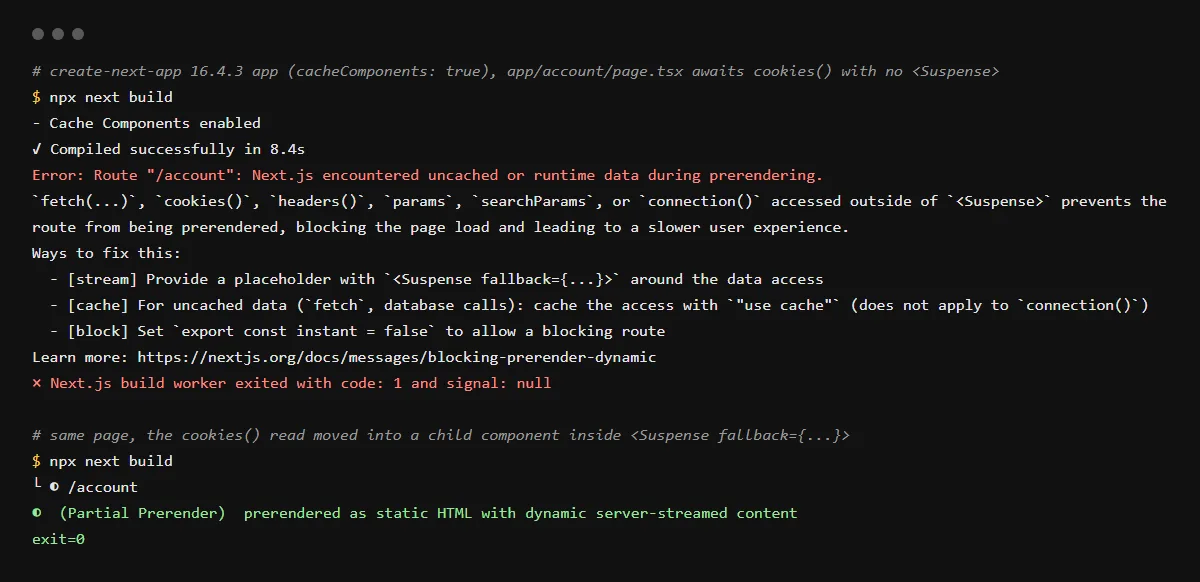
Next.js 16.0 to 16.2 printed "Uncached data was accessed outside of <Suspense>" with a link to the blocking-route docs page, which still exists under that title. 16.3 replaced it with three messages: runtime data (cookies(), headers(), params, searchParams), uncached data (fetch, database calls, connection()), or both when next build cannot tell them apart. On 2026-10-25 we ran next build on a create-next-app 16.4.3 app with a page that awaits cookies(), and it failed with exit code 1:
Error: Route "/account": Next.js encountered uncached or runtime data during prerendering.

`fetch(...)`, `cookies()`, `headers()`, `params`, `searchParams`, or `connection()` accessed outside of `<Suspense>` prevents the route from being prerendered, blocking the page load (...)

Ways to fix this:
  - [stream] Provide a placeholder with `<Suspense fallback={...}>` around the data access
  - [cache] For uncached data (`fetch`, database calls): cache the access with `"use cache"` (does not apply to `connection()`)
  - [block] Set `export const instant = false` to allow a blocking route

Learn more: https://nextjs.org/docs/messages/blocking-prerender-dynamic
Why a brand new app hits it
Since 16.4, create-next-app writes cacheComponents: true and partialPrefetching: true into next.config.ts. Code written for the old model, including code an agent writes from memory, reads cookies() or fetches at the top of a page, which Cache Components treats as blocking the whole route. Upgrading an existing app to 16.4 does not turn it on: Next.js 16 still defaults cacheComponents to false. The Next.js blog says Cache Components will become the default in Next.js 17, with no date given.
Supabase and other cookie-based auth
Supabase's server client reads the request cookies on every request, so creating it in a Server Component is a cookies() read, and the same rule applies: put the component that uses it inside <Suspense>. That is our reading of the two docs; on 2026-10-25 Supabase's Next.js docs did not mention Cache Components. The Next.js guide to authentication with Cache Components says signed-in UI streams in behind a Suspense boundary, and that "use cache: private" can read cookies() and headers() with the result kept in the browser.
Route segment config "dynamic" is not compatible with nextConfig.cacheComponents
A related build error on the same apps. With Cache Components on, the dynamic, dynamicParams, revalidate and fetchCache exports are removed, and the runtime export is not supported. Delete them; "use cache" with cacheLife replaces revalidate. Our build printed one line per export:
Error: Route segment config "dynamicParams" is not compatible with `nextConfig.cacheComponents`. Please remove it.export const instant = false
The third fix in the message allows that one route to block. The docs say it does not turn prerendering off; it only turns off instant navigation validation for the route. Use it for a page that has nothing useful to show before its data arrives.
Checklist
Fix the route
- 01Open the route the error names, or run next dev and load it: the dev error points at the line that reads the data.
- 02Move the read (cookies(), headers(), searchParams, a fetch, a database query) into its own async component, and render it inside <Suspense fallback={...}> with a placeholder.
- 03For data that is the same for every visitor, cache it instead: add "use cache" to the function or component and set cacheLife, such as cacheLife('hours').
- 04Remove dynamic, dynamicParams, revalidate, fetchCache and runtime exports from route files.
- 05Build again; the route should show as ◐ (Partial Prerender) or static:
npx next build
Related
Related guides


Sources
Official docs behind this checklist
- Next.js, Uncached data was accessed outside of <Suspense>
- Next.js, Encountered uncached data during prerendering
- Next.js, Encountered runtime data during prerendering
- Next.js, cacheComponents
- Next.js, Route segment config
- Next.js, Authentication with Cache Components
- Next.js, create-next-app
- Next.js blog, Next.js 16.4 (2026-10-06)
- vercel/next.js v16.4.3, blocking-route-messages.ts
- Supabase, Creating a Supabase client for SSR
Browse all launch guides · Read resources · How to make and check your next change
FAQ
FAQ for builders before launch
Can I turn Cache Components off?
For now, yes: remove cacheComponents: true from next.config.ts, or create the app with --no-cache-components. The Next.js docs say the option goes away in the next major release, when Cache Components is on everywhere.
Does Date.now() or Math.random() cause this error?
No, those have their own messages, "Cannot access Date.now() ... before other uncached data or Request data" and the Math.random() equivalent, with their own docs pages.