Firebase Admin error
 Vercel
 Firebase
Failed to parse private key: Error: Invalid PEM formatted message.
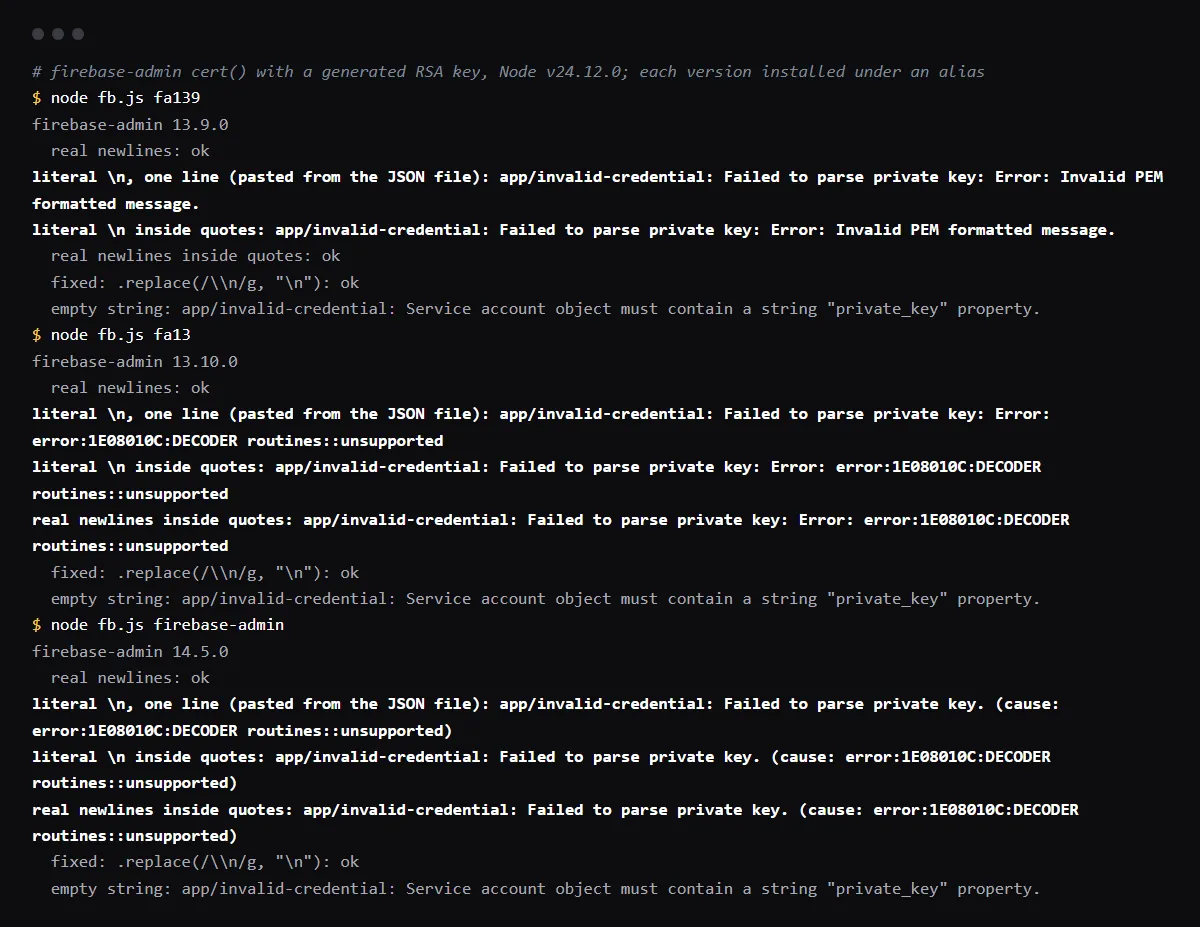
"Failed to parse private key: Error: Invalid PEM formatted message." is thrown by firebase-admin when the private key passed to cert() is not a valid PEM block, usually because the environment variable holds the two characters \n where the key needs line breaks. That happens when private_key is copied from the service account JSON file into a Vercel environment variable: the JSON escapes the line breaks and the variable keeps the escapes. Turn them back into line breaks where you read the key, with process.env.FIREBASE_PRIVATE_KEY.replace(/\\n/g, "\n"), and remove any quotes pasted around the value. It often works locally because Next.js reads .env.local with dotenv, which expands \n inside double quotes. This wording comes from firebase-admin 13.9.0 and older; 13.10.0 and 14 print other text for the same key. Reproduced with firebase-admin 13.9.0, 13.10.0 and 14.5.0 on 2026-10-27.
Use this from your agent
- Claude Code: 4 read-only tools; cannot see your repo.
claude mcp add --transport http viberaven https://viberaven.dev/mcp - Codex: same server, in ~/.codex/config.toml.
[mcp_servers.viberaven] url = "https://viberaven.dev/mcp" - In your repo: writes Vercel + Supabase check rules for your agent (what it writes).
npx -y viberaven init
Storing the key as a Secret variable on Vercel? See what the Secret type changes and what it does not.
The same mistake in firebase-admin 13.10 and 14
firebase-admin 13.10.0, released on May 14, 2026, stopped using node-forge to read the key and uses Node.js crypto instead, so the error text changed. In our run 13.10.0 printed "Failed to parse private key: Error: error:1E08010C:DECODER routines::unsupported", and 14.5.0 printed "Failed to parse private key." with the OpenSSL error as its cause. All three versions use the code app/invalid-credential. Since 13.10.0 a key wrapped in quotes fails even with real line breaks; 13.9.0 accepted it.
Why it works locally and fails on Vercel
Next.js loads .env.local with dotenv, and dotenv turns \n into a line break inside a double-quoted value. In our run @next/env 16.4.3 did that for FIREBASE_PRIVATE_KEY="-----BEGIN PRIVATE KEY-----\n...". A value saved in the Vercel dashboard is not parsed that way, so the function receives the backslashes. The replace call below works for both.
import { cert, getApps, initializeApp } from 'firebase-admin/app'

const privateKey = process.env.FIREBASE_PRIVATE_KEY?.replace(/\\n/g, '\n')

if (!getApps().length) {
  initializeApp({
    credential: cert({
      projectId: process.env.FIREBASE_PROJECT_ID,
      clientEmail: process.env.FIREBASE_CLIENT_EMAIL,
      privateKey,
    }),
  })
}
Keep the whole service account in one variable
Another way round the escapes is to base64 encode the downloaded JSON file, store that one string, and decode it in code with JSON.parse(Buffer.from(value, "base64").toString("utf8")). Firebase's setup docs recommend GOOGLE_APPLICATION_CREDENTIALS, which holds a path to the JSON file, and a Vercel function has no such file unless you deploy one, which puts the key in your build output.
Checklist
How to fix it, then check the fix
- 01Find the code that calls cert() and the variable it reads the private key from.
- 02Add .replace(/\\n/g, "\n") where the key is read, and remove quotes around the value in Vercel.
- 03Log only the key's shape, never the key, from the deployed function once:
console.log({ hasEscapes: key.includes('\\n'), startsWithPem: key.startsWith('-----BEGIN PRIVATE KEY-----'), lines: key.split('\n').length }) - 04Redeploy: a changed variable reaches only new deployments.
- 05Call one Admin SDK method from production, such as verifying an ID token, and remove the log line.
Related
Related guides
Sources
Official docs behind this checklist
Browse all launch guides · Read resources · How to make and check your next change
FAQ
FAQ for builders before launch
Is the private key safe in a Vercel environment variable?
It is a credential for your whole Firebase project, so keep it in server code only: never under a NEXT_PUBLIC_ or VITE_ name, which are copied into the browser bundle.
I see Service account object must contain a string "private_key" property instead
Then the variable is empty or unset where the code runs. Set it for the Vercel environment that serves the request, Production or Preview, and redeploy.