Browser error after deploy
Failed to load module script: Expected a JavaScript-or-Wasm module script but the server responded with a MIME type of "text/html"
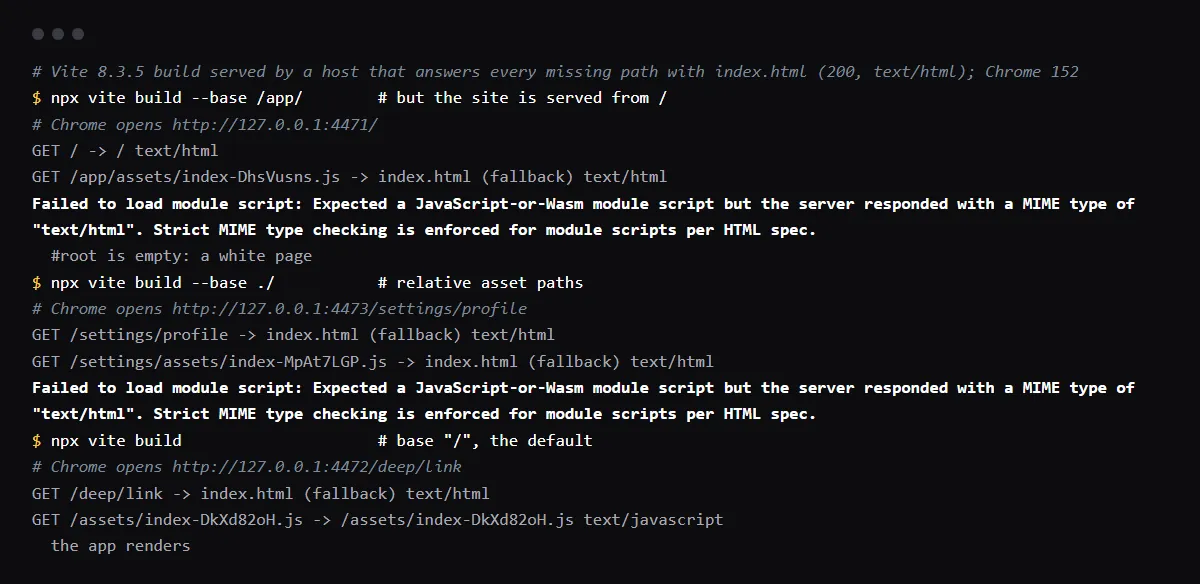
Chrome prints "Failed to load module script: Expected a JavaScript-or-Wasm module script but the server responded with a MIME type of "text/html"" when the URL of your app's JavaScript bundle answers with an HTML page, usually your own index.html served by a single-page-app fallback, so the app never starts and the page stays blank. The script is not at the path the HTML asks for: Vite's base does not match where the site is served, a relative base of "./" breaks on deep links, or the folder deployed is not the build output. Open the failing script URL from the console, see which file comes back, then fix base or the deploy so /assets/*.js is a real file on the host. Older Chrome versions say "JavaScript module script", and Firefox and Safari word it differently. Reproduced with Vite 8.3.5 in Chrome 152 on 2026-10-27.
Use this from your agent
- Claude Code: 4 read-only tools; cannot see your repo.
claude mcp add --transport http viberaven https://viberaven.dev/mcp - Codex: same server, in ~/.codex/config.toml.
[mcp_servers.viberaven] url = "https://viberaven.dev/mcp" - In your repo: writes Vercel + Supabase check rules for your agent (what it writes).
npx -y viberaven init
The page loads and only a lazy chunk fails after a deploy? See what Failed to fetch dynamically imported module means.
Find which URL returned HTML
Click the script URL in the console error, or filter the Network tab by JS: the failing request has status 200 and a body that starts with <!doctype html>. From a terminal, the content-type header says the same:
curl -sI https://app.example.com/assets/index-DhsVusns.js | grep -i content-type
content-type: text/html; charset=utf-8
Vite base
Vite's base is the public path the app is served from, / by default. Built with base /app/ and served from /, the HTML asks for /app/assets/..., which does not exist, and the fallback answers with index.html. Vite documents ./ for embedded deployment; in our run it broke on a deep link, because /settings/profile asked for /settings/assets/index-....js. Use / unless the app really lives under a subpath, and then set that subpath.
// vite.config.ts
export default defineConfig({
  base: '/', // or '/app/' when the site is served from /app/
})
Is the rewrite the cause on Vercel or Netlify?
Usually not by itself. Vercel serves real files before it applies a rewrite, and Netlify by default does not let a rewrite shadow a file that exists. So the script came back as HTML because no file exists at that path in the deployment: a wrong base, a different output directory, or a hash from an older build. Keep the single-page-app rewrite for deep links; see the index.html rewrite for Vite apps on Vercel.
The same error in Firefox and Safari
Firefox logs "Loading module from “<url>” was blocked because of a disallowed MIME type (“text/html”)." Safari, through WebKit, rejects with "'text/html' is not a valid JavaScript MIME type for module script '<url>'." Older Chrome versions print the same sentence as today with "JavaScript module script" instead of "JavaScript-or-Wasm module script".
Checklist
How to fix it, then check the fix
- 01Copy the failing script URL from the console and request it with curl -sI: note the status and content-type.
- 02Compare its path with the files in your build output, dist/assets for Vite.
- 03Set Vite's base to the path the site is served from, / for a site at the root of its domain.
- 04Check the host deploys the build output: the output directory on Vercel or the publish directory on Netlify is dist for Vite.
- 05Rebuild and redeploy, then load a deep link in a private window and confirm the page renders and the script returns a JavaScript content-type.
Related
Related guides

Sources
Official docs behind this checklist
Browse all launch guides · Read resources · How to make and check your next change
FAQ
FAQ for builders before launch
Should I add a MIME type header for .js files?
Only if the server really sends the JavaScript file with the wrong type. Here it sends an HTML page instead of the file, so a header changes nothing: fix the path.
Why does only a deep link show the blank page?
With a relative base, the browser resolves ./assets/... against the current URL, so a page at /settings/profile asks for /settings/assets/.... The root page asks for /assets/... and works.