Vite and Lovable error
Failed to fetch dynamically imported module
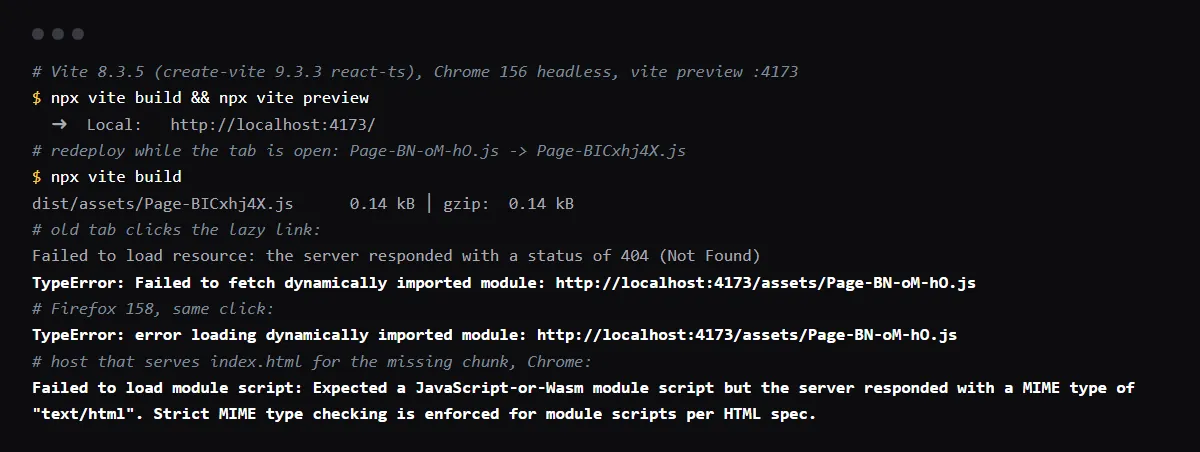
"TypeError: Failed to fetch dynamically imported module: <url>" is Chrome's error when an import() of a JavaScript chunk fails. In a Vite app, including Lovable apps, the usual cause is a deploy: Vite names each lazy chunk with a hash of its content, a new build gives the changed chunk a new name, and a tab opened before the deploy still asks for the old name, which the host no longer has. Vite's docs describe exactly this and give the fix: listen for the vite:preloadError event and reload the page, and serve index.html with Cache-Control: no-cache so the reload gets the new chunk names. Firefox says "error loading dynamically imported module" and Safari "Importing a module script failed." for the same failure. Reproduced with Vite 8.3.5 in Chrome and Firefox on 2026-10-27.
A deep link or a refresh returns 404 instead? See why a Vite or React app 404s on refresh on Vercel.
Reload on vite:preloadError
Vite wraps every import() in a helper that fires vite:preloadError on window when the import fails, with the original error in event.payload; calling event.preventDefault() stops the error from being thrown. In our run, this handler reloaded the page, the new chunk loaded and the lazy page rendered. If the reloaded page still points at a missing chunk, it reloads again, so fix the caching below before you rely on it:
// src/main.tsx
window.addEventListener('vite:preloadError', (event) => {
  event.preventDefault()
  window.location.reload()
})
Do not cache index.html
Vite's docs say to set Cache-Control: no-cache on the HTML file, otherwise the old assets will still be referenced. The hashed files under /assets can be cached for a long time; index.html must be checked on every load, or the reload brings back the old chunk names.
Expected a JavaScript-or-Wasm module script
A host that answers every missing path with index.html, the rewrite single-page apps use for deep links, answers the old chunk with HTML too. Chrome then logs "Failed to load module script: Expected a JavaScript-or-Wasm module script but the server responded with a MIME type of "text/html"" before the same TypeError (older Chrome versions say "JavaScript module script"). Keep the fallback away from /assets so a missing chunk is a 404; see the Vercel rewrite for Vite apps.
It happens on every load, not only after a deploy
Then the chunk is missing from the build output or blocked. Open the URL from the error in a new tab: a 404 on a fresh load means the base path or the deploy is wrong, such as a base option that does not match where the app is served. A request that never leaves the browser points at an extension or a network filter.
Checklist
How to fix it, then check the fix
- 01Open the chunk URL from the error: a 404 or an HTML page means the file is gone from the current deploy.
- 02Add a vite:preloadError handler in the app entry that reloads the page.
- 03Serve index.html with Cache-Control: no-cache, and keep the single-page app fallback away from /assets.
- 04Reproduce it locally: build, open the preview, change a lazy page and build again, then click the lazy link in the open tab.
npx vite build && npx vite preview - 05With the handler in place, that click reloads the page once and the new chunk loads.
Related
Related guides


Sources
Official docs behind this checklist
Browse all launch guides · Read resources · How to make and check your next change
FAQ
FAQ for builders before launch
Is this a bug in Vite?
No. The message comes from the browser, and Vite documents the case: a deploy removed the files an open tab still points at.
Why only some users?
Only tabs opened before the deploy hold the old chunk names, and only when they open a lazy route they had not loaded yet.