Vercel question
 Vercel
Why does my Vite or React app 404 on refresh on Vercel?
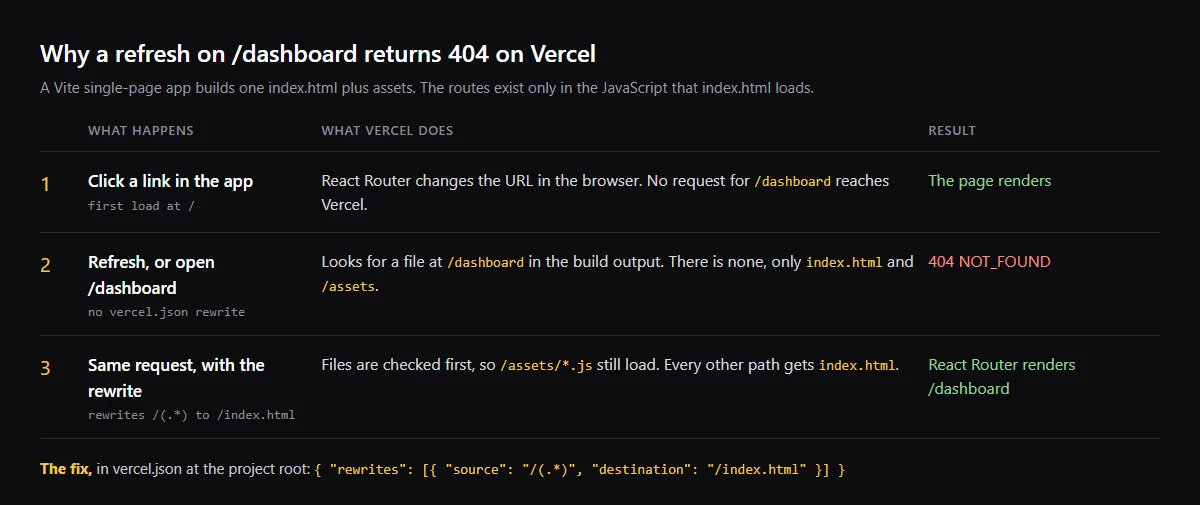
A Vite or React single-page app returns 404 on refresh on Vercel because a route such as /dashboard exists only in your JavaScript router, and Vercel finds no file at that path in the build output. Clicking a link works because React Router changes the URL in the browser without asking Vercel for the page. The fix Vercel documents is one rewrite in vercel.json, at the root of your project, that sends every path to /index.html. Vercel serves real files, such as your /assets scripts, before it applies a rewrite.
Deploying a vibe-coded app for the first time? Follow the deploy order for Vercel and Supabase.
vercel.json rewrites for a single-page app
This is the rewrite from Vercel's Vite guide. If your vercel.json sets cleanUrls to true, use / as the destination instead of /index.html.
{
  "$schema": "https://openapi.vercel.sh/vercel.json",
  "rewrites": [{ "source": "/(.*)", "destination": "/index.html" }]
}
Still 404 after adding vercel.json?
Check that the file is in the project's root directory, the Root Directory set for the project if the app lives in a subfolder, and that it is committed. Then open a new deployment: the old one keeps its old configuration. Prefer rewrites over a routes entry: Vercel says rewrites check the filesystem by default.
Does a Next.js app need this rewrite?
No. The rewrite is for a single-page app, which builds one index.html. Next.js builds a page or a function for each route, so Vercel has something to serve at that path.
Checklist
Fix 404 on refresh
- 01Confirm the symptom: the app loads from / and links work, but refreshing or opening a deep link returns 404 NOT_FOUND.
- 02Add vercel.json with the catch-all rewrite at the root of the project, next to package.json.
- 03Leave your static files alone. Vercel gives the filesystem precedence over rewrites, so scripts, images and functions in the api folder are still served as before.
- 04Commit, push, open the new deployment and refresh a deep link such as /dashboard.
- 05Add a catch-all route in your router that shows your own not-found page. After the rewrite, every unknown path returns index.html, so the router decides what a missing page looks like.
Related
Related guides


Sources
Official docs behind this checklist
Browse all launch guides · Read resources · How to make and check your next change
FAQ
FAQ for builders before launch
Will the rewrite break my API routes?
No. Vercel applies the filesystem before rewrites, and says a rewrite source should not be a file or a Vercel Function for that reason. Requests for real files and functions are served first.
Why does the 404 only show on the deployed site?
Vite's appType option defaults to spa, which makes the dev server fall back to index.html for unknown paths. Vercel serves the built files as they are, so it needs the rewrite.