Vercel error
 Vercel
MIDDLEWARE_INVOCATION_FAILED
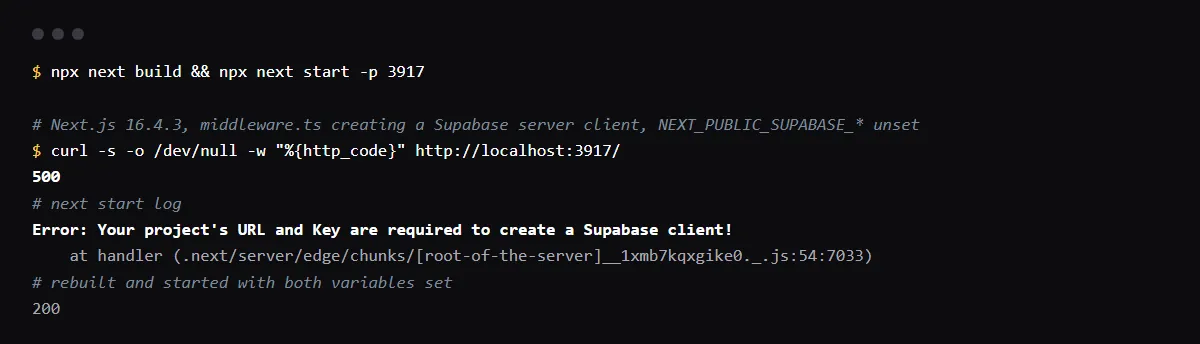
MIDDLEWARE_INVOCATION_FAILED is Vercel's 500 when your Routing Middleware, middleware.ts or, since Next.js 16, proxy.ts, throws instead of returning a response; Vercel's error page names unhandled exceptions as one cause. Middleware runs on every request its matcher allows, so one exception takes down every page. In Supabase apps a common one is the session-refresh middleware creating a client from NEXT_PUBLIC_SUPABASE_URL and a key the deployment does not have: we reproduced it locally with Next.js 16.4.3, where every request returned 500 with "Your project's URL and Key are required to create a Supabase client!". Read the exception in the runtime logs, set the missing variables and redeploy, or guard the code. Reproduced on 2026-10-26.
The 500 comes from a function instead? See what FUNCTION_INVOCATION_FAILED means.
Find the exception
Vercel's page for this error says to check the application logs first, then its status page for an outage. Open the deployment's runtime logs, filter to the failing request and read the error the middleware threw: that line, not the error code, says what to fix. Locally, the same exception shows in the next start output.
Missing environment variables in middleware
A variable set for Production but not for Preview, or added after the last deploy, is undefined in middleware, and a client created from it throws. The Supabase server client is the frequent case, because the guide's middleware calls it on every request; see the Supabase URL and Key error on Vercel. Set the variables for every environment, redeploy, and guard the middleware so a missing value skips the refresh instead of failing every page.
export async function middleware(request: NextRequest) {
  const url = process.env.NEXT_PUBLIC_SUPABASE_URL
  const key = process.env.NEXT_PUBLIC_SUPABASE_PUBLISHABLE_KEY ?? process.env.NEXT_PUBLIC_SUPABASE_ANON_KEY
  if (!url || !key) {
    console.error('Supabase variables missing in middleware')
    return NextResponse.next({ request })
  }
  // create the server client and refresh the session as before
}
middleware.ts or proxy.ts on Next.js 16
Next.js 16 renamed the middleware file convention to proxy and runs proxy on the Node.js runtime by default. A middleware.ts still builds, with a deprecation warning, and in our build it ran on the Edge runtime, where Node.js APIs a library expects may be missing and throw. The codemod renames the file and the function.
npx @next/codemod@canary middleware-to-proxy .MIDDLEWARE_INVOCATION_TIMEOUT is a different error
A 504 with MIDDLEWARE_INVOCATION_TIMEOUT means the middleware did not respond in time; Vercel's page gives 25 seconds. Look for a slow fetch or an endless loop there, and set a timeout on outside calls.
Checklist
How to fix it, then check the fix
- 01Open the runtime logs for a failing request and copy the error the middleware threw.
- 02If it names a missing value, set that variable in Vercel for the environment of the failing deployment, then redeploy.
- 03Guard the middleware so a missing value or a failed outside call returns NextResponse.next() and logs, instead of throwing.
- 04Narrow the matcher so static files and images skip the middleware.
- 05Reproduce it locally without your .env.local before you push:
mv .env.local .env.local.off && npx next build && npx next start; mv .env.local.off .env.local
Related
Related guides

Sources
Official docs behind this checklist
Browse all launch guides · Read resources · How to make and check your next change
FAQ
FAQ for builders before launch
Why does it work locally and fail on Vercel?
Locally, Next.js reads .env.local; Vercel never sees that file and uses only the variables set for that environment, in deployments created after you set them.
Should I wrap all middleware in try and catch?
A catch that logs and returns NextResponse.next() keeps pages up, but a failed session refresh then goes unnoticed. Log it so you see it, and fix the cause.