Vercel error
 Vercel
DEPLOYMENT_NOT_FOUND
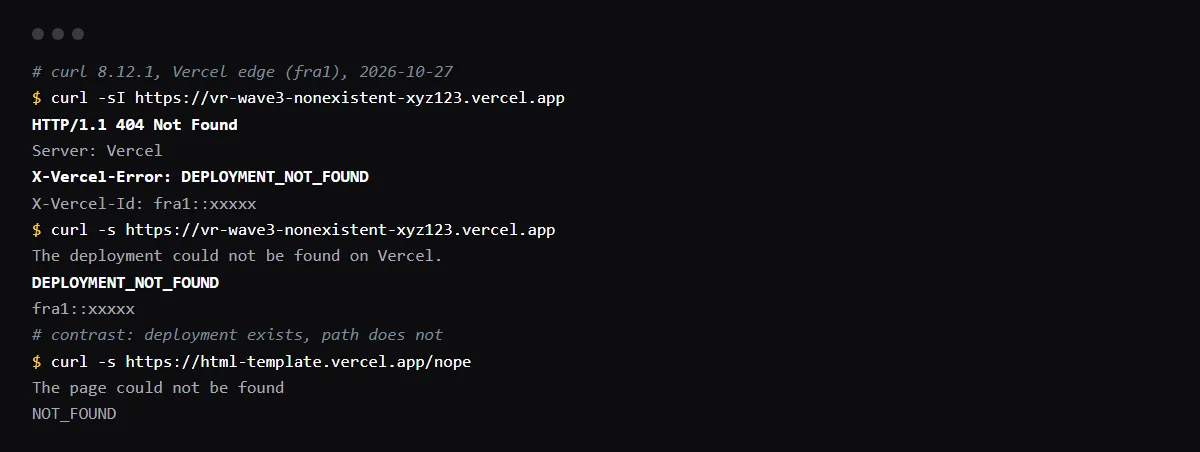
DEPLOYMENT_NOT_FOUND is Vercel's 404 when no deployment answers the URL you requested, before any of your code runs. Vercel's error page names the causes: a deployment ID or URL that is wrong, or a deployment that was deleted. In practice that is a mistyped or guessed *.vercel.app URL, a preview URL whose deployment was removed by a retention policy, an old link saved in a webhook, an OAuth callback or an env var, or a domain whose DNS points at Vercel but that was never added to a project. Open the project's Deployments list, copy the URL of a deployment that exists, and add custom domains in the project's Domains settings. A missing page inside a working deployment is a different code, NOT_FOUND. Reproduced with curl against Vercel on 2026-10-27.
The deployment exists, and a refresh on a deep link returns 404? See why a Vite or React app 404s on refresh.
What the 404 looks like
Vercel sends the code in the X-Vercel-Error response header. In our run, curl got a plain text body, "The deployment could not be found on Vercel.", then the code and the request ID; a browser gets a page that reads 404: NOT_FOUND, This page doesn't exist, then 404 DEPLOYMENT_NOT_FOUND.
curl -sI https://your-app-git-branch-team.vercel.app | grep -i x-vercel-errorDEPLOYMENT_NOT_FOUND, NOT_FOUND or DEPLOYMENT_DISABLED
Each code points somewhere else. DEPLOYMENT_NOT_FOUND: no deployment for that host, so check the URL or the domain. NOT_FOUND: the deployment exists and has no file or route at that path, so check the build output or your rewrites. DEPLOYMENT_DISABLED, a 402 in our run: the deployment exists and is paused or blocked, so check the team's billing and usage.
Preview URLs that stop working
Each deployment has its own URL, and a deployment deleted by hand or by the project's deployment retention policy stops answering. Links saved in a pull request comment, a Stripe or Resend webhook, a Supabase redirect allow list or an env var then return DEPLOYMENT_NOT_FOUND. Use the branch URL or the production domain in those places, and update them after you rename a project or a team, which changes the generated URLs.
A custom domain that points at Vercel
DNS that points at Vercel is not enough: the domain must be added to a project. In our run, an HTTP request for a domain that was not added to any project got the same DEPLOYMENT_NOT_FOUND 404; over HTTPS the browser shows a certificate error first, because Vercel has issued no certificate for it. Add the domain in the project's Settings, Domains, and wait for it to show as valid.
Checklist
How to fix it, then check the fix
- 01Read the X-Vercel-Error header of the failing request: DEPLOYMENT_NOT_FOUND, NOT_FOUND or DEPLOYMENT_DISABLED.
- 02Open the project's Deployments list in Vercel and copy the URL of a deployment that exists; compare it letter by letter with the one that failed.
- 03For a custom domain, check that it is listed under the project's Domains settings and shows as valid.
- 04Replace saved preview URLs in webhooks, OAuth settings and env vars with the production domain or the branch URL.
- 05Request the URL again: the header is gone, and the response comes from your app.
Related
Related guides

Sources
Official docs behind this checklist
Browse all launch guides · Read resources · How to make and check your next change
FAQ
FAQ for builders before launch
Can my code cause DEPLOYMENT_NOT_FOUND?
No. Vercel answers before any deployment runs, so the fix is in the URL, the domain or the deployment list, not in the app.
Why does an old preview link now return it?
The deployment behind it was deleted, by hand or by the deployment retention policy. Deploy the branch again or use a current URL.