How do I test a Lovable app before launch?
To test a Lovable app before launch, ask Lovable's browser testing to run your main flow in the preview, test private data yourself with two ordinary accounts and a signed-out visitor, run the Quick and Deep security scans, then repeat the flow on the published URL. The preview and the published app can be different versions, so a passing preview does not prove the live app.
Already published? Recheck the live app after every change with the Lovable post-launch checklist.
Why this matters
Read against the Lovable docs on 19 October 2026. Lovable calls the preview a "private testing space that always runs your latest work", while visitors see "a snapshot that only changes when you publish". The two "share the same backend and data, so changes to your database affect both", so create clearly named test records; some Cloud apps separate test and live environments instead. Browser testing always runs against the preview, and Lovable says its scans "cannot guarantee complete security". The steps below are a proposed procedure, not an observed customer result.
Lovable app testing before you publish
- Ask Lovable to test the main flow in the preview. Browser testing clicks buttons, fills and submits forms, moves between pages and reads console logs and network requests. Lovable's own example prompt:
Use browser testing to verify the sign-up flow works. - Check what it can sign in as. On Lovable Cloud it can test pages behind a login as an app user. With your own Supabase project or another auth provider, it can only test pages that need no sign-in, so test the signed-in flows yourself.
- Test private data with two ordinary accounts in separate browser profiles. User A creates a private record and reloads it; it must still be there. User B and a signed-out visitor then open the list and the record's URL, and neither may see it.
- Open Publish, top right next to Share. The Quick scan runs when the dialog opens and checks database access rules, dependencies and MCP server exposure. Click its result line to open the Security view and start the Deep security scan there: it reviews access control, leaked secrets, payments and authentication, and does not run on its own.
- Publish, then repeat the main flow and the two-account test on the published URL, your-subdomain.lovable.app or your custom domain. A later change goes live only after Publish changes, and these checks are due again.
Optional repo check
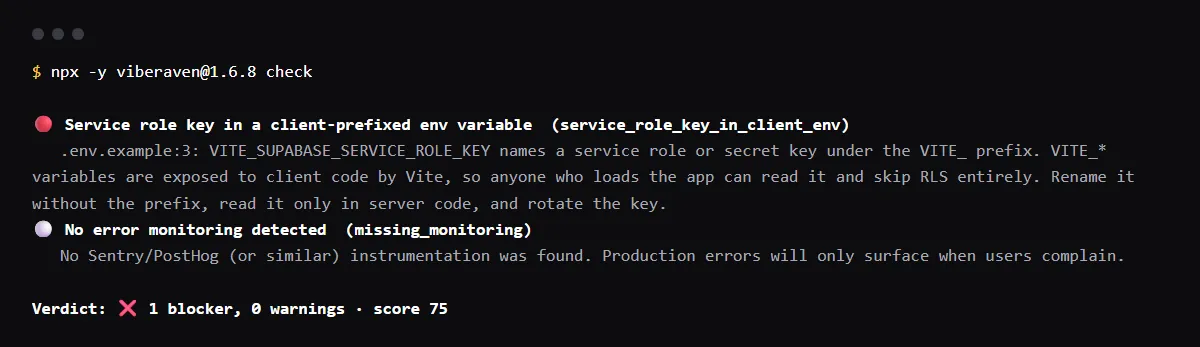
For AI-built Vercel + Supabase apps, an optional check applies to a Lovable repo exported or synced to GitHub that uses that stack. In a run of npx -y viberaven@1.6.8 check on a Vite + Supabase fixture repo on 2026-10-19 it reported VITE_SUPABASE_SERVICE_ROLE_KEY in .env.example as service_role_key_in_client_env, a blocker. It does not scan Lovable Cloud, run your app or test sign-in. It is advice, not a gate, and a repository check, not a live database or security test. It exits with code 1 when it finds a blocker and writes a .viberaven folder that it does not add to .gitignore.
Related guides
Sources
Can Lovable test my app automatically?
Partly. Ask in the project chat, for example "test this" or "verify it works", and browser testing runs the flow in a real browser. It is weak at canvas tools, drag and drop and subtle visual differences, and it runs against the preview, so check the published app yourself.
Does testing in the preview change my live data?
It can. Lovable says the preview and the published app share the same backend and data, so records you create while testing show up in the live app too. Use clearly named test records and delete them afterwards, unless your Cloud app separates test and live environments.