Supabase Storage error
 Supabase
Supabase Storage upload fails with "new row violates row-level security policy" or "must be owner of table objects": the fix
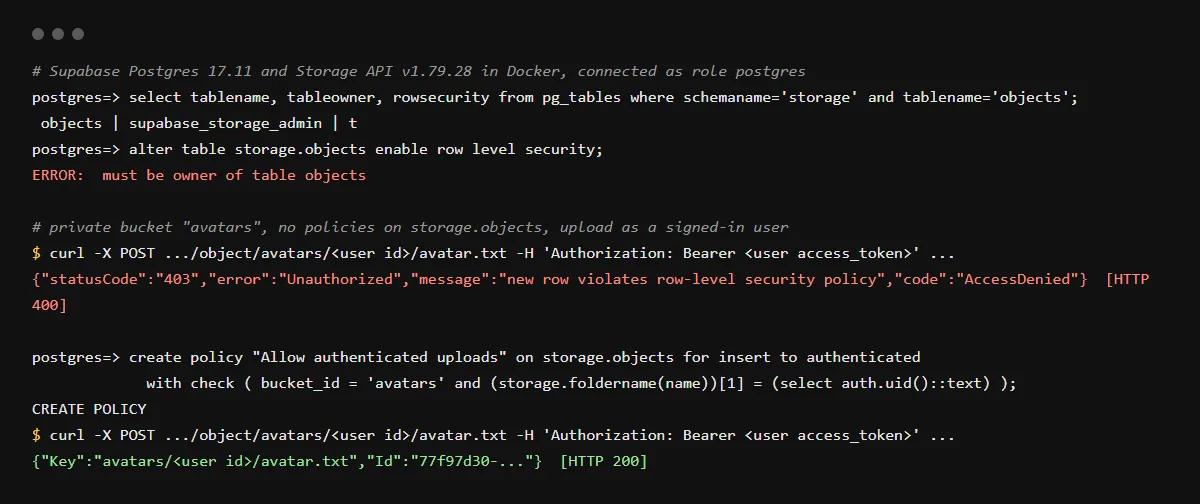
"new row violates row-level security policy" on a Supabase Storage upload means storage.objects has no policy that lets this user insert this file: row level security is on for that table by default, and Supabase says Storage allows no uploads without a policy. Fix it by adding an INSERT policy on storage.objects for the bucket, usually limited to a folder named after the user's ID, and add SELECT and UPDATE policies too if you upload with upsert. "must be owner of table objects" is the error from a migration that runs alter table storage.objects enable row level security, which agents still write: the storage tables belong to supabase_storage_admin, Supabase has blocked changes to them since 2025-04-21, and RLS is already on, so delete that line and keep only the create policy statements, which still work. Checked against Supabase's docs and the Storage server source on 2026-10-25.
An upload is an insert, so the policy needs a WITH CHECK clause. For how the two clauses differ, see USING vs WITH CHECK in Supabase policies.
The error body, and why the HTTP status is 400
We ran Supabase's Storage API v1.79.28 locally on 2026-10-25 and uploaded to a private bucket with no policies. The body says 403 and AccessDenied, but the response status was 400: the Storage server sends 400 for every client error and keeps the original status in the body. The same text comes back when an upsert or update is denied, because Storage reports every row level security denial with this one message.
{"statusCode":"403","error":"Unauthorized","message":"new row violates row-level security policy","code":"AccessDenied"}The INSERT policy for per-user folders
Upload each user's files under a folder named after their ID, such as avatars/<user id>/avatar.png, and check that folder in the policy. storage.foldername(name) returns the path's folders as an array, so [1] is the first one. The upload succeeded in our run once this policy existed, and an upload to another user's folder was still denied:
create policy "Users upload to their own folder"
on storage.objects for insert to authenticated
with check (
  bucket_id = 'avatars'
  and (storage.foldername(name))[1] = (select auth.uid()::text)
);
Upsert fails even though insert works
Supabase's docs say overwriting with upsert also needs SELECT and UPDATE. In our run an upsert with only the INSERT policy failed even for a new path, because the insert asks Postgres to return the row and no SELECT policy allowed it. Add SELECT and UPDATE policies with the same bucket and folder check. A private bucket with no SELECT policy also answers downloads with "Object not found", not "denied".
must be owner of table objects
The full error is ERROR: must be owner of table objects, and the same appears for disable row level security or any alter table on storage.objects. In our run, the postgres role was not the owner and every storage table already had row level security on. Supabase's announcement of the 2025-04-21 restriction still allows creating RLS policies and triggers on storage.objects, and its docs ask you to treat the storage schema as read-only. Remove the alter line from the migration; if the migration already ran on the project, the advice in supabase/cli issue 4114 is to mark it applied with supabase migration repair --status applied and the migration's version.
Does a public bucket fix it?
No. Supabase's docs say a public bucket only skips access control for downloading files; uploading, deleting, moving and copying are still checked. Buckets are private by default. The service role key skips RLS altogether, so keep it on the server and never use it to make browser uploads work.
Checklist
Make uploads work without opening the bucket
- 01Delete any alter table storage.objects line from your migrations.
- 02Pick the path layout, such as <bucket>/<user id>/<file name>, and upload to it from the client with the signed-in user's session.
- 03Create the INSERT policy above for your bucket, in a migration or the SQL editor.
- 04If you upload with upsert: true, add SELECT and UPDATE policies with the same bucket and folder check.
- 05For a private bucket, add a SELECT policy so users can download their own files, or create signed URLs on the server.
- 06Sign in as two users and check each can upload and read only their own folder.
Related
Related guides
Sources
Official docs behind this checklist
- Supabase, Storage access control
- Supabase, Storage helper functions
- Supabase, Storage buckets
- Supabase, Storage schema design
- Supabase, Storage error codes
- Supabase, Postgres roles
- Supabase troubleshooting, Storage 403 new row violates row-level security policy on upload
- Supabase discussion, restrictions on the auth, storage and realtime schemas (2025-04-21)
- supabase/cli issue 4114, must be owner of table objects
- supabase/storage v1.79.28, src/storage/database/errors.ts
Browse all launch guides · Read resources · How to make and check your next change
FAQ
FAQ for builders before launch
Do I need to enable RLS on storage.objects?
No. It is already on, and you cannot change that table. Your migration only needs the create policy statements.
Why does the upload work with the service role key but not from the browser?
Supabase's docs say service keys bypass RLS policies entirely. The browser uploads as the signed-in user, and the policies apply to that user.