Supabase API error
 Supabase
JWT expired
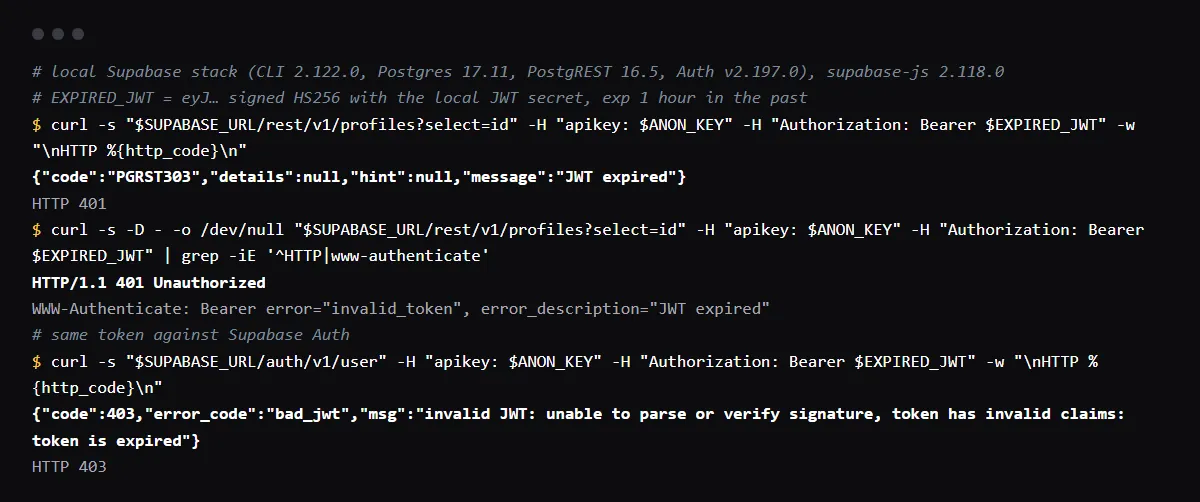
"JWT expired" means the access token in the Authorization header is past its exp time. The Supabase REST API (PostgREST) answers HTTP 401 with code PGRST303 and the message JWT expired; Supabase Auth answers the same token with HTTP 403, error code bad_jwt and "token is expired". Access tokens last 1 hour by default and supabase-js refreshes them ahead of time, so the error almost always means a token was taken out of the client and reused: passed into a global Authorization header, a server client, an Edge Function call or a cookie that nothing refreshes. Let the Supabase client manage the session, refresh it in server code with @supabase/ssr, and sign the user in again when the refresh token is gone. Reproduced on a local Supabase stack (PostgREST 16.5, Auth v2.197.0) and checked against the PostgREST source on 2026-10-27.
No token at all in server code? See why Supabase says Auth session missing.
PGRST303 or PGRST301
PostgREST 13 and later return PGRST303 for a token whose claims fail, an expired exp included, with the WWW-Authenticate header error_description="JWT expired". Up to PostgREST 12 the same message came with PGRST301, so older posts and logs show that code. PGRST301 today means the token could not be decoded at all, a wrong key or a broken token: in our run a bad signature returned "No suitable key or wrong key type". An expired token is a timing problem; PGRST301 is a key problem.
Where a token stops being refreshed
supabase-js refreshes the session before the access token expires, as long as it owns the session. It stops helping when you copy the token out of it:
// expires after an hour: the client never refreshes this header
createClient(url, key, { global: { headers: { Authorization: `Bearer ${session.access_token}` } } })

// refreshes: the client reads its own session for every request
const supabase = createClient(url, key)
await supabase.auth.signInWithPassword({ email, password })
In Next.js server code
Server Components cannot write cookies, so a session refreshed there is lost. Supabase's Next.js guide creates the server client with createServerClient from @supabase/ssr and refreshes the session in proxy.ts (middleware.ts before Next.js 16) by calling supabase.auth.getClaims() on every request. Without that, a page left open past the hour sends the old token from the cookie and gets JWT expired.
Calling an Edge Function or your own API with the token
functions.invoke() sends the client's current token. A fetch you wrote yourself with an access_token saved in state, local storage or a database keeps sending it after it expires. Read it from supabase.auth.getSession() right before the call, so you get the refreshed one.
JWT expired in the Supabase dashboard
Supabase has a separate troubleshooting answer for this message in the dashboard itself, where the usual cause is the computer's clock: Supabase's session docs note that laptops and phones can be off by minutes or hours. Set the clock to sync automatically and sign in again.
Checklist
How to fix it, then check the fix
- 01Find where the failing request gets its Authorization header, and remove any access_token copied into a global header, a cookie or saved state.
- 02In Next.js, check that proxy.ts (or middleware.ts) runs on the failing routes and refreshes the session with @supabase/ssr.
- 03Keep autoRefreshToken on in the browser client (it is the default) and do not lower the JWT expiry below 5 minutes.
- 04When the refresh itself fails, sign the user out and send them to sign in, instead of retrying with the old token.
- 05Leave the app open for more than an hour, then use it: requests succeed and the token in the request has a new exp.
Related
Related guides
Sources
Official docs behind this checklist
Browse all launch guides · Read resources · How to make and check your next change
FAQ
FAQ for builders before launch
Should I raise the JWT expiry to stop the error?
No. Supabase recommends the 1 hour default; a longer expiry only delays the error and keeps stolen tokens valid longer. Fix the code that reuses the token.
Why does Auth say 403 bad_jwt while the API says 401?
They are different servers. PostgREST maps expired claims to 401 PGRST303; Supabase Auth rejects the same token as bad_jwt with 403.
Can I use the anon key to avoid it?
The anon key never expires in the same way, but requests with it run as anon, so RLS policies for signed-in users stop matching. Refresh the user's session instead.