Stripe MCP change
 Stripe
Stripe MCP after November 30, 2026: full-access sk_ keys and untagged rk_ keys get a 401, so switch to OAuth or an agent API key
Stripe says to update your Stripe MCP authentication by November 30, 2026: starting in December, mcp.stripe.com stops accepting full-access secret keys (sk_live_, sk_test_) and restricted keys (rk_) without the Agent tag, and answers them with a 401 and an OAuth discovery challenge. Replace the key with a newly created agent API key, which is a restricted key you tag by selecting "Authorizing agent access to your account" when you create it, or reconnect with OAuth. An interactive client such as Claude Code or Codex should use OAuth: add the server, then sign in from the client. A client that cannot use OAuth sends the agent key as a bearer token read from an environment variable: ${VAR} in the headers of Claude Code's .mcp.json, or bearer_token_env_var in Codex's config.toml, never the key itself. The prefix does not show whether an rk_ key is tagged; the Agent badge in the Dashboard does. Checked against Stripe's, Anthropic's and OpenAI's docs on 2026-10-25.
For what the Stripe server can read and change next to the Supabase, Vercel and PostHog servers, see the provider MCP servers side by side.
The 401 and the OAuth discovery challenge
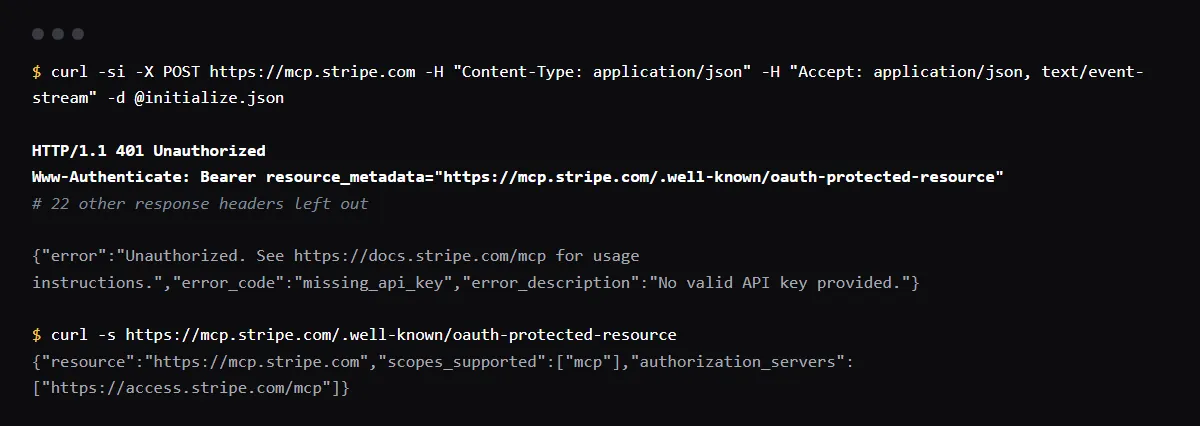
On 2026-10-25 we sent an MCP initialize request to https://mcp.stripe.com with no key. It returned HTTP 401 with the header below and the body {"error":"Unauthorized. See https://docs.stripe.com/mcp for usage instructions.","error_code":"missing_api_key","error_description":"No valid API key provided."}. The header is the OAuth discovery challenge: it points the client at Stripe's protected resource metadata, which names https://access.stripe.com/mcp as the authorization server, and an MCP client that supports OAuth starts sign-in from there. Stripe says a request with an unsupported key gets a 401 with this challenge from December. We did not send a real key, so the body for a rejected key is not shown here.
HTTP/1.1 401 Unauthorized
Www-Authenticate: Bearer resource_metadata="https://mcp.stripe.com/.well-known/oauth-protected-resource"
Which keys stop working, and which keep working
Rejected from December: secret keys (sk_live_, sk_test_), which Stripe calls full-access because their permissions cannot be limited, and restricted keys (rk_live_, rk_test_) created without the Agent tag. Accepted: OAuth sessions, and agent API keys. An agent API key is a restricted key tagged at creation, when Stripe asks for the key's intended use and you select "Authorizing agent access to your account"; the Dashboard shows it with an Agent badge. It uses the same permissions as any restricted key, and it is also subject to approval rules: Stripe adds default rules for payouts, refunds and account configuration changes when you create your first one, and a designated reviewer approves those actions.
Claude Code: OAuth, or an agent key in .mcp.json
For OAuth, Stripe's docs add the server with claude mcp add --transport http stripe https://mcp.stripe.com/, then you start Claude Code and run /mcp to sign in. For an agent key, put the server in the project's .mcp.json with the key in an environment variable, set in your shell before you start Claude Code. Claude Code expands ${VAR} in a remote server's url and headers, and leaves an unset variable with no default as literal text, with a warning in claude mcp list. It also reads some credential names as empty in a remote server's url and headers, such as its own ANTHROPIC_API_KEY and your cloud provider's credentials, so the server gets "Bearer " and rejects the request, usually with a 401; Anthropic's docs say to copy the key into a variable with a name of your own.
{
  "mcpServers": {
    "stripe": {
      "type": "http",
      "url": "https://mcp.stripe.com",
      "headers": {
        "Authorization": "Bearer ${STRIPE_AGENT_API_KEY}"
      }
    }
  }
}
Codex: OAuth, or bearer_token_env_var
For OAuth, Stripe's docs add the server with codex mcp add stripe --url https://mcp.stripe.com, and OpenAI's docs start sign-in with codex mcp login stripe. The ChatGPT desktop app, the Codex CLI and the IDE extension share that configuration. For an agent key, set bearer_token_env_var in ~/.codex/config.toml, or a project's .codex/config.toml, to the name of the variable that holds the key. It takes the name itself, not the name wrapped in ${}.
[mcp_servers.stripe]
url = "https://mcp.stripe.com"
bearer_token_env_var = "STRIPE_AGENT_API_KEY"
Connected accounts need an agent key
Stripe MCP does not support OAuth when it acts for the connected accounts of a Connect platform. Use an agent API key for the platform, grant only the connected-account permissions the agent needs, and send the Stripe-Account header with the connected account id.
Refunds and payouts still need a person
When an agent acts with your user credentials, Stripe asks a person to confirm some stripe_api_write actions, such as refunds and outbound payments: open the URL the agent shows you, review the request and select Approve, then tell the agent to retry. An approval you do not give within 24 hours expires. Stripe also says to keep your client's tool approval on. Stripe's recommended setup, stripe agent setup from the Stripe CLI (npm install -g @stripe/cli@latest), detects the agents you use and configures the server and Stripe's skills for them.
Checklist
Before November 30, 2026
- 01Find every Stripe MCP setup that holds a key. Search the project and your user config files for the server URL and the key prefixes:
grep -rn -e "mcp.stripe.com" -e "sk_live_" -e "sk_test_" -e "rk_live_" -e "rk_test_" .mcp.json .cursor .vscode .codex ~/.codex/config.toml ~/.claude.json ~/.cursor/mcp.json 2>/dev/null - 02For each client that can sign in, remove the key and reconnect with OAuth.
- 03For each rk_ key that stays, open the API keys page in the Dashboard and look for the Agent badge. Without it, create a new agent API key: the tag is chosen when a key is created.
- 04Give the new key only the permissions the agent needs, put it in an environment variable, and reference it by name in .mcp.json or bearer_token_env_var.
- 05Test the new setup in a sandbox, then expire the old key, as Stripe advises. Roll any key that was ever committed to Git.
- 06If you administer the account, check the MCP and CLI access settings in the Dashboard: MCP is turned on or off for the whole team, separately for live mode and sandboxes.
Related
Related guides


Sources
Official docs behind this checklist
Browse all launch guides · Read resources · How to make and check your next change
FAQ
FAQ for builders before launch
Does an agent API key have its own prefix?
No. It is a restricted key, so it starts with rk_live_ or rk_test_ like any other. Only the Agent badge in the Dashboard shows that it is tagged.
Does the cutoff affect my app's Stripe secret key?
Not this notice: it covers the keys sent to Stripe MCP at mcp.stripe.com. Stripe's API keys guide separately advises restricted keys over secret keys for new uses.