MCP servers
 Supabase
 Vercel
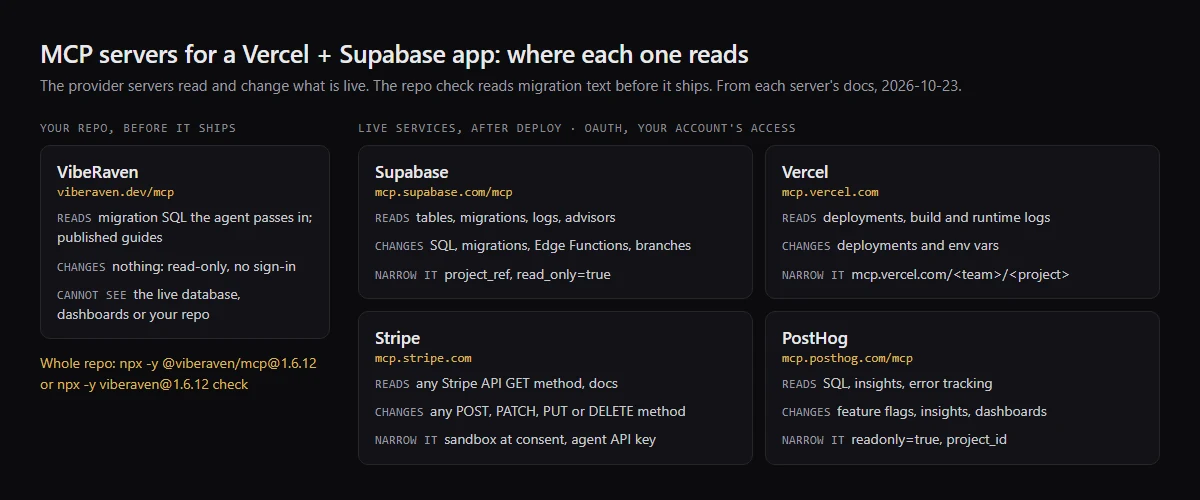
MCP servers for a Vercel + Supabase app: what each one reads and changes
Add the official MCP server of each provider your app uses: Supabase (https://mcp.supabase.com/mcp), Vercel (https://mcp.vercel.com), Stripe (https://mcp.stripe.com) and PostHog (https://mcp.posthog.com/mcp). All four are hosted, sign in with OAuth and act with your own account's access, so each can change live resources: run SQL, deploy to production, write to the Stripe API, delete feature flags. Start each one narrow: Supabase with project_ref and read_only=true, PostHog with readonly=true and project_id, Vercel with its project URL, Stripe with a sandbox, and keep tool approval on. They read what is live; checking the migrations in your repo before they ship is a separate step, listed below. Checked against each provider's docs on 2026-10-23.
Fixing a warning that get_advisors returned? What each Supabase Security Advisor warning means.
Supabase MCP server tools: get_advisors, execute_sql and query_logs
The Supabase server groups its tools. Database: list_tables, list_extensions, list_migrations, apply_migration and execute_sql. Debugging: query_logs, which runs a read-only SQL query against project logs, and get_advisors, which returns the security and performance advisors. Development: get_project_url, get_publishable_keys and generate_typescript_types. It also has Edge Functions tools, account tools such as create_project and pause_project, search_docs, and branching tools that need a paid plan. Every group except Storage is on by default; features=database,docs,debugging turns on only those.
For what each Security Advisor warning means and how to fix it, see what each Supabase Security Advisor warning means.
Vercel MCP server tools: deployments and build logs
list_deployments and get_deployment find and inspect deployments, get_deployment_build_logs returns the most recent build log lines (errorsOnly returns only the failing ones), and get_runtime_logs and get_runtime_errors read what happened after the build. The same server can create_deployment, deploy_to_vercel to preview or production, cancel_deployment, and create_project_env or edit_project_env, and get_project_env returns the decrypted value of an env var. Vercel lists 217 catalog tools in all, and your connection may show fewer.
Stripe MCP server tools: reading webhook endpoints and other API methods
Stripe exposes the API through a few tools instead of one per method: stripe_api_search finds a method, stripe_api_details gives its parameters, stripe_api_read calls any GET method, such as List all webhook endpoints, and stripe_api_write calls any POST, PATCH, PUT or DELETE method, such as Create a webhook endpoint or Create refund. search_stripe_documentation searches the docs. Stripe asks a person to approve some writes, such as refunds and outbound payments, through a link the agent shows you.
PostHog MCP in Claude Code: install
Run npx @posthog/wizard mcp add, or claude mcp add --transport http posthog https://mcp.posthog.com/mcp -s user, then sign in when Claude Code first uses it. PostHog routes you to the US or EU region from your login. Add readonly=true to the URL to drop every tool that creates, updates or deletes, and project_id to pin one project.
Checklist
Which MCP server to add, and how to narrow it
- 01Supabase, https://mcp.supabase.com/mcp: reads tables, migrations, logs and advisors on your hosted projects, and can change them with execute_sql, apply_migration, deploy_edge_function, create_project and the branching tools. It signs in with OAuth in the browser; a personal access token is for CI. Add project_ref=<id> to scope it to one project, which also removes the account tools, and read_only=true to run every query as a read-only Postgres user. Supabase says to connect a production project only when the task needs production evidence, to keep manual approval of tool calls on, and not to give the server to your customers, because it runs with your developer permissions.
- 02Vercel, https://mcp.vercel.com: reads projects, deployments, build logs, runtime logs and errors, and Web Analytics, and can create deployments, including to production, and create or edit env vars. It signs in with OAuth, only from clients Vercel has reviewed, such as Claude Code, Codex CLI and Cursor, and Vercel says the connection has the same access as your Vercel account. Use the project URL https://mcp.vercel.com/<team>/<project>, which vercel mcp --project sets up for the linked project, so the session is scoped to that project. Vercel documents no read-only mode; it asks you to keep human confirmation on for each step.
- 03Stripe, https://mcp.stripe.com: reads any Stripe API GET method and writes any POST, PATCH, PUT or DELETE method, such as customers, refunds, subscriptions and webhook endpoints. It signs in with OAuth, and the consent page lets you grant a sandbox or a live mode account with separate permissions; an agent that cannot use OAuth uses an agent API key with only the permissions it needs. From December 2026 it stops accepting full-access secret keys and restricted keys without the Agent tag. Stripe says to turn on your client's tool approval, and requires a person to approve some writes, such as refunds.
- 04PostHog, https://mcp.posthog.com/mcp: runs SQL (execute-sql) and insight queries and lists error tracking issues, and can create, update and delete feature flags, insights and dashboards. It signs in with OAuth, or with a personal API key made with the MCP Server preset. readonly=true leaves only read tools, project_id pins one project and removes the switch-project tool, and features= or tools= limit the list further. PostHog says to review each tool call before it runs, because of prompt injection.
- 05VibeRaven, https://viberaven.dev/mcp: an open source repo check for Vercel + Supabase apps, built to read what is about to ship rather than what is live. The hosted server is read-only and needs no sign-in, and each request stands alone. Its check_supabase_migrations tool runs the CLI's SQL rules on migration text the agent passes in, up to 200 KB: tables without RLS, RLS with no policies, using (true) policies, security definer functions the anon key or signed-in users can call, and the October 30 Data API grant gaps, each with file, line and a one-line fix. explain_finding, search_guides and launch_checklist answer from the guides on viberaven.dev. The text you pass is processed in memory and is not stored or logged; for each request the server logs the method, the tool name, the client name and version, and success or error. It cannot see your live database, dashboards or repo. For the whole repo, the local server (npx -y @viberaven/mcp@1.6.12) has repository tools, and npx -y viberaven@1.6.12 check reads every migration and also looks for a service role key in client code and Stripe webhooks with no signature check. It is advice, not a gate, and a repository check, not a live database test: it does not connect to Supabase, Vercel or Stripe, so it cannot see live policies, and a clean result does not prove the app is secure. It exits with code 1 when it finds a blocker and writes a .viberaven folder that it does not add to .gitignore. Where it fits next to Supabase's server: get_advisors reads the schema that is live, and this reads a migration before it is applied.
Comparison
The MCP servers side by side, and how to add them
Each row is from that server's own docs, read on 2026-10-23. A setting a provider does not document is marked as not documented, not guessed. Placeholders in angle brackets are your own project ids.
Five MCP servers in one table
| Server | What it reads | What it can change | How it signs in | Safety settings to use |
|---|---|---|---|---|
| Supabase, mcp.supabase.com/mcp | Tables, extensions, migrations, logs (query_logs), security and performance advisors (get_advisors), Edge Functions, docs | Runs SQL (execute_sql), applies migrations, deploys Edge Functions, creates and pauses projects, manages branches | OAuth in the browser; personal access token for CI | project_ref=<id>, read_only=true, features= for only the groups you need; manual tool approval; a development project or branch, not production |
| Vercel, mcp.vercel.com | Teams, projects, deployments, build logs, runtime logs and errors, Web Analytics, docs | Creates and cancels deployments, including to production; creates and edits env vars; reads decrypted env var values | OAuth, from clients Vercel has reviewed; same access as your Vercel account | Project URL mcp.vercel.com/<team>/<project>; human confirmation on; read-only mode not documented |
| Stripe, mcp.stripe.com | Any Stripe API GET method, account info, docs and support articles | Any Stripe API POST, PATCH, PUT or DELETE method; some writes, such as refunds, need a person to approve | OAuth per account and sandbox; agent API key for agents that cannot use OAuth | Grant a sandbox at consent; an agent API key with only the permissions needed; tool approval on; read-only mode not documented |
| PostHog, mcp.posthog.com/mcp | SQL (execute-sql), insights, dashboards, feature flags, error tracking, docs | Creates, updates and deletes feature flags, insights, dashboards and error tracking alerts | OAuth; personal API key with the MCP Server preset | readonly=true, project_id=<id>, features= or tools= to limit the list; review each tool call |
| VibeRaven, viberaven.dev/mcp | Migration SQL the agent passes in (check_supabase_migrations), and the guides on viberaven.dev | Nothing; every tool is read-only | None, no account or API key | Nothing to narrow; it cannot see your live database, dashboards or repo. For the whole repo, the local @viberaven/mcp server or the CLI check |
Claude Code
Run these from your app folder. --scope project writes each server to .mcp.json, so everyone on the project gets the same list, and Claude Code asks before it first uses a server from that file. Then run /mcp in Claude Code and sign in to each provider in the browser. Quote each URL: the shell reads & and angle brackets otherwise.
claude mcp add --scope project --transport http supabase "https://mcp.supabase.com/mcp?project_ref=<project-ref>&read_only=true"
claude mcp add --scope project --transport http vercel "https://mcp.vercel.com/<team>/<project>"
claude mcp add --scope project --transport http stripe "https://mcp.stripe.com"
claude mcp add --scope project --transport http posthog "https://mcp.posthog.com/mcp?readonly=true&project_id=<project-id>"
claude mcp add --scope project --transport http viberaven "https://viberaven.dev/mcp"
claude mcp add --scope project --transport stdio viberaven-local -- npx -y @viberaven/mcp@1.6.12Cursor
Put this in .cursor/mcp.json in the project, or ~/.cursor/mcp.json to use them everywhere. Cursor shows a Needs login prompt for each server that signs in with OAuth, and asks before it runs an MCP tool unless you change its run mode.
{
  "mcpServers": {
    "supabase": { "url": "https://mcp.supabase.com/mcp?project_ref=<project-ref>&read_only=true" },
    "vercel": { "url": "https://mcp.vercel.com/<team>/<project>" },
    "stripe": { "url": "https://mcp.stripe.com" },
    "posthog": { "url": "https://mcp.posthog.com/mcp?readonly=true&project_id=<project-id>" },
    "viberaven": { "url": "https://viberaven.dev/mcp" },
    "viberaven-local": { "command": "npx", "args": ["-y", "@viberaven/mcp@1.6.12"] }
  }
}
Codex
Put this in ~/.codex/config.toml, or in .codex/config.toml in a trusted project. Then run codex mcp login supabase, and the same for vercel, stripe and posthog. default_tools_approval_mode = "prompt" sets each tool of that server to ask for approval before it runs.
[mcp_servers.supabase]
url = "https://mcp.supabase.com/mcp?project_ref=<project-ref>&read_only=true"
default_tools_approval_mode = "prompt"

[mcp_servers.vercel]
url = "https://mcp.vercel.com/<team>/<project>"
default_tools_approval_mode = "prompt"

[mcp_servers.stripe]
url = "https://mcp.stripe.com"
default_tools_approval_mode = "prompt"

[mcp_servers.posthog]
url = "https://mcp.posthog.com/mcp?readonly=true&project_id=<project-id>"
default_tools_approval_mode = "prompt"

[mcp_servers.viberaven]
url = "https://viberaven.dev/mcp"

[mcp_servers.viberaven-local]
command = "npx"
args = ["-y", "@viberaven/mcp@1.6.12"]
Related
Related guides

Sources
Sources behind this list
- Supabase, Model context protocol (MCP)
- Supabase CLI reference, supabase db advisors
- Vercel, Use Vercel MCP
- Vercel MCP, Tools
- Vercel MCP, Deployments tools
- Vercel MCP, Environment Variables tools
- Vercel CLI, vercel mcp
- Stripe, Model Context Protocol (MCP)
- PostHog, Model Context Protocol
- PostHog MCP, FAQ
- PostHog MCP, Tools
- PostHog MCP, Claude Code
- Claude Code, Connect Claude Code to tools via MCP
- Cursor, Model Context Protocol
- Codex, Model Context Protocol
Browse all launch guides · Read resources · How to make and check your next change
FAQ
FAQ for builders before launch
Is it safe to connect the Supabase MCP server to a production project?
Supabase says to connect a production project only when the task needs production evidence, and then with project_ref, read_only=true, only the feature groups you need and the narrowest query that answers the question. It also warns about prompt injection: data in a table can carry instructions, and wrapping SQL results to discourage following them is not foolproof. For changes, use a development project or a branch and keep manual approval of each tool call on.
Which of these MCP servers have a read-only mode?
Supabase (read_only=true runs every query as a read-only Postgres user) and PostHog (readonly=true removes every tool that creates, updates or deletes). The Vercel and Stripe docs describe no read-only switch: scope Vercel to one project and keep human confirmation on, and give Stripe a sandbox or an agent API key with only the permissions it needs. Codex can also allow or deny single tools per server with enabled_tools and disabled_tools.
Can these MCP servers check my migrations before I push them?
Not the provider servers: they read the live project. Supabase list_migrations lists the migrations already applied, and get_advisors checks the schema that is live. To check a migration before it reaches the hosted project, run supabase db reset and then supabase db advisors --local on your local database, or use a static check of the migration files, as in the list above.