Stripe webhooks
 Stripe
Do I need a Stripe webhook if I use Stripe Checkout?
Yes, if anything in your app depends on the payment. Stripe's fulfillment guide says you cannot rely on the Checkout success page alone, because a customer can pay and then lose their connection before it loads, and that webhooks are required for subscriptions and for payment methods that succeed later. Grant access from checkout.session.completed (and checkout.session.async_payment_succeeded for delayed methods) on your server, and treat the success page as a second, optional trigger that runs the same fulfillment code.
For the rest of the billing checks, see the Stripe webhook checklist for AI-built apps.
Repository check
Check this in your repo
Find Stripe with no webhook handler
For AI-built Vercel + Supabase apps, run the command below from your app folder with Node.js 20 or newer. It reports missing_stripe_webhook when package.json lists stripe, or your code uses Stripe, and no webhook handler or constructEvent call is found. When it finds a handler that does not verify the signature, it reports unverified_stripe_webhook instead.
It is advice, not a gate, and a repository check, not a live database or payment test: it does not see whether an endpoint is registered in Stripe, which events it listens for, or whether your fulfillment code grants the right access.
npx -y viberaven@1.6.12 checkWhat it printed on a fixture repo
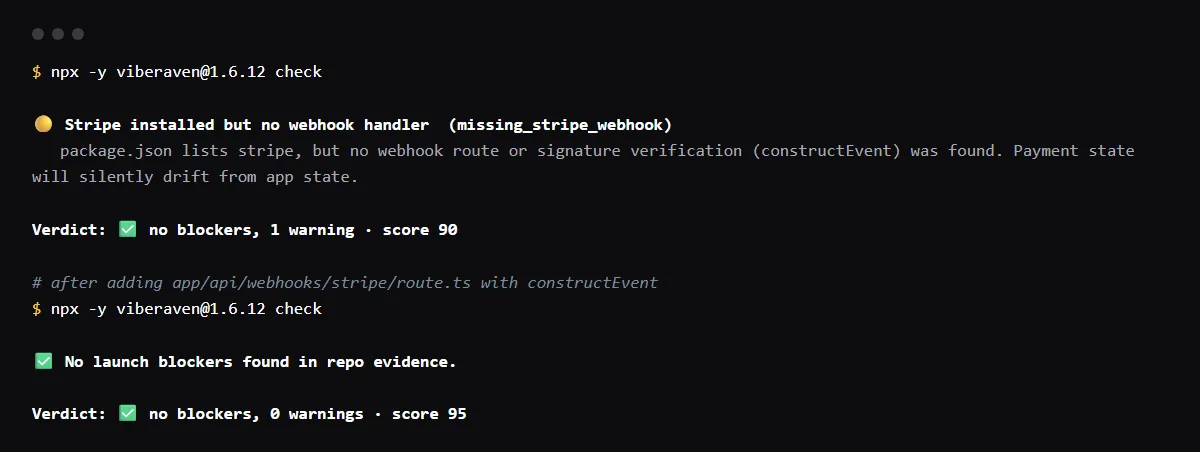
On 2026-10-23 we ran it on a small Next.js fixture repo made for this page, not a customer repo. Its only Stripe code was app/api/checkout/route.ts, which creates a subscription Checkout Session with a success_url. The output is below, with the temp folder shortened to ~/stripe-app. A warning is not a blocker, so the exit code was 0.
After we added app/api/webhooks/stripe/route.ts, verifying with constructEvent over await req.text(), the same command reported no warnings.
$ npx -y viberaven@1.6.12 check

viberaven check · ~/stripe-app

🟡 Stripe installed but no webhook handler  (missing_stripe_webhook)
   package.json lists stripe, but no webhook route or signature verification (constructEvent) was found. Payment state will silently drift from app state.

Verdict: ✅ no blockers, 1 warning · score 90
Fix: viberaven fix · Details: ~/stripe-app/.viberaven/agent-tasklist.md
Is it safe to grant access on the success_url page?
Not on its own. Anyone can open that URL, and the customer may never reach it. If you use it, put {CHECKOUT_SESSION_ID} in the success_url, retrieve the session on your server, and fulfill only when payment_status is not unpaid. Stripe recommends this as a second trigger next to the webhook, because webhooks can be delayed, not as a replacement.
Which Stripe webhook events does a subscription app need?
checkout.session.completed to link the Stripe customer and subscription to your user. customer.subscription.updated and customer.subscription.deleted to keep status current, and to revoke access when a subscription is canceled or unpaid. invoice.paid to extend access on each renewal, after confirming the subscription is active, and invoice.payment_failed to tell the customer.
Checkout redirects before my webhook finishes
With an endpoint listening for checkout.session.completed and a success_url set, Checkout waits up to 10 seconds for your endpoint to respond before redirecting the customer. Respond quickly. When you test with the Stripe CLI, Checkout redirects right away, so the success page can load before your handler runs.
Checklist
Move fulfillment to a webhook
- 01Write one fulfill function that takes a Checkout Session ID, retrieves the session, checks payment_status and records that it fulfilled it. Stripe says it may run more than once, even concurrently, for the same session, so it has to be safe to repeat.
- 02Call it from a verified webhook route on checkout.session.completed and checkout.session.async_payment_succeeded.
- 03Register a live mode endpoint for that route in Workbench and select only the events you handle.
- 04Optionally call the same function from the success page, using the session ID from the URL, so a customer sees access right away.
- 05Payment Links use Checkout too, so the same applies to them.
Related
Related guides

Sources
Official docs behind this checklist
Browse all launch guides · Read resources · How to make and check your next change
FAQ
FAQ for builders before launch
Can I check subscription status by calling Stripe instead of storing it?
Yes. Lovable's Stripe integration, for example, checks status with Stripe from the server by default and adds webhooks only when you ask. That avoids trusting the success page, but every check is an API call, and you still learn about cancellations and failed payments only when you ask.
Does this apply to one-time payments with cards only?
Stripe still says not to rely on the landing page alone, because the customer may not reach it. The webhook is what makes fulfillment happen for every payment.