Sentry SDK error
 Sentry
Invalid Sentry Dsn: undefined
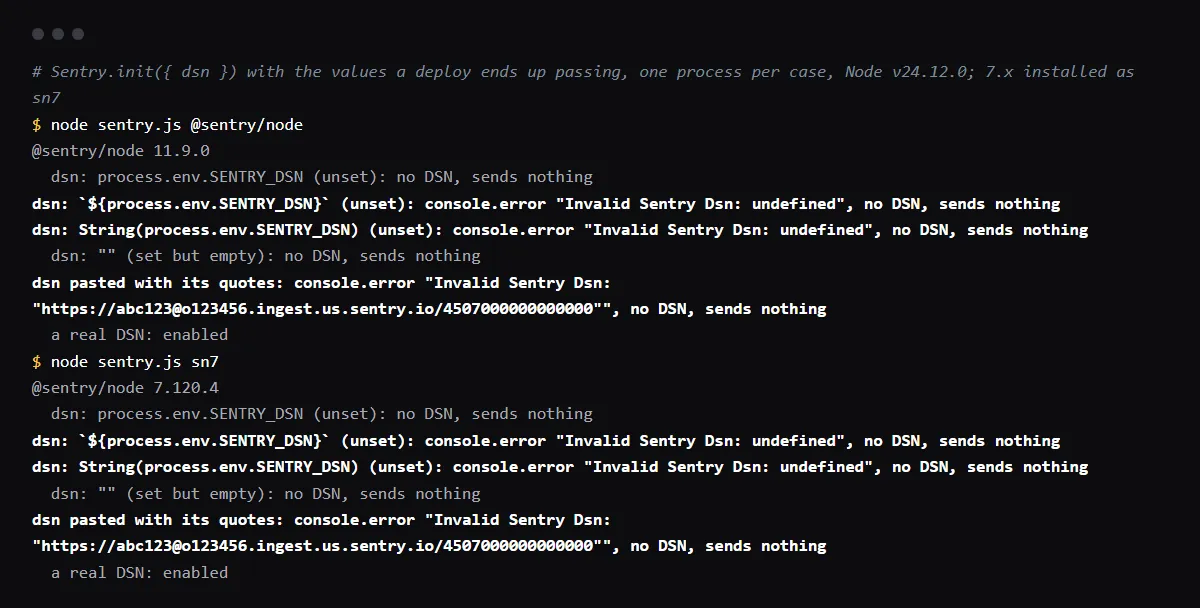
"Invalid Sentry Dsn: undefined" is logged by the Sentry JavaScript SDK when the dsn passed to Sentry.init() is the text "undefined": an environment variable that was not set got turned into a string on the way, by a template literal, String() or a build step that wrote it into a file. The SDK then sends nothing, and it does not throw. Set the DSN variable in the environment that builds the app, NEXT_PUBLIC_SENTRY_DSN for Next.js on Vercel or VITE_SENTRY_DSN for a Vite app such as a Lovable export, pass it to Sentry.init() as it is, and redeploy, because both frameworks copy public variables into the bundle at build time. A DSN that is simply unset logs nothing at all. Reproduced with @sentry/node 7.120.4 and 11.9.0 on 2026-10-27; the browser SDKs share the same DSN parser.
Use this from your agent
- Claude Code: 4 read-only tools; cannot see your repo.
claude mcp add --transport http viberaven https://viberaven.dev/mcp - Codex: same server, in ~/.codex/config.toml.
[mcp_servers.viberaven] url = "https://viberaven.dev/mcp" - In your repo: writes Vercel + Supabase check rules for your agent (what it writes).
npx -y viberaven init
Setting Sentry up from scratch? Use the Sentry setup checklist.
Repository check
Check this in your repo
Find a DSN variable your env template does not list
For AI-built Vercel + Supabase apps, run the command below from your app folder with Node.js 20 or newer. It compares the environment variable names your code reads, such as process.env.NEXT_PUBLIC_SENTRY_DSN in instrumentation-client.ts, with the names in .env.example or a similar template, and lists each one the template lacks as env_var_drift; it cannot see the variables set in your Vercel project, so it points at the names most likely to be missing there, not at the ones that are. In a fixture repo on 2026-10-27 it reported NEXT_PUBLIC_SENTRY_DSN this way.
It is a repository check, not a live database test: it reads files and sends nothing to Sentry. It is advice, not a gate, and it exits with code 1 when it finds a blocker.
npx -y viberaven@1.6.12 checkWhy it says undefined
The SDK skips a DSN that is undefined or empty and stays off without a message. It logs Invalid Sentry Dsn only when it gets a string that is not a DSN, and the string "undefined" is what JavaScript makes of an unset variable inside a template literal or String(). In our run both of these logged the error, and passing process.env.SENTRY_DSN straight through did not:
// logs Invalid Sentry Dsn: undefined when the variable is unset
Sentry.init({ dsn: `${process.env.NEXT_PUBLIC_SENTRY_DSN}` })
Sentry.init({ dsn: String(process.env.NEXT_PUBLIC_SENTRY_DSN) })

// stays off quietly when unset, and works when set
Sentry.init({ dsn: process.env.NEXT_PUBLIC_SENTRY_DSN })
Invalid Sentry Dsn with the DSN in quotes
A DSN pasted into the Vercel dashboard with its quotes is read with the quotes, and the SDK logs Invalid Sentry Dsn followed by the quoted URL. In our run a trailing space did not break it. Paste the bare https:// value.
The variable is set and the error stays
Next.js replaces every NEXT_PUBLIC_ reference with its value during next build, and Vite does the same for import.meta.env.VITE_ names, so a DSN added after the build is not in the bundle. Redeploy after you add it. On Vercel, set it for Production and Preview, or the preview builds keep the old text. See how NEXT_PUBLIC_ values reach the browser.
Is the Sentry DSN a secret?
Sentry's docs say DSNs are safe to keep public because they only allow submitting new events, not reading anything, which is why the browser SDK takes it in a NEXT_PUBLIC_ or VITE_ variable. The auth token used to upload source maps is different: keep SENTRY_AUTH_TOKEN out of public names.
Checklist
How to fix it, then check the fix
- 01Find each Sentry.init() call and see how its dsn is built. Pass the variable itself, not a template literal or String().
- 02Set NEXT_PUBLIC_SENTRY_DSN (Next.js) or VITE_SENTRY_DSN (Vite) in Vercel for Production and Preview, without quotes.
- 03Redeploy, so the build copies the value into the bundle.
- 04Check the built bundle for the DSN host instead of the word undefined:
grep -rl "ingest" .next/static dist 2>/dev/null | head - 05Throw a test error from the deployed app and confirm it appears in your Sentry project.
Related
Related guides

Sources
Official docs behind this checklist
Browse all launch guides · Read resources · How to make and check your next change
FAQ
FAQ for builders before launch
Does Invalid Sentry Dsn crash the app?
No. In our runs the SDK logged the message and kept the app running with no client, so errors are silently not reported. That is why it is easy to miss.
Should I hard-code the DSN?
Sentry's docs say the DSN can be public, so a DSN in the code is not a leak. A variable is still useful to send previews to another Sentry project.