Railway and Supabase error
 Supabase
connect ENETUNREACH
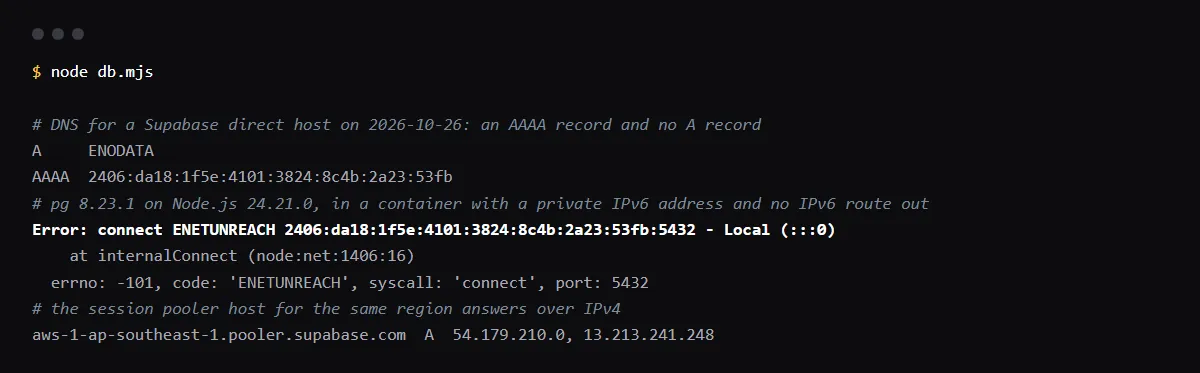
"Error: connect ENETUNREACH <IPv6 address>:5432 - Local (:::0)" from a Railway service means the app dialed the Supabase direct host, db.<project-ref>.supabase.co, which has only an IPv6 address, and the service has no IPv6 route out: Railway's docs say Outbound IPv6 is off by default and that IPv6 connections then fail with ENETUNREACH. Switch DATABASE_URL to the session pooler string from the Supabase Connect panel (user postgres.<project-ref>, host aws-<n>-<region>.pooler.supabase.com, port 5432), which Supabase says is IPv4 on every plan, and redeploy. Turning on Enable Outbound IPv6 in the service's Networking settings is the other fix. We reproduced the error with pg 8.23.1 on 2026-10-26 in a container with the same network shape.
Moving the same database code to Vercel functions later? Read why serverless apps use the transaction pooler instead.
Why the direct host fails from Railway
On 2026-10-26 the direct host of our Supabase project had an AAAA record and no A record. Supabase's connection guide lists the direct connection as IPv6 on the Free and paid plans, and IPv4 only with the paid IPv4 add-on. Railway's outbound networking docs say Outbound IPv6 is disabled by default and that, while it is off, "IPv6 connection attempts fail with "Network is unreachable" or ENETUNREACH". Node.js prints the address it tried and the local side:
Error: connect ENETUNREACH 2406:da18:1f5e:4101:3824:8c4b:2a23:53fb:5432 - Local (:::0)
  errno: -101, code: 'ENETUNREACH', syscall: 'connect', port: 5432
Use the session pooler, not port 6543 on the same host
A Railway service is a long-running server, and for a persistent backend on an IPv4-only network Supabase's guide recommends the shared pooler in session mode. Its host is aws-<n>-<region>.pooler.supabase.com and the user name carries the project ref. Changing only the port on the direct host does not help: db.<project-ref>.supabase.co:6543 is the dedicated pooler, which Supabase lists as IPv6 too. The shared pooler on port 6543 is transaction mode, which is IPv4 as well but drops session state such as prepared statements and listen.
# fails from Railway with Outbound IPv6 off
postgresql://postgres:[YOUR-PASSWORD]@db.[PROJECT-REF].supabase.co:5432/postgres
# session pooler, IPv4
postgresql://postgres.[PROJECT-REF]:[YOUR-PASSWORD]@aws-[INDEX]-[REGION].pooler.supabase.com:5432/postgres
Or turn on Outbound IPv6
Railway made outbound IPv6 available to every workspace in its 2026-04-24 changelog. Open the service's Settings tab, find Networking and turn on Enable Outbound IPv6; Railway stages the change, and applying it redeploys the service. The CLI stages the same change. Railway says IPv4 keeps working alongside it, so the direct host then becomes reachable.
railway outbound-network ipv6 status --service api
railway outbound-network ipv6 enable --service api
Network is unreachable in other languages
The error is the operating system's error 101, so it reads differently outside Node.js: Railway's docs name both "Network is unreachable" and ENETUNREACH, and a Python client prints [Errno 101] Network is unreachable. The fix is the same connection string.
Checklist
How to fix it, then check the fix
- 01In the Railway service's Variables tab, look at the host in DATABASE_URL: db.<project-ref>.supabase.co is the direct host.
- 02In Supabase, open Connect, choose Session pooler and copy that string; the user becomes postgres.<project-ref>.
- 03Test it from a machine without IPv6 before you paste it:
psql "postgresql://postgres.[PROJECT-REF]:[YOUR-PASSWORD]@aws-[INDEX]-[REGION].pooler.supabase.com:5432/postgres" -c "select 1" - 04Paste it into DATABASE_URL in Railway and apply the staged change; Railway redeploys the service.
- 05Or keep the direct host and turn on Enable Outbound IPv6 under Settings, Networking, then apply.
- 06Check the deploy logs: the app connects, and no line shows ENETUNREACH.
Related
Related guides

Sources
Official docs behind this checklist
Browse all launch guides · Read resources · How to make and check your next change
FAQ
FAQ for builders before launch
Is Supabase down when I see ENETUNREACH?
No. The error comes from your server before anything reaches Supabase: it has no route to the IPv6 address the direct host resolves to.
Does the Supabase IPv4 add-on fix it?
Yes, on a paid plan. Supabase says the add-on swaps the direct host's AAAA record for an A record, so it then answers over IPv4 only. The session pooler costs nothing extra.