Supabase service role key exposed, research
 Supabase
 Lovable
5.7% of 512 Lovable Apps Commit Their Supabase Service Role Key
29 of 512 public Lovable repos (5.7%), each read at its last commit before October 3, 2026, commit a Supabase service role or secret key, the key that skips RLS. The key is rarely in the app itself. It sits in a one-off script, a deploy guide, or the .env.example that was meant to hold placeholders.
What we found
Out of 512 public Lovable projects with their own Supabase migrations, each read at its last commit before October 3, 2026:
- 5.7% (29) commit at least one service role key or secret key, the keys that skip row level security. Anyone who can read the repo can read the key.
- In 27 of the 29, the key names the same Supabase project as a URL elsewhere in the repo. The other 2 hold only new sb_secret_ keys, which carry no project ID.
- 9 of the 29 have the key in more than one kind of file. The median repo has it in 2 files, and one has it in 94.
- 3 repos put the key in app code the browser loads, and 3 more read it from a VITE_ variable in app code, which Vite copies into the bundle when the variable is set.
- 25 of the 29 hold only the legacy service_role key, a signed token (JWT) with no fixed prefix.
Where the key sits
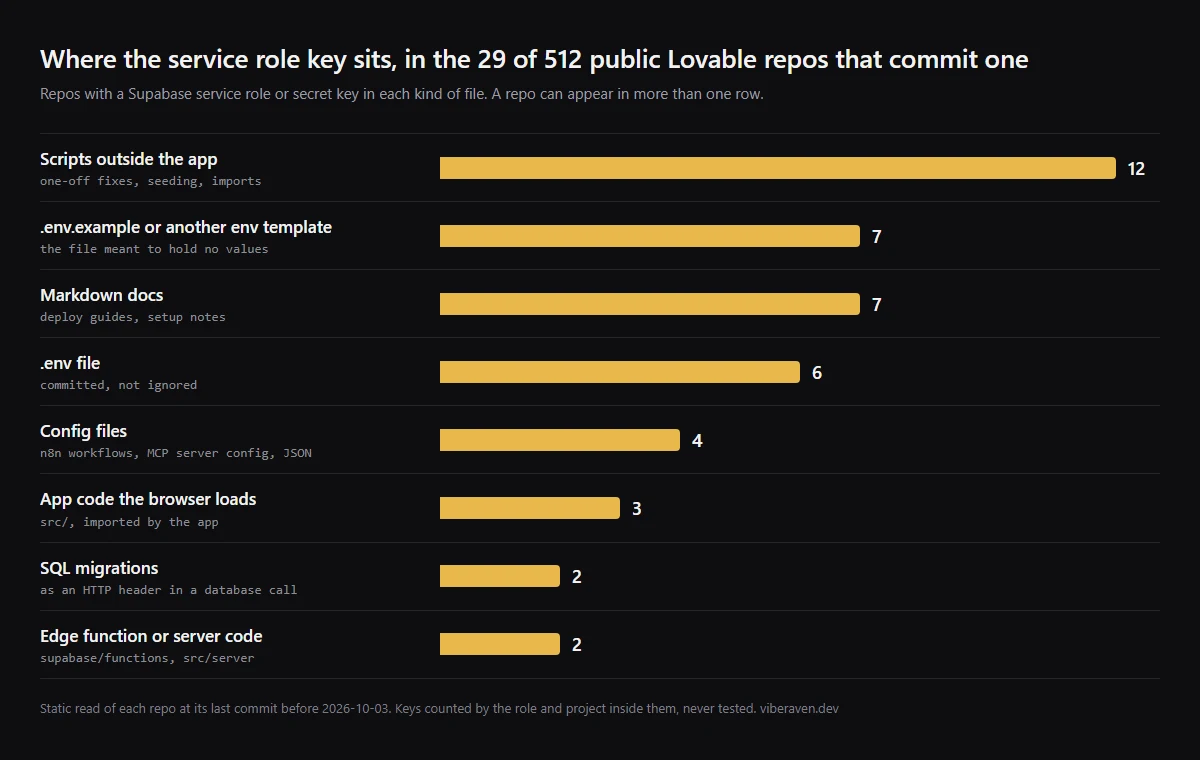
The app is not where most of these keys live. The common places are the files an agent writes around the app: a script to fix one admin account, a guide that walks through deploying, an env template. Our first post counted 14 repos with a service role or secret key in an env file. Reading every committed file, the number is 29.
| Where the key is | Repos | What it looks like, paraphrased, projects withheld |
|---|---|---|
| Scripts outside the app | 12 | A one-off script to fix an admin account, run a migration, seed data or import users, with the key in a constant at the top. |
| .env.example or another env template | 7 | The real key where a placeholder should be. In one, under the name VITE_SUPABASE_SERVICE_ROLE_KEY. |
| Markdown docs | 7 | Deploy guides and setup notes with the key pasted next to the steps. One is a task list of security fixes. |
| .env file | 6 | A committed .env with the service role key set. |
| Config files | 4 | Exported n8n workflows with the key in an Authorization header, and a committed MCP server config. |
| App code the browser loads | 3 | The key as the fallback value in a Supabase client file under src/, or in a page component that deletes users from Auth. |
| SQL migrations | 2 | A migration that makes an HTTP call from the database with the key in the Authorization header. |
| Edge function or server code | 2 | The key typed into an Edge Function or a server config file, in place of or as a fallback to the environment. |
Six repos put it in front of the browser
Three repos have the key in a file under src/ that the app imports. Two of them use the pattern import.meta.env.VITE_SUPABASE_SERVICE_ROLE_KEY || "eyJ...": the bundle gets the variable when it is set at build time and the typed key when it is not. Either way a service role key ships to every visitor.
Three more read a service role key from a VITE_ variable in app code. Vite copies every VITE_ variable into the client bundle, so the key ships the moment someone sets that variable to make the code work. One further repo puts the real key under VITE_SUPABASE_SERVICE_ROLE_KEY in .env.example, which is the line a new contributor copies.
In one repo, a script keeps the service role key in a variable named supabaseAnonKey. As with the policy names in our first post, the name is not what Supabase checks.
The legacy key is the one GitHub does not list
Supabase has two kinds of server key. The legacy service_role key is a JWT that starts with eyJ, like any other JWT. The newer secret key starts with sb_secret_. Supabase plans to retire the legacy anon and service_role keys by the end of 2026.
GitHub's list of supported secret scanning patterns, read on October 22, 2026, has four Supabase entries: the secret key, two kinds of personal access token and OAuth access tokens. The legacy service_role key is not one of them. Push protection covers the secret key and one kind of personal access token. 25 of the 29 repos hold only legacy keys.
Method
This uses the dataset behind our posts on RLS policies and security definer functions in the same apps: public GitHub repos whose package.json includes lovable-tagger, Lovable's build tag, found through GitHub code search and kept when they had a supabase/migrations folder, first read with VibeRaven 1.6.1 on October 3, 2026.
On October 22, 2026 we cloned each repo again, checked out its last commit before that scan, and read every text file of a common source, config or docs type outside node_modules and build folders. 496 of the 512 could be read. 15 had been deleted or made private, and 1 had its history rewritten.
A key counts when it is a JWT whose payload says role service_role, issuer supabase and a 20-character project ID, or a full-length sb_secret_ key, outside test folders. That leaves out the local development key the Supabase CLI prints, which is public by design, and fake keys in test fixtures. 6 repos had only keys like those, or one token we could not classify, and are not counted.
Keys were decoded on this machine to read the role and project inside them. No key value was printed or written into our results, and none was tested. The browser findings come from reading by hand the 20 repos VibeRaven 1.6.1 flagged for service role use in client code.
What we did not measure
Whether any key still works. A key may have been rotated, the legacy keys turned off or the project deleted. Read 29 as repos that published a key, not as working keys.
Git history. We read one commit per repo, the last one before the scan, so a key that was committed and then deleted is not counted. The number of repos that ever published a key can only be higher, and so can the true count across all 512, since 16 could not be read again.
Whether the browser keys reached a deployed bundle. We read the source. For the three VITE_ reads, it depends on whether the variable was set at build time.
The sample of 512 is not random. It comes from GitHub search, and public repos lean toward side projects. A private repo with the same files has not published its key the same way.
Check your repo and rotate what you find
Run these from the root of your repo. The first prints each file with a JWT in it and the role inside that JWT: anon is expected, service_role is the leak. The second lists files with a secret key. The third lists every commit that added or removed one, including deleted files. None of them prints a key.
If a public repo holds a service role or secret key, treat the key as leaked. Deleting the file does not help, because git history and every clone and fork still have it. Create a new secret key in Settings, API Keys, move your servers to it, then turn off the legacy keys or delete the leaked secret key. The leaked key guide below has each step.
For AI-built apps on Vercel + Supabase, npx -y viberaven check flags a service role key typed into app code or into a script outside the scripts/ and server folders, app code that reads it from a VITE_ or NEXT_PUBLIC_ variable, and a service role key name under one of those prefixes in an env file. It does not read the values in .env files, Markdown, JSON config, scripts/ folders or git history, so run the commands above too. The version we scanned with flagged 10 of the 29. It is advice, not a gate, and a repository check, not a live database test, so it cannot tell whether a key still works.
# every file with a JWT, and the role inside it (prints no keys)
git grep -oE "eyJ[A-Za-z0-9_-]+\.eyJ[A-Za-z0-9_-]+\.[A-Za-z0-9_-]+" | sort -u \
  | node -e 'require("fs").readFileSync(0, "utf8").trim().split("\n").filter(Boolean).forEach((l) => { const i = l.indexOf(":"); console.log(l.slice(0, i), JSON.parse(Buffer.from(l.slice(i + 1).split(".")[1], "base64url")).role) })'

# files with a secret key
git grep -lE "sb_secret_[A-Za-z0-9_-]{20,}"

# commits that ever added or removed one
git log --all --oneline -E -G "sb_secret_|service_role|SERVICE_ROLE"
Related guides
Sources
FAQ
Is it safe to put the Supabase service role key in .env.example?
No. .env.example is meant to be committed, so whatever is in it is public in a public repo. Keep the variable name with an empty value or a placeholder, and keep the real key in your hosting provider's environment settings.
I deleted the key from my repo. Am I safe?
No. The key is still in git history and in every clone and fork. Rotate it: create a new secret key, move your servers to it, then turn off the legacy keys or delete the leaked secret key.
Were any keys tested or any databases accessed?
No. Only public code on GitHub was read. Keys were decoded locally to read their role, no key was used, no database was queried and no project is named.