NextAuth and Auth.js error
 Vercel
 Auth.js
[next-auth][error][NO_SECRET]
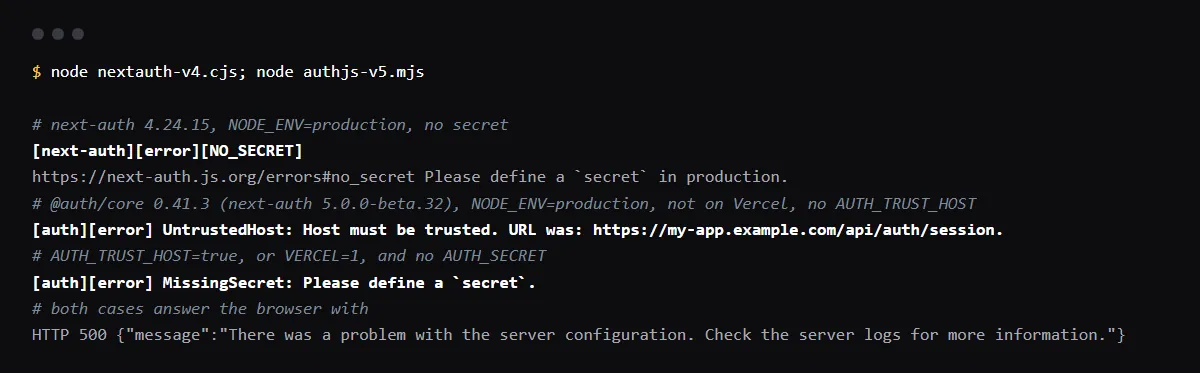
"[next-auth][error][NO_SECRET]" with "Please define a `secret` in production." means NextAuth.js v4 ran with NODE_ENV=production and no secret, so every auth request answers 500. Generate one with npx auth secret or openssl rand -base64 32, add it in Vercel as NEXTAUTH_SECRET (v4) or AUTH_SECRET (Auth.js v5, which still reads NEXTAUTH_SECRET) for Production and Preview, and redeploy. Auth.js v5 logs the same mistake as "MissingSecret: Please define a `secret`.". On Vercel you need neither NEXTAUTH_URL nor AUTH_TRUST_HOST: both versions take the host from the request when the VERCEL variable is set. "UntrustedHost: Host must be trusted" is the self-hosted case, fixed with AUTH_TRUST_HOST=true. Reproduced with next-auth 4.24.15 and 5.0.0-beta.32 on 2026-10-26.
Going through the rest of an Auth.js launch? Use the Auth.js production checklist.
Repository check
Check this in your repo
Find an Auth.js app with no secret in the repo
For AI-built Vercel + Supabase apps, run the command below from your app folder with Node.js 20 or newer. When package.json lists next-auth or an @auth/ package and no file in the repo mentions AUTH_SECRET or NEXTAUTH_SECRET, it reports auth_secret_missing as a blocker. It cannot see the variables set in your Vercel project, so a secret set only there still gets the finding: add the name to .env.example with a placeholder.
It is a repository check, not a live database test: it does not start your app or call the auth routes. It is advice, not a gate, and it exits with code 1 when it finds a blocker.
npx -y viberaven@1.6.12 checkWhat it printed on a fixture repo
On 2026-10-26 we ran it on a small Next.js fixture repo made for this page, not a customer repo, with next-auth 5.0.0-beta.32, a GitHub provider and an .env.example that listed only AUTH_GITHUB_ID and AUTH_GITHUB_SECRET. The output is below, with the temp folder shortened to ~/notes-app. The finding is a blocker, so the exit code was 1.
$ npx -y viberaven@1.6.12 check

viberaven check · ~/notes-app

🔴 Auth secret is not configured  (auth_secret_missing)
   Auth.js/NextAuth is installed but no AUTH_SECRET or NEXTAUTH_SECRET is referenced anywhere in the repo. Sessions will be signed with an unstable or missing secret.
⚪ No error monitoring detected  (missing_monitoring)
   No Sentry/PostHog (or similar) instrumentation was found. Production errors will only surface when users complain.

Verdict: ❌ 1 blocker, 0 warnings · score 75
Fix: viberaven fix · Details: ~/notes-app/.viberaven/agent-tasklist.md
The v4 and v5 messages
NextAuth.js v4 checks for a secret in core/lib/assert.ts: in development it only warns with [next-auth][warn][NO_SECRET], and in production it fails with the error below. Auth.js v5 (@auth/core) checks the host first and then the secret, and appends a link to errors.authjs.dev. Both answer the browser with a 500 that says only that there is a problem with the server configuration.
[next-auth][error][NO_SECRET]
https://next-auth.js.org/errors#no_secret Please define a `secret` in production.

[auth][error] UntrustedHost: Host must be trusted. URL was: https://my-app.example.com/api/auth/session.
[auth][error] MissingSecret: Please define a `secret`.
NEXTAUTH_URL on Vercel
The NextAuth.js v4 deployment docs say that on Vercel you do not need to set NEXTAUTH_URL. Its detectOrigin reads NEXTAUTH_URL first, though, so a NEXTAUTH_URL set to the production domain makes preview deployments use that domain too, and sign-in on a preview sends users to production. Leave it unset on Vercel. The Auth.js v5 docs call AUTH_URL mostly unnecessary, since the host comes from the request headers.
UntrustedHost: Host must be trusted
Auth.js v5 trusts the request host when trustHost is set or when AUTH_URL, AUTH_TRUST_HOST, VERCEL or CF_PAGES is set, or NODE_ENV is not production (core/lib/utils/env.ts). So it fails on a self-hosted server such as Docker, Railway or next start, where you set AUTH_TRUST_HOST=true. On Vercel it can only fail if the deployment lacks VERCEL, which Vercel sets when system environment variables are exposed to the project.
Sign-in on preview deployments
Most OAuth providers accept only fixed callback URLs, so a new preview URL per commit fails at the provider, not in Auth.js. Auth.js documents a redirect proxy for that, with one stable deployment and AUTH_REDIRECT_PROXY_URL; for the provider side, see why Google sign-in fails on a domain it does not know.
Checklist
How to fix it, then check the fix
- 01Generate a secret:
npx auth secret # or openssl rand -base64 32 - 02Add it in Vercel as AUTH_SECRET (or NEXTAUTH_SECRET on v4) for Production and Preview, and add the name with a placeholder to .env.example.
- 03Remove NEXTAUTH_URL and AUTH_TRUST_HOST from the Vercel project unless you need a custom base path.
- 04On a self-hosted server, set AUTH_TRUST_HOST=true, or trustHost: true in the config.
- 05Redeploy and open /api/auth/session: it returns JSON (null when signed out), not a 500.
Related
Related guides
Sources
Official docs behind this checklist
Browse all launch guides · Read resources · How to make and check your next change
FAQ
FAQ for builders before launch
Why does it work with next dev but not in production?
Both versions relax the check outside production: v4 only warns without a secret, and v5 trusts the host when NODE_ENV is not production. next start and Vercel run with NODE_ENV=production.
Can I rotate the secret without signing everyone out?
Auth.js v5 reads AUTH_SECRET_1, AUTH_SECRET_2 and AUTH_SECRET_3 next to AUTH_SECRET in its env defaults, so old sessions can still be read while new ones use the new secret.