Clerk + Supabase
 Supabase
 Clerk
ClerkClerk + Supabase third-party auth: RLS on the auth.jwt() sub claim, and the JWT template it replaced
Clerk + Supabase now uses Supabase's native third-party auth integration, not the Clerk JWT template, which both products call deprecated since April 1, 2025: activate the Supabase integration in the Clerk Dashboard, add Clerk as a provider in Supabase, pass the Clerk session token to supabase-js through the accessToken option, and write row level security policies on the Clerk user id in auth.jwt()->>'sub'. The integration adds the "role": "authenticated" claim Supabase needs to Clerk's session tokens. Store the user id in a text column, and do not use auth.uid(): Supabase casts sub to uuid, and Clerk user ids such as user_2abc are not UUIDs. Checked against Clerk's and Supabase's docs on 2026-10-25.
Still choosing who handles sign-in? See how Supabase Auth and Clerk compare.
Repository check
Check this in your repo
Check the RLS policies in your repo
For AI-built Vercel + Supabase apps, run the command below in the repo, with Node.js 20 or newer. In supabase/migrations it reports a public table created without row level security as rls_disabled, and a policy whose condition is a bare true as rls_policy_allows_all_read or rls_policy_allows_all_write, which is what a policy often turns into after auth.uid() fails on Clerk user ids. Policies that compare auth.jwt()->>'sub' with a column are not flagged.
It is a repository check, not a live database test: it does not connect to Clerk or Supabase, so it cannot tell whether the integration is active or whether your tokens carry the role claim. It is advice, not a gate, and it exits with code 1 when it finds a blocker.
npx -y viberaven@1.6.12 checkWhat it printed on a Clerk + Supabase fixture repo
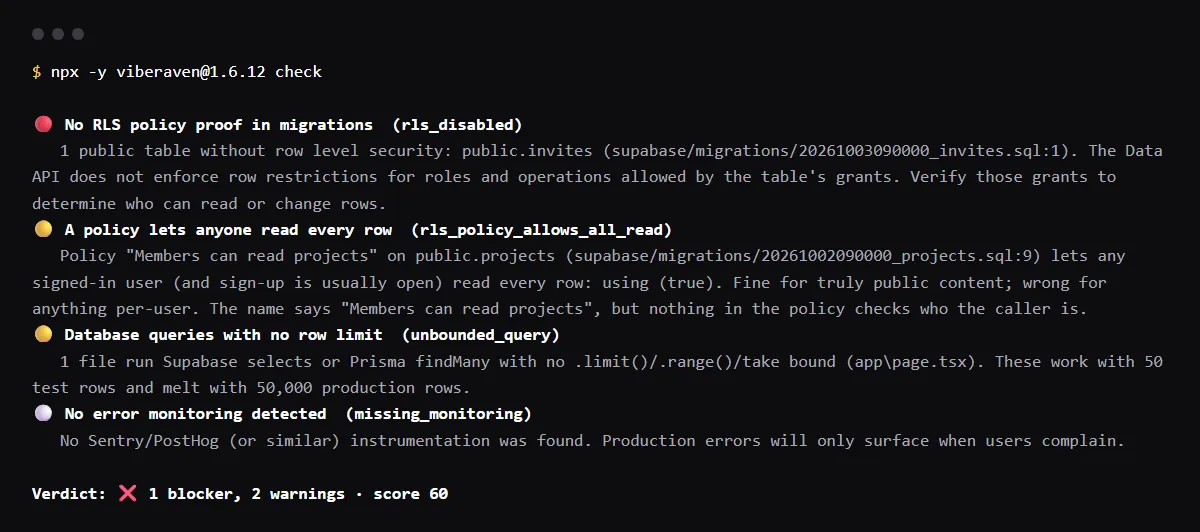
On 2026-10-25 we ran it on a small fixture repo made for this page, not a customer repo: a Next.js app on Clerk with three migrations and the [auth.third_party.clerk] block in supabase/config.toml. The tasks table uses the sub policies shown below and was not flagged. The projects policy had been loosened to using (true) after auth.uid() failed, and the invites table never got RLS. The output is below, with the temp folder shortened to ~/clerk-supabase-app. It found one blocker, so the exit code was 1.
$ npx -y viberaven@1.6.12 check

viberaven check · ~/clerk-supabase-app

🔴 No RLS policy proof in migrations  (rls_disabled)
   1 public table without row level security: public.invites (supabase/migrations/20261003090000_invites.sql:1). The Data API does not enforce row restrictions for roles and operations allowed by the table's grants. Verify those grants to determine who can read or change rows.
🟡 A policy lets anyone read every row  (rls_policy_allows_all_read)
   Policy "Members can read projects" on public.projects (supabase/migrations/20261002090000_projects.sql:9) lets any signed-in user (and sign-up is usually open) read every row: using (true). Fine for truly public content; wrong for anything per-user. The name says "Members can read projects", but nothing in the policy checks who the caller is.
🟡 Database queries with no row limit  (unbounded_query)
   1 file run Supabase selects or Prisma findMany with no .limit()/.range()/take bound (app\page.tsx). These work with 50 test rows and melt with 50,000 production rows.
⚪ No error monitoring detected  (missing_monitoring)
   No Sentry/PostHog (or similar) instrumentation was found. Production errors will only surface when users complain.

Verdict: ❌ 1 blocker, 2 warnings · score 60
Fix: viberaven fix · Details: ~/clerk-supabase-app/.viberaven/agent-tasklist.md
Set up the native integration
In the Clerk Dashboard, open the Supabase integration setup and select Activate Supabase integration, which shows your Clerk domain. In the Supabase Dashboard, open Authentication, then Sign In / Providers, select Add provider, choose Clerk and paste that domain. For local development with the Supabase CLI, add the provider to supabase/config.toml; your Clerk instance still needs the Supabase integration turned on.
[auth.third_party.clerk]
enabled = true
domain = "example.clerk.accounts.dev"
Pass the Clerk session token to supabase-js
Give createClient an accessToken function that returns the Clerk session token, with no template name. On the server, call auth() from @clerk/nextjs/server; in a Client Component, read the session with useSession() from @clerk/nextjs. With accessToken set, supabase.auth cannot be used on that client, and the users stay in Clerk: the integration does not sync them into Supabase.
// Server, as in Clerk's Next.js example
import { createClient } from '@supabase/supabase-js'
import { auth } from '@clerk/nextjs/server'

export function createServerSupabaseClient() {
  return createClient(process.env.NEXT_PUBLIC_SUPABASE_URL!, process.env.NEXT_PUBLIC_SUPABASE_PUBLISHABLE_KEY!, {
    async accessToken() {
      return (await auth()).getToken()
    },
  })
}

// Client Component
const { session } = useSession()
const supabase = createClient(url, publishableKey, {
  accessToken: async () => session?.getToken() ?? null,
})
RLS policies on auth.jwt()->>'sub'
Keep the Clerk user id in a text column that defaults to the sub claim, and compare against it in each policy, wrapped in select so Postgres evaluates it once per query. This is Clerk's own example:
create table tasks(
  id serial primary key,
  name text not null,
  user_id text not null default auth.jwt()->>'sub'
);
alter table "tasks" enable row level security;

create policy "User can view their own tasks"
on "public"."tasks" for select to authenticated
using ( ((select auth.jwt()->>'sub') = (user_id)::text) );

create policy "Users must insert their own tasks"
on "public"."tasks" as permissive for insert to authenticated
with check ( ((select auth.jwt()->>'sub') = (user_id)::text) );
Why auth.uid() fails with Clerk
Supabase's third-party auth docs say auth.uid() casts sub to uuid, so it fails when a provider issues ids that are not UUIDs, and Clerk ids look like user_2abc. A policy written with auth.uid() errors or matches nothing, and the quick fix, using (true), lets every signed-in user read every row. Replace both with the sub comparison above.
Organization claims in the v2 session token
Clerk's v2 session token puts the active organization in an o claim: the id is auth.jwt()->'o'->>'id' and the role, without the org: prefix, is auth.jwt()->'o'->>'rol'. Version 1, deprecated on April 14, 2025, used the flat org_id and org_role claims. Supabase's example policy reads both:
organization_id = (select coalesce(auth.jwt()->>'org_id', auth.jwt()->'o'->>'id'))Moving off the deprecated JWT template
The old setup pasted your Supabase JWT secret into a Clerk JWT template named supabase and called getToken({ template: 'supabase' }) for each request. Supabase still lets it work unofficially, with limited support, and calls sharing the JWT secret with a third party a problematic security practice. To move, turn on the integration, add the provider in Supabase, and replace the template call with getToken() through accessToken.
Checklist
Move a Clerk + Supabase app to the native integration
- 01Activate the Supabase integration in the Clerk Dashboard and copy the Clerk domain.
- 02Add Clerk under Authentication, Sign In / Providers in Supabase, and to supabase/config.toml for local development.
- 03Replace getToken({ template: 'supabase' }) with the accessToken option and getToken() with no template.
- 04Give each per-user table a text user id column that defaults to auth.jwt()->>'sub', and policies that compare (select auth.jwt()->>'sub') with it.
- 05Replace every auth.uid() in your policies, and every using (true) that stood in for one.
- 06Sign in as two different users and confirm neither can read or change the other's rows.
Related
Related guides
Sources
Official docs behind this checklist
Browse all launch guides · Read resources · How to make and check your next change
FAQ
FAQ for builders before launch
Do Clerk users appear in auth.users?
Clerk's docs say the integration does not synchronize user records between Clerk and Supabase. If you need users in your own tables, Clerk points to its webhooks.
Does Supabase charge for Clerk users?
Yes, as third-party monthly active users. Supabase's usage docs, read on 2026-10-25, include 50,000 on the Free plan and 100,000 on Pro and Team, then $0.00325 each.
Do Storage and Realtime work with Clerk tokens?
Yes. Supabase's Clerk guide says RLS policies on the Clerk token secure database tables, Storage objects and Realtime channels.